

The Cognite Power BI OData Connector (in Power BI Desktop) and Excel use the Microsoft Power Query for Excel enterprise application (
client_id: a672d62c-fc7b-4e81-a576-e60dc46e951d) to retrieve data from CDF via user interaction.Scheduled data refreshes in the Power BI Service use the Power BI Data Refresh enterprise application (client_id: b52893c8-bc2e-47fc-918b-77022b299bbc).If your organization uses both interactive connections (Excel/Power BI Desktop) and scheduled refreshes (Power BI Service), you may need to grant admin consent for both applications separately.Before you start
- Register the Cognite API and the CDF application in Microsoft Entra ID.
- Set up Microsoft Entra ID and CDF groups to control access to CDF data.
Step 1: Identify the correct client IDs
1
Determine which applications require consent
Determine which applications require admin consent based on how users will access CDF data:
-
For Excel and Power BI Desktop connections: Use the Microsoft Power Query for Excel client ID:
a672d62c-fc7b-4e81-a576-e60dc46e951d -
For Power BI Service scheduled data refreshes: Use the Power BI Data Refresh client ID:
b52893c8-bc2e-47fc-918b-77022b299bbc
Step 2: Grant admin consent via URL
1
Construct the consent URL
Construct the consent URL by replacing the placeholders in the template below with the appropriate values:
-
Replace
<tenant_id>with your organization’s Microsoft Entra ID tenant ID. -
Replace
<cluster>with the name of your CDF cluster, for instancewesteurope-1,az-eastus-1. -
Replace
<client_id>with the specific client ID identified in the previous step. This is either for Microsoft Power Query for Excel or for Power BI Data Refresh.
2
Open the URL as administrator
Open the constructed URL in your web browser. You need an Azure Global Administrator role or any role capable of granting tenant-wide admin consent.
3
Review the requested permissions
Sign in with your administrator account credentials. Review the requested permissions carefully. The application requests permission to access the Cognite API (
<cluster>.cognitedata.com) and act on behalf of the signed-in user (user_impersonation and IDENTITY).4
Grant consent
Select Consent on behalf of your organization and select Accept to approve.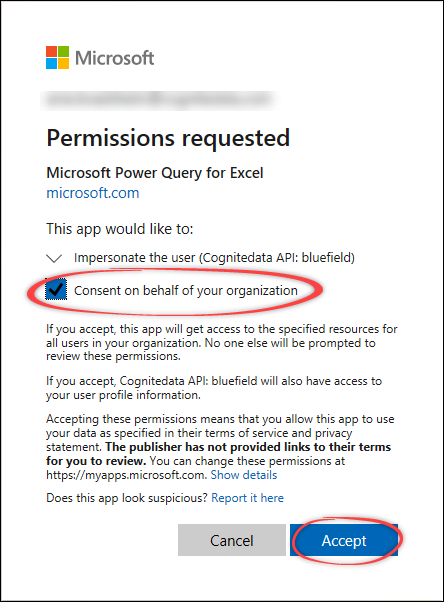
This action registers the necessary permissions in your Microsoft Entra ID tenant for the specified client application. You may be redirected to a blank page (
login.microsoftonline.com/common/oauth2/nativeclient) after accepting. This is expected.5
Repeat for additional client IDs
Repeat this step to grant consent for client IDs for both desktop use and service refresh.
Step 3: Test the connection (admin or test user)
When you’ve granted consent for the Microsoft Power Query for Excel client ID, test the connection using Excel or Power BI Desktop. The steps below use Excel as an example:1
Open Microsoft Excel
Open Microsoft Excel.
2
Open OData Feed connection
Select Data > Get data > From Other Sources > From OData Feed.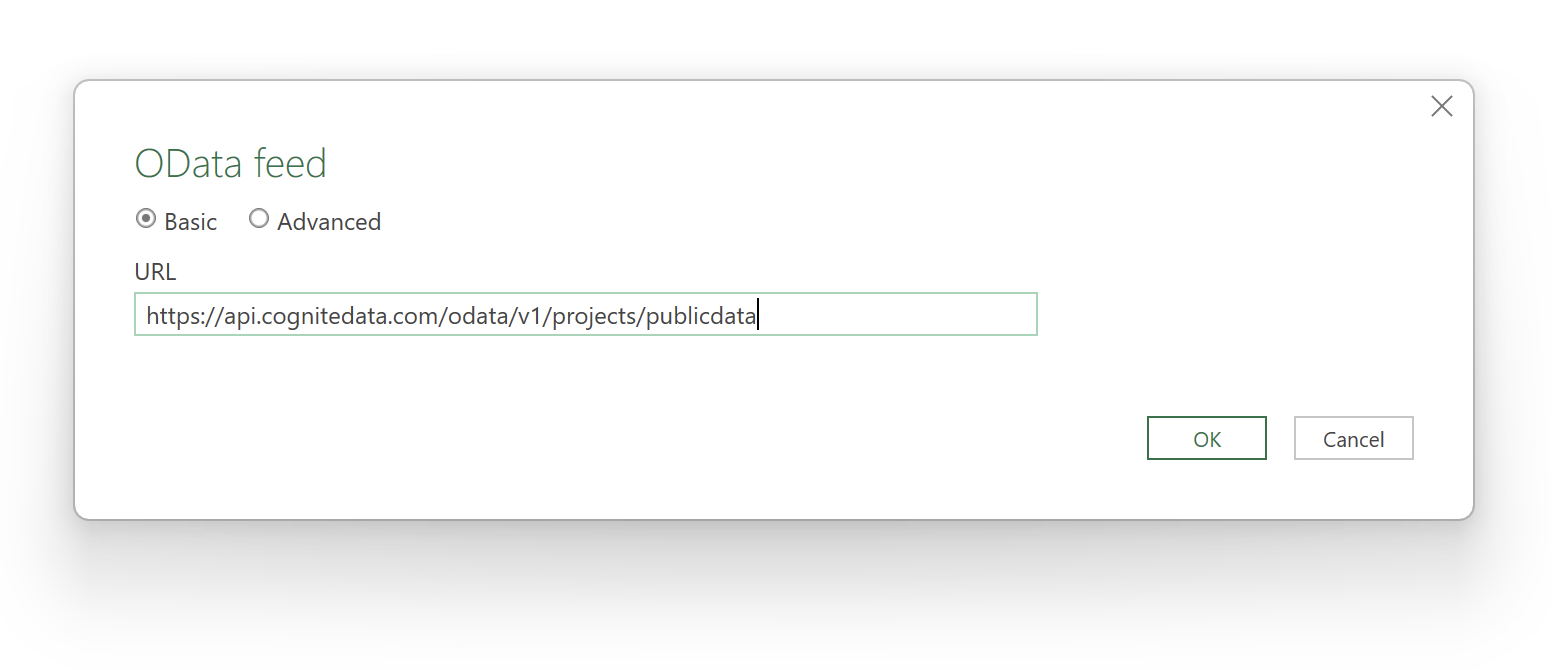
3
Enter the OData Feed URL
Enter the URL for the OData Feed you want to connect to, for instance
https://<cluster>.cognitedata.com/odata/v1/projects/<projectName>.If you need to sign in to Microsoft Entra ID as a guest user, you might also have to add the tenant ID as a query variable at the end of the URL, for example, oDataUrl?tenantID=MyEntraIDTenant.onmicrosoft.com.Read more about OData services.4
Sign in with organizational account
In the Authentication dialog, select Organizational account > Sign in.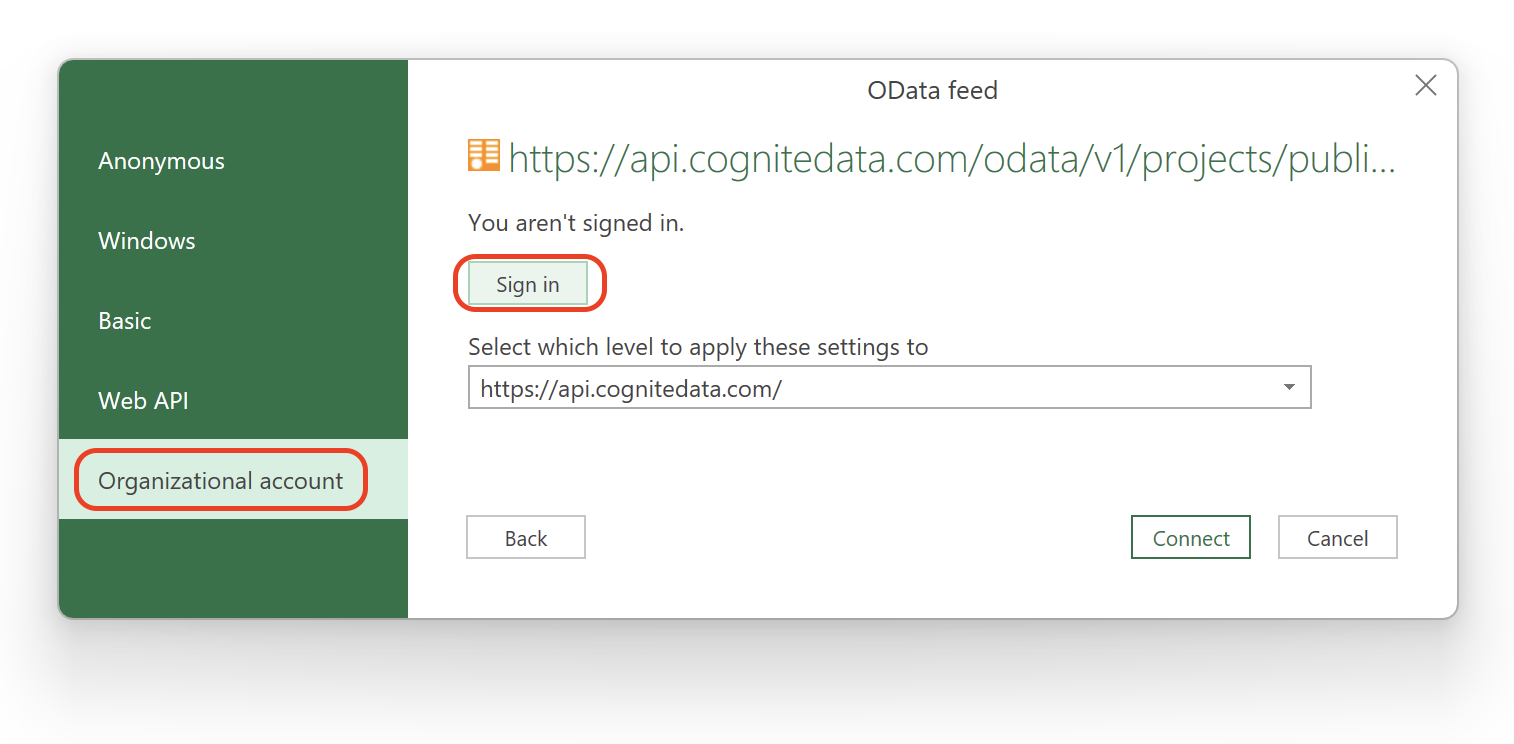 Sign in with your organizational account. This can be the admin account used for consent or any user account that should have access. Since admin consent was granted previously for this client ID, you won’t see the consent prompt again.
5
Connect to the data source
Once authenticated, select Connect.
Step 4: Verify data access
In Navigator, you’ll see the CDF OData tables and data you have access to based on your CDF group memberships.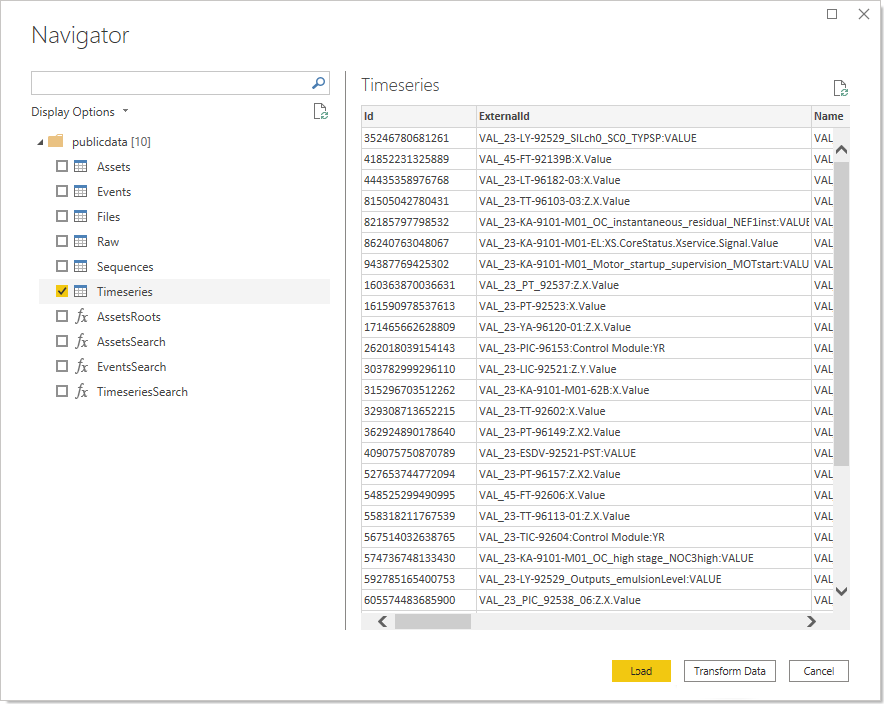
1
Test with a non-admin user
Sign in to Power BI Desktop or Excel with a non-admin identity belonging to the appropriate CDF access groups. This confirms that regular users in your Microsoft Entra ID can sign in and retrieve data from the CDF project.
2
Test scheduled data refresh
If applicable, configure and test a scheduled data refresh in the Power BI Service to ensure the consent granted for the Power BI Data Refresh client ID is working correctly.