

Before you start
Complete the prerequisites in SAP writeback service.1
Set up the SAP server destination
To send requests to your SAP S/4HANA instance, set up the SAP host destination.An SAP instance is a configuration for an external SAP S/4HANA destination system. The instance resource contains all the information the SAP writeback service needs to connect to the SAP S/4HANA destination.Send a POST request to
https://{cluster}.cognitedata.com/api/v1/projects/{project}/writeback/sap/instances to create an SAP instance destination. See API documentation for more information.2
Set up your schema mapping (Optional)
The SAP writeback service provides schema mapping functionality to map a CDF resource data schema to an SAP entity schema.
Define the mapping with the Cognite extractor mapping language. If you set a mapping, the SAP writeback service will apply the mapping expression before sending the request to the SAP destination.The example below contains an expression mapping the Cognite InField observation schema to the SAP maintenance notification schema:To save your mapping, send a POST request to
Write the mapping expressions to fulfill your business needs regarding field or value mapping between Cognite Data Fusion and SAP entities.
https://{cluster}.cognitedata.com/api/v1/projects/{project}/writeback/sap/mappings. See API documentation for more information.3
Set up the SAP endpoint destination
In the SAP writeback service, an SAP endpoint is a configuration to an SAP S/4HANA OData endpoint (and its related OData entity). The API will send writeback requests to this endpoint. It defines which SAP instance destination and schema mapping should be used when processing a writeback request. Use the SAP endpoint as a reference to send requests to your SAP destination.To set the SAP endpoint, send a POST request to
https://{cluster}.cognitedata.com/api/v1/projects/{project}/writeback/sap/endpoints. See API documentation for more information.4
Connectivity check (Optional)
The SAP writeback service provides an endpoint that checks if the connectivity between CDF and the configured SAP endpoint destination is successful.Send a POST request to
https://{cluster}.cognitedata.com/api/v1/projects/{project}/writeback/sap/endpoints/verify. See API documentation for more information.For a successful connection, the response from the SAP writeback /verify endpoint looks like:5
Send a request
Once you’re done with the setup, send requests to your SAP destination.The SAP writeback service sends all requests to SAP asynchronously. Once you send a request through the service, you’ll get a Response:To check the request status, send a POST request to Response:The writeback request is completed when the request status is set to 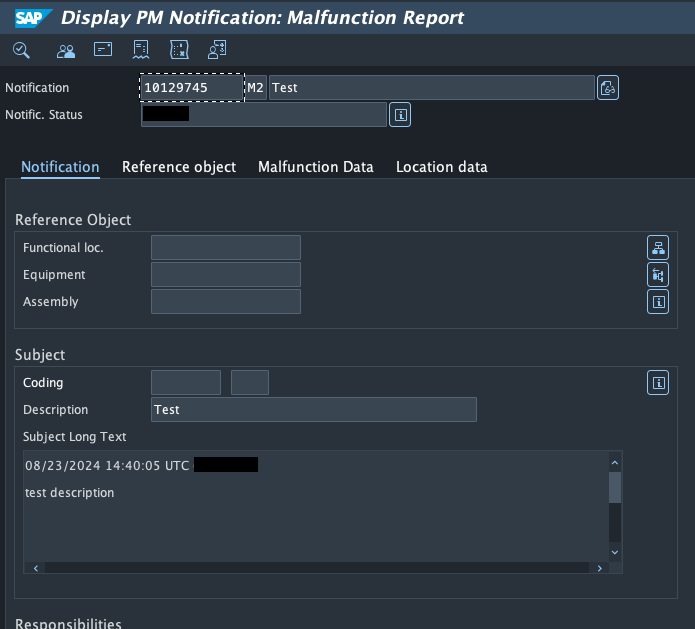
requestId. You can use the requestId to track the status of the request once it is completed.Send a POST request to https://{cluster}.cognitedata.com/api/v1/projects/{project}/writeback/sap/requests with the payload to be sent to SAP. See API documentation for more information.This example shows a SAP writeback request to create a SAP maintenance notification.https://{cluster}.cognitedata.com/api/v1/projects/{project}/writeback/sap/requests/byids with the related requestId. See API documentation for more information.Request:done. The response parameter sapObjectId contains the object ID of the record created in the SAP destination.Sign in to your SAP server and go to transaction code IW23 to check the maintenance notification created by the writeback request.Input the sapObjectId value available in the writeback response.6
Send an attachment writeback request
To attach a file to an SAP object, use an SAP endpoint with The service fetches file content through the File content API (For the full request schema, see Writeback requests.
endpointType: attachment. See SAP endpoints for more information.Before you send the request, make sure the file exists in CDF in one of these forms:- Data modeling: a
CogniteFileinstance — see Files in data modeling - Asset-centric (legacy): a file created with the Files API. In the API,
type: "cdf_classic_file"is synonymous with an asset-centric (legacy) file. Use these references in asset-centric and hybrid projects only.
sourceId to the SAP notification ID that the attachment belongs to. Also provide either fileId or fileReference — not both. When you use fileId, set it to the file external ID.Reference a CogniteFile
Send a POST request tohttps://{cluster}.cognitedata.com/api/v1/projects/{project}/writeback/sap/requests. This example references a CogniteFile instance:Reference an asset-centric (legacy) file
In asset-centric and hybrid projects, use either legacyfileId (file external ID) or fileReference with type: "cdf_classic_file":/files/downloadlink) for both asset-centric (legacy) files and CogniteFile instances. The SAP attachment OData endpoint is unchanged.Poll the request status with requests/byids, as in the Send a request step.Don’t set both
fileId and fileReference on the same request item. The request fails with HTTP 422.7
Update a record in SAP
The writeback service can send update requests to SAP.The request is similar to the
create request in the Send a request step. However, the object ID of the SAP record must be available in the request payload.