

Prerequisites: Familiarity with the data modeling service and core CDF concepts (containers, views, and data models, spaces and instances) will help you get the most from this guide.
Why it matters
A well-designed data model reduces integration complexity, improves query performance, and makes it easier to scale as your organization grows. Poor design leads to slow queries, maintenance overhead, and difficulty adding new data sources or applications. Following the principles in this guide helps you avoid common pitfalls and build models that support both operational and analytical use cases.Layered architecture
A layered data model architecture separates responsibilities and optimizes for different use cases. Clear ownership at each layer improves maintainability: Data producers focus on quality and freshness, data modelers on integration and business logic, and data consumers on application-specific views. This structure also scales better as your organization grows, because changes in one layer do not cascade unpredictably to others. The three layers map loosely to the medallion architecture (bronze, silver, gold). See medallion architecture for an overview.
Delta Lake Medallion Architecture by Databricks
As a general rule, map data into solution views directly from enterprise data model containers rather than transforming or duplicating the data.
In specific cases, a solution model can include its own containers (populated by discrete workflows) to store data unique to a particular use case or application.
Write-back principle: For write-back use cases, data must be written to a separate source data model (owned by a data producer), never directly into the enterprise layer.
You can use a simplified layered architecture to get started faster (for example, with only two layers). The full three-layer architecture described in this section is the recommended approach for enterprise-scale deployments.
Core design principles
Beyond layered architecture, a few design principles keep your data models efficient and scalable. These apply whether you are building a source, enterprise, or solution model.Avoid duplication via shared IDs
Represent each entity only once in the knowledge graph. You link data across views and layers by reusing the same instance ID (space + external ID). Direct relations are usually only required between different entities and not between different dimensions of the same entity.Extend core data models (CDM)
When you build your enterprise data model, prefer custom views that implement the relevant base core data model (CDM) views instead of using the CDM views directly. CDM is a blueprint for common properties, but you will usually add domain-specific properties and relationships for your use cases. Because you cannot change CDM views or their relations, linking custom views to them can break the schema or create dead ends where you cannot walk the graph back to your custom entity. Usually, extend theCogniteAsset, CogniteEquipment, CogniteFile, CogniteTimeSeries, and CogniteActivity views when you plan to populate them with data. Skip extending any of these that you do not need. Other CDM views are often used directly by CDF applications, for example CogniteFileCategory and the 3D views Cognite3DModel, Cognite3DModelRevision, and Cognite3DModelRevisionFile. You typically do not need to extend those unless a custom application reads from them.
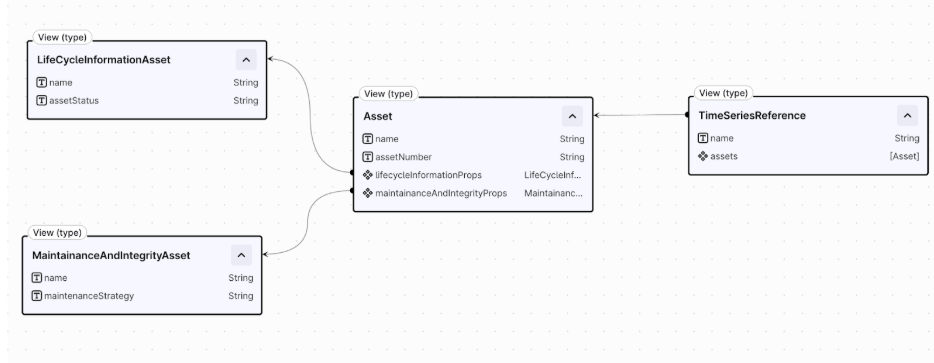
Asset type implementing CogniteAsset with relations to domain-specific dimensions
Distribute properties contextually
Distribute properties for the same instance across multiple context-specific containers and views. Containers are physical ‘property groups’, and therefore are a great way to group context relevant properties of an instance together, while views can consist of a combination of these. As a general rule of thumb, you should try to avoid both very wide and very narrow containers and views, in order to ensure optimal performance and to avoid schema proliferation. Following this principle also improves AI accuracy by scoping containers and views to a relevant set of properties for a particular context and use case. For example, omit pipe-coating properties from a view focused on pump equipment. Finally, both containers and views have property count limits, which are set on a CDF project-level, and this practice can also help you adhere to these limits.Model relationships
Choose the right relationship type for your use case. Direct relations are the default. They are simpler, faster, and less resource-intensive than edges. Add a reverse direct relation when you need to navigate the graph in both directions. Use edges when you need metadata on relationships, or when you have dynamic and potentially very high cardinality on a many-to-many relationsip. Edges have unbounded cardinality, while a single relationship represented by a list of direct relations currently only support up to 2,000 outgoing direct relations from one instance. Edges add complexity and cost, they count as instances and hence use up instance quota limits. Additionally, supported query patterns for edges vary from direct relations, which needs to be considered in the design.Query and performance optimization
Indexing and constraints are essential for efficiency and to prevent timeouts. Without them, queries on large graphs can become unusably slow. Add B-tree indexes to scalar properties you filter on and to direct relations you use for graph traversal, including reverse direct relations. Use inverted indexes for list-type properties. You can define up to 10 indexes per container. For more detail, read Performance considerations. Use human-readable names and descriptions for all properties to aid users and AI agents (Atlas AI). Denormalize properties that are frequently queried and give additional context, since this helps AI agents, applications, and human users alike. See Optimizing data models for AI for more guidance.Security and governance
Separating schema from data instances enables granular access control. Use distinct schema spaces (for model definitions) and instance spaces (for data), and rely on tooling for controlled deployment. The permission model distinguishes schema from data:datamodels:read gives schema access, while datamodelinstances:read is required to read any data.
Time series and files are special cases. Conceptually, they are meta/container types: the data model instance (the node) points to the actual bulk storage for the instance’s data (the datapoints or file bytes). To control access, you need two distinct types of permissions:
- Schema access: You need
datamodels:readon thecdf_cdmspace. This is required for your application to understand the structure and definition of what a CogniteTimeSeries or CogniteFile is. - Data access: You need
datamodelinstances:readon the instance space (for example,my-asset-space). This grants access to read the specific instances and their associated time series datapoints or file bytes. Using distinct instance spaces is the essential strategy for segregating data access.
sp_location_a_instances) to control data access using CDF groups.
Consider limits on space count within the project when implementing a strategy that subdivides data by source system, location, or use case. Combining these could result in exponential growth in space usage for enterprise-scale deployments.
Source and enterprise layer instance strategy
Define a strategy for instances between the source and enterprise layers. In the solution layer, you generally map data within the enterprise layer. Separation prevents data deletion risk and enables data isolation (for example, for third-party suppliers who may be competitors) but increases the instance count. Combining reduces instances and simplifies mapping, but risks unintended data loss. Extra care is needed when making changes in the source layer, since deleting an instance in a source model would delete the same instance in the enterprise model.Deployment
Govern and version your model in Git, and deploy it with configuration as code rather than manual changes in the UI. Two tools support this, depending on who is doing the modeling work:- Data modelers, working directly in YAML: use the Cognite Toolkit to build, validate, and deploy across Dev/Staging/Prod environments through CI/CD.
- Domain subject matter experts, working in spreadsheets: use NEAT to design and validate the model, then convert it to YAML and deploy it with the Cognite Toolkit. NEAT does not replace the Cognite Toolkit for deployment.
Naming and versioning
Follow the resource naming conventions for external IDs and properties, and use Cognite Toolkit variables to configure names and versions across environments. Bump the view version with every schema change.Validation checklist
Before deploying or merging changes, run through this checklist to confirm your model follows the best practices in this guide. The following table lists verification items by category: layered architecture, core design, query and performance, governance, deployment, and naming.Tools and services
The following services and tools support data modeling in CDF. Choose the right tool based on your role and workflow.Further reading
- Data modeling concepts – Core concepts: property graph, spaces, instances, containers, views, and data models.
- Data modeling guides – Examples and best practices for extending CDM, performance, and CI/CD.
- Data modeling principles – Organizational principles and best practices for data modeling with NEAT.
- Resource naming conventions – Complete reference for naming CDF resources.