

CogniteMigration data model, which stores the lineage information the migration plugin needs for later migration phases.
Required capabilities
The following capabilities are required to runcdf migrate prepare:
Deploying the CogniteMigration data model
The migration plugin requires that you store the lineage of the migration process in Cognite Data Fusion (CDF). A user-controlled data model calledCogniteMigration stores this lineage.
1
Run `cdf migrate prepare`
Deploy the
CogniteMigration data model to your CDF project if it does not already exist.2
Verify the data model
Confirm that the
CogniteMigration data model exists in your CDF project. You should see the views described in CogniteMigration data model structure.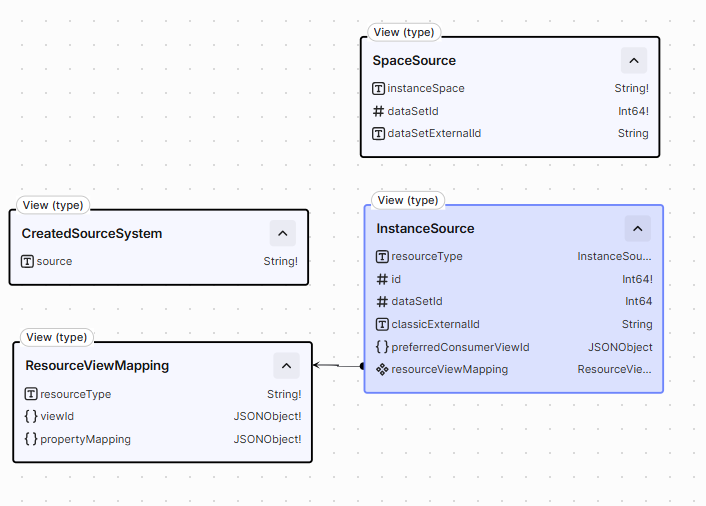
CogniteMigration data model structure
TheCogniteMigration data model consists of the following main concepts:
Space Source
This concept tracks which data set each instance space was created from. Instance spaces are the primary access control mechanism in data modeling. They are not equivalent to CDF data sets, as data sets are a property on the data, while spaces are part of the identifier of the data. Later migration phases use this information to look up which instance space to use when creating data model instances. For more information about the data set migration, see Data sets.All nodes with properties in the
SpaceSource view are expected to be located in the cognite_migration space.Created Source System
In the asset-centric schema, only assets, events, and files have a source. The source is a simple string property, with no further structure. In the data modeling world, CogniteSourceSystem is a first-class concept that can store more information about the source system. Assets, time series, activities, and files all have a pointer to a CogniteSourceSystem. To migrate the source property, the migration plugin tracks which source strings map to whichCogniteSourceSystem identifier.
For more information about source system migration, see Source system.
All nodes with properties in the
CreatedSourceSystem view are expected to be located in the cognite_migration space.Resource View Mapping
To migrate from asset-centric to data modeling-based CDF projects, you need to have mappings from the asset-centric resources to the data model resources. These mappings are stored in this view. You govern the resource-to-view mappings, making them reusable across CDF projects. You can also define multiple mappings for each resource type. For example, you can have one mapping from asset to wind turbine, and another from asset to wind farm. When you runcdf migrate prepare, the Cognite Toolkit deploys several default resource view mappings to help you get
started. These default mappings are for each resource type and map to the appropriate view in the Cognite Core
data model.
All nodes with properties in the
ResourceViewMapping view are expected to be located in the cognite_migration space.Instance Source
When you migrate assets, events, time series, and file metadata, the Cognite Toolkit stores the lineage: which source resource maps to which data modeling instance. Application-level and access management migration need this mapping for dependent resources. For example, Charts and Canvas contain references to assets, time series, and files. The Cognite Toolkit uses the lineage to update those references to the new instances. You can also set the preferred consumer view for each instance. The Charts and Canvas migration uses this setting to select which view to use when looking at the data modeling instance.Manual population of the CogniteMigration data model
If you are not migrating Charts, Canvas, annotations, Cognite InField, or 3D models using the migration plugin, you can skip this section.
CogniteMigration data model automatically when you migrate data sets, source systems, assets,
events, time series, and file metadata. If you skip those commands — for example, by updating your data pipelines to write to
data modeling instances instead of asset-centric resources — you must add the lineage yourself. You need that lineage to
migrate Charts, Canvas, annotations, InField, and 3D models.
Example of manually creating lineage using the Cognite SDK
This example uses the Cognite Python SDK (cognite-sdk) to create lineage from the asset my_source_asset to the instance
my_migrated_asset in the destination_space space. It also sets the preferred consumer view to
MyCogniteAssetExtension in the my_schema_space space. Charts and Canvas use that view when they display the asset.
Before you run this snippet, deploy the CogniteMigration data model. The asset my_source_asset and the
instance my_migrated_asset must already exist in your CDF project.
Example of manually creating lineage using the data plugin
You can use the Cognite Toolkit data plugin to download the source data, create the lineage data offline, and then upload it using the data plugin. This takes advantage of the data plugin’s optimized upload and download functionality. To enable the data plugin, enable it in yourcdf.toml file. You also have
to enable the alpha flags that extend the download and upload functionality of the data plugin.
cdf.toml
my_source_assets data set, you can run the following command:
my_source_assets data set to the data/ directory in CSV format.
You can then create the lineage data offline, using for example Pandas:
create_lineage.py
lineage) and add the .Manifest.yaml suffix to the file name:
data/lineage/lineage.Manifest.yaml