

cdf build command
to build the necessary artifacts to deploy the modules.
Before you deploy the artifacts, we recommend that you always do a dry-run deployment to verify
that the configurations and deployment perform as expected.
When you’ve verified the configuration, you run the cdf deploy command to deploy the artifacts to the CDF project using the CDF SDK and APIs.
Before you start
Complete these prerequisites before you build and deploy:- Install the Cognite Toolkit and open a terminal in your project directory.
- Set up authentication with
cdf auth initandcdf auth verifyso the Toolkit can access the target CDF project. - Initialize modules with
cdf modules init(or use an existing project that already has amodules/directory andconfig.<env>.yamlfiles).
1
Configure access to the CDF project
Confirm that authentication works for the CDF project you plan to deploy to. If you have not configured credentials yet, follow Authentication, run
cdf auth init, and verify access with cdf auth verify.2
Configure modules
To configure the modules to deploy to a CDF project:
-
The
cdf modules initcommand will usually have created aconfig.<env>.yamlfile for each of your environments.You need one config.<env>.yaml file for each CDF project you deploy to. For example, if you haveprod,staging, anddevprojects/environments, you need config.prod.yaml, config.staging.yaml, and config.dev.yaml configuration files. -
Open the configuration file, and edit the
projectproperty to match the name of your CDF project (line 3 in this example):showLineNumbers -
In the
selectedproperty, list the modules you want to deploy (lines 6-7 above). You can list any of the modules in the modules sub-directory. -
Update the variables in the
variablessection to match the CDF project you’re deploying to, for example, to change the name of your default location.
- Save the configuration file.
3
Build deployment artifacts
To build the artifacts to deploy for the modules you have configured:
-
In a terminal, run these commands:
The
--config-yaml=<env>parameter specifies which configuration file to use, in this example config.dev.yaml.
cdf build adds enforceable rules for these checks, and the Neat plugin is no longer used for them. Configure which rules to enforce or ignore in the [rules] section of cdf.toml.4
Deploy to the CDF project
To deploy the configured artifacts to your CDF project:
-
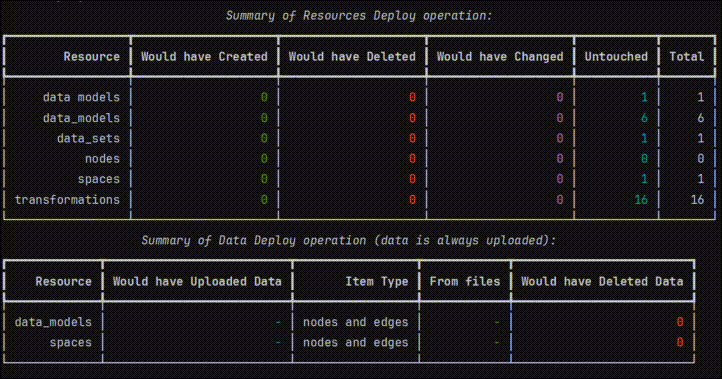
In a terminal, run these commands to do a dry-run of the deployment:
-
Inspect the output from the dry run and verify that the configurations and deployment perform as expected.
-
Run this command to deploy the artifacts to your CDF project:
From v0.8, the
cdf deploy command sends all content from YAML files to CDF, including parameters the Toolkit doesn’t explicitly know about. This ensures forward compatibility with new CDF API fields without waiting for a Toolkit update.5
Clean up configurations and data (optional)
To deploy from a clean state, you can remove configurations and data before you deploy. This is typically not necessary for regular deployments, but can be useful when a resource rejects updates and you want to force a clean deployment.One use case is data modeling views. Views can reject an update when the change requires a version bump. To delete and recreate the view (common in development), use the Remove and redeploy configurations and dataDelete everything managed by your configurations
--drop option before deploying again.Remove and redeploy configurations (keep data)