

About files
Files are created in two steps where the first step stores the metadata in a file object, and the second step uploads the file contents. This means that files can exist in Cognite Data Fusion without actually being uploaded. Each file has a uniqueid that’s generated at file creation. Specify a fileName when the file is created.
If you want to be in control of the file identifier, you can specify an externalId which must be unique within a project.
A file can also have metadata key-value fields that are searchable. You can use these fields to store source system IDs and other information.
Additionally, files can have labels attached to them, making it easier to organize and categorize files.
You can retrieve the information for a file, both standard and dynamic metadata fields, using the files list or searching REST API calls. You can download the file contents with the file download REST API call.
Geographic location of files
Specify a file’s geographic location, for example, its geometric features and coordinates, in thegeoLocation field. Data in this field needs to follow the GeoJSON specification, explained in detail in RFC 7946. The coordinate reference system for all GeoJSON coordinates is a geographic coordinate reference system that uses the World Geodetic System 1984 (WGS84).
GeoJSON types
A GeoJSON object has one of 3 types:- Feature - Geometric objects with (optional) extra features.
- FeatureCollection - A collection of Features.
- GeometryCollection - A collection of Geometry objects (see below).
type and a corresponding array of coordinates. Below are the supported Geometry types:
| Type | Description | Example | |
|---|---|---|---|
| Point | Only one exact point. |  | {"type": "Point", "coordinates": [30, 10]} |
| MultiPoint | Multiple points. |  | {"type": "MultiPoint", "coordinates": [[10, 40], [40, 30], [20, 20], [30, 10]]} |
| LineString | A line. |  | {"type": "LineString", "coordinates": [[30, 10], [10, 30], [40, 40]]} |
| MultiLineString | Multiple lines. |  | {"type": "MultiLineString", "coordinates": [[[10, 10], [20, 20], [10, 40]], [[40, 40], [30, 30], [40, 20], [30, 10]]]} |
| Polygon | A closed shape. Can have inner holes of arbitrary shapes. |  | {"type": "Polygon", "coordinates": [[[35, 10], [45, 45], [15, 40], [10, 20], [35, 10]], [[20, 30], [35, 35], [30, 20], [20, 30]]]} |
| MultiPolygon | Multiple closed shapes. Can have inner holes of arbitrary shapes. |  | {"type": "MultiPolygon", "coordinates": [[[[30, 20], [45, 40], [10, 40], [30, 20]]], [[[15, 5], [40, 10], [10, 20], [5, 10], [15, 5]]]]} |
Adding geoLocation to a file
ThegeoLocation field requires the following properties:
type
The type of GeoJSON. Cognite Data Fusion only supports theFeature type.
geometry
Represents the points, curves, and surfaces in coordinate space. The property consists of:-
type- Must be one of the following geometry types:Point,MultiPoint,LineString,MultiLineString,Polygon, andMultiPolygon. See GeoJSON types above. -
coordinates- An array describing the specified geometry type. The type of geometry determines the shape of this array. For instance, aPointgeometry type will contain acoordinatearray consisting of just a single x and a single y coordinate. See example 1 below. -
A
LineStringgeometry type will contain acoordinatearray with two or more points, as shown in example 2. APolygongeometry type will need to contain an array of closedLineStringswith four or more points, as shown in example 3. See the GeoJSON spec for more details on the various shapes of thecoordinatesfield.
properties
An optional field specifying extra information to enrich theFeature.
Example 1
Polygon specifies an outer and inner LineString.
A Polygon can (but doesn’t have to) contain several of these LineStrings, where the first must be the exterior ring, and the next LineStrings are interior rings. This is how you would define a surface with holes.
Upload example
Update example
GeoLocation filtering
Filtering on, or searching for files matching a certaingeoLocation requires two properties:
-
relation- The geographic relation, eitherINTERSECTS,WITHIN, orDISJOINT. -
shape- Thegeometry, as described in the geometry section. Filtering is not available for theMultiPointtype.
Filter example
Rate and concurrency limits
There are limits on the rate of requests (RPS) and the number of parallel requests. A request exceeding the limits will result in a 429 error response: Too Many Requests. Define limits at both the API service and endpoint levels. Every request has a different budget due to the varying resource consumption. For example, there are two types of requests: CRUD (Create(Upload/Upload multipart/Complete multipart), Retrieve, Request ByIDs, Get icon, Download, Update, and Delete) and Analytical (Aggregate, List, Search, and Filter). CRUD requests are less resource-intensive than Analytical requests. Among all Analytical requests, Aggregates are the most resource-intensive, so they receive their request budget within the overall Analytical request budget. The limits for the API service and its endpoints are shown in the diagram below. These limits are subject to change based on consumption patterns and resource availability over time. Changes to limits will be notified in the changelog.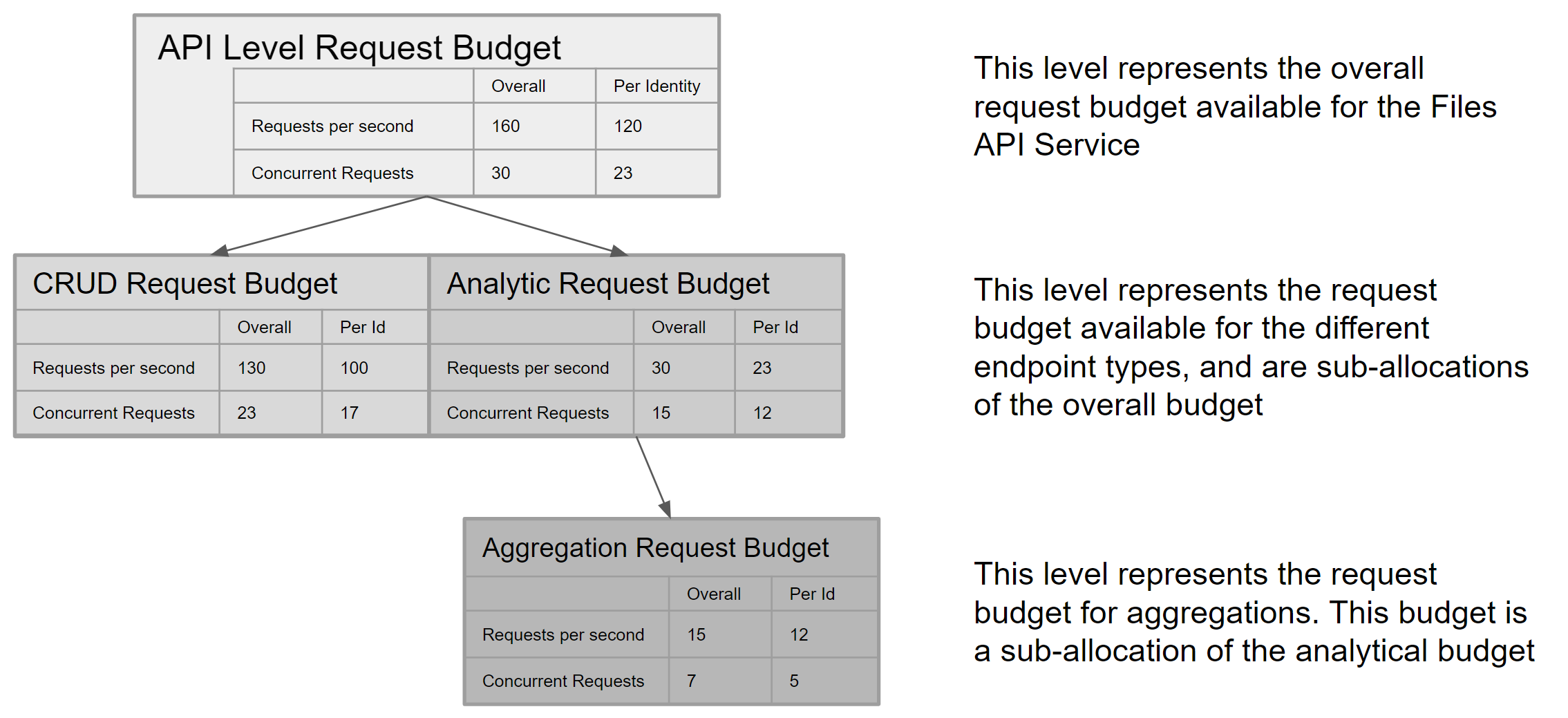
Translate RPS to data speed
A single request can retrieve up to 1000 items, where 1 item is a file record. The top API service level has a maximum theoretical data speed of 160,000 items per second for all consumers and 120,000 for a single identity or client in a project.Use of parallel retrieval
Parallel retrieval is a technique used to improve data retrieval performance in cases where due to query complexity, data retrieval speeds are lower than they would normally be with a fast, simple query. Use parallel retrieval to retrieve large data sets up to the capacity limits defined for an API service. For example, the Files API request has the following limits:- A single request can retrieve up to 1000 items.
- Up to 23 requests per second may be issued for an analytical query (per identity), such as when using /list or /filter API endpoints (see above diagram).
- A theoretical maximum of 23,000 items read per second per identity.
- A single request taking longer than 1s to read or write 1000 items.
Use parallel retrieval only when a single request flow provides data retrieval speeds significantly less than the theoretical maximum.
The overall requests per second limit still apply regardless of the number of concurrent requests issued. For example, if a request returns data at 18,000 items per second, adding a second parallel request provides little benefit as only 5,000 more items can be returned before the budget limit is reached.