

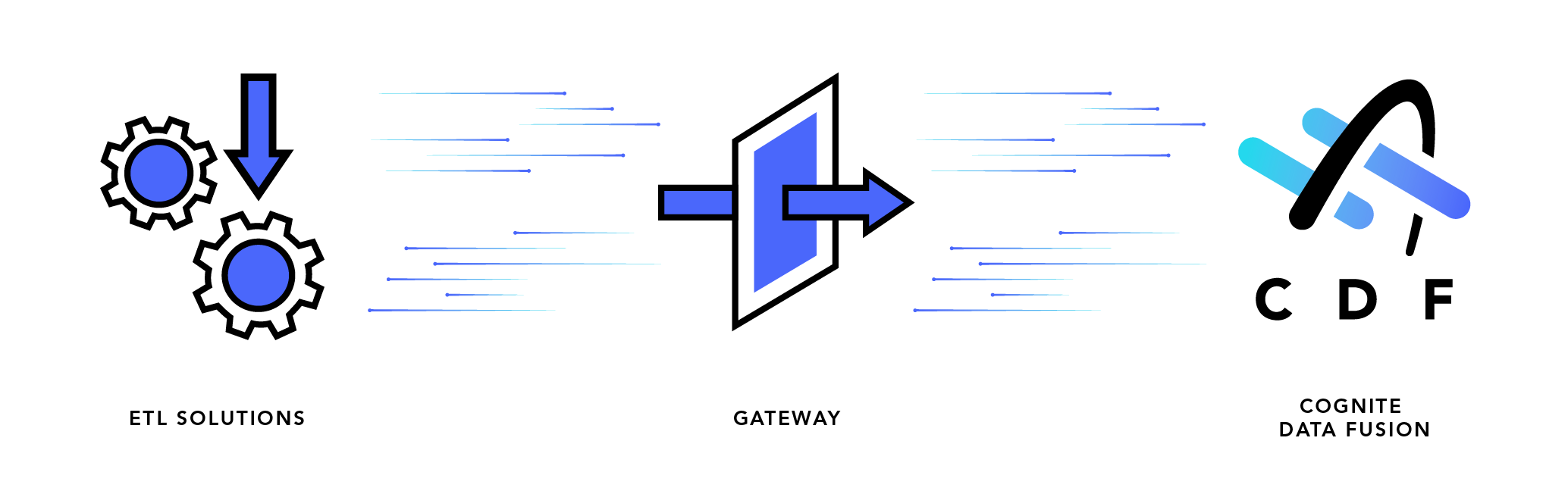
Data moves from a source system through an ETL tool into CDF.
- Microsoft’s Azure Data Factory is the officially supported ETL tool. Alternative tools may be used, but without support from Cognite.
- The PostgreSQL gateway is primarily intended for ingestion. You can run a simple filtered read in a SQL client to verify ingested data. Aggregations, joins, and
ORDER BYon fields the CDF API doesn’t support sorting on aren’t pushed down and can trigger a full table scan. See Limitations. - Don’t connect business intelligence tools to the gateway. For BI or aggregation-heavy queries, use Transformations to materialize data to CDF RAW or a data model, then query that result. Don’t query the materialized data through the PostgreSQL gateway.
When to use the PostgreSQL gateway
Consider using the PostgreSQL gateway if:- You’re integrating a new data source that can be accessed through Azure Data Factory (ADF) or another ETL tool that supports writing to PostgreSQL. You can use the PostgreSQL gateway as a sink in ADF.
- You have previously built an extractor that can push data to PostgreSQL, but not to CDF.
- You need aggregations, joins, or a business intelligence tool. Use Transformations to materialize data, then query that result. Don’t query the materialized data through the PostgreSQL gateway.
- You need very high performance, especially for ingestion of RAW rows or time series datapoints, in the order of tens of thousands rows/points per second (10-50k/s as a ballpark figure).
psql. Connect to the PostgreSQL gateway using the credentials returned from the Postgres Gateway Users endpoint:
How the PostgreSQL gateway works
The PostgreSQL gateway is a foreign data wrapper, which is a PostgreSQL extension where you create foreign tables. These are constructs that look like normal PostgreSQL tables, but instead are thin references to external data. When you query a foreign table in the PostgreSQL gateway, your query is translated into one or more HTTP requests to the Cognite API. This implicitly creates limitations. The PostgreSQL gateway is only capable of doing what the Cognite API can do, but will typically try to fulfill any query. If you write a query that doesn’t easily translate into requests to the Cognite API, the gateway may read all available data from CDF to fulfill your request. For example, this query reads all assets from CDF, then finds the asset with the highest ID:name, the gateway translates the query into a single request to CDF:
EXPLAIN to see what the query will do:
name.
If EXPLAIN shows many CDF requests, or that the gateway will read all rows to fulfill the query, don’t deploy that query.
Custom tables
In the Cognite API, you can create custom tables that represent data modeling views or RAW tables. This is a convenient interface for ingesting data into types that have a flexible schema in CDF. When you create a custom table representing a RAW table, the table in CDF RAW isn’t required to pre-exist. Instead, the table is automatically created if you insert data into the table in the gateway. If you delete a table in the gateway, the corresponding resource isn’t deleted. When you create a custom table representing a data modeling view, the view is required to exist when the table is created since the data modeling definition is imported. If the view is deleted, the table in the gateway isn’t deleted.Limitations
The PostgreSQL gateway only does what the CDF API can do. Simple filters push down. Aggregations, joins, and someORDER BY clauses don’t, and can read all matching data from CDF.
Operations such as UPDATE ... WHERE and DELETE ... WHERE work as expected. Filters are pushed down as much as possible.
This query performs a single update request:
name, then updates based on the result:
Errors from CDF
Note that in general the PostgreSQL gateway does not automatically ignore errors from CDF. If you try to update assets that don’t exist, the query will fail. This also applies for attempting to insert duplicates. These are not translated on a per-row level to PostgreSQL rejections, and queries likeUPDATE ... ON CONFLICT DO ... won’t work.
Joins and aggregations
Joins and aggregations aren’t pushed down to the CDF API. This query retrieves all assets from CDF:Best practices
These are the best practices to apply when using the PostgreSQL gateway.- Use
COPY FROM ...for insertion as this is more efficient. If this isn’t possible, use batchINSERTqueries. Avoid making manyINSERTqueries with one row in each. - Run
EXPLAINon queries before you deploy them. Avoid queries that result in full-table scans or many CDF requests, unless that’s what you want. - Ingest directly into CDF resources when you can. This simplifies the ingestion pipeline and avoids using Transformations only as an extra ingestion step.