> ## Documentation Index
> Fetch the complete documentation index at: https://docs.cognite.com/llms.txt
> Use this file to discover all available pages before exploring further.
# Integrate with the Cognite PI extractor
> Configure the PI extractor and PI replace utility to automatically detect and correct data loss and reconnection incidents using Cognite Data Fusion (CDF) events.
The PI replace utility fetches the events at startup and replaces the data points for the time range when the events occurred.
Set up the PI replace utility to [run daily](/cdf/integration/guides/extraction/run_extractor_win_task_scheduler) to find and correct data loss and reconnection incidents.
## Before you start
* Install version 2.1.0 or higher of the Cognite PI extractor.
## Configure the PI extractor and PI replace utility to read CDF events
To create CDF events each time the extractor detects a data loss incident or a reconnection, add the following section to the PI extractor configuration file:
```yaml theme={"languages":{"custom":["/_languages/kuiper.json","../_languages/kuiper.json"]}}
events:
source: 'PiExtractor'
external-id-prefix: 'cog-pi-events.'
data-set-id: 3258926993736049
store-extractor-events-interval: 10
```
where:
* `source` is a unique identifier for the PI extractor.
* `external-id-prefix` is an optional prefix to the time series.
* `data-set-id` is an optional data set for adding time series to.
* `store-extractor-events-interval` determines how often or if the extractor pushes the events to CDF. The default value is -`1m`, which indicates that the extractor doesn't push events to CDF. Set a positive value to push to CDF.
Here are two examples of events created by the PI extractor:
```yaml theme={"languages":{"custom":["/_languages/kuiper.json","../_languages/kuiper.json"]}}
{
'externalId': 'cog-pi-events.Reconnection-2020-07-17 12:08:17.089(0)',
'dataSetId': 3258926993736049,
'startTime': 1594987632218,
'endTime': 1594987699519,
'type': 'Reconnection',
'subtype': 'ExtractorFailure',
'source': 'PiExtractor',
'id': 4894105677746187,
'lastUpdatedTime': 1595340918756,
'createdTime': 1594987732877,
}
```
```yaml theme={"languages":{"custom":["/_languages/kuiper.json","../_languages/kuiper.json"]}}
{
'externalId': 'cog-pi-events.DataLoss-2020-07-17 12:14:55.523(1)',
'dataSetId': 3258926993736049,
'startTime': 1594987993792,
'endTime': 1594988095526,
'type': 'DataLoss',
'subtype': 'DataPipeOverflow',
'source': 'PiExtractor',
'id': 2759118070077116,
'lastUpdatedTime': 1595340918756,
'createdTime': 1594988119054,
}
```
where:
* `external ID` starts with the configured prefix, followed by the event type, the date and time the event occurred, and an event number.
* `startTime` and `endTime` indicate when the incident started and ended.
* `type` indicates if this is a reconnection or data loss incident.
* `subtype` gives further information about the incident. For instance:
* The `type` value `Reconnection` may indicate `ExtractorFailure` or `ExtractorRestart`.
* The `type` value `DataLoss` may indicate `DataPipeOverflow` or `Other`.
The PI replace configuration file must contain an [events](/cdf/integration/guides/extraction/pi_replace/pi_replace_configuration#events) section with values identical to the [values in the PI extractor](/cdf/integration/guides/extraction/configuration/pi#events):
```yaml theme={"languages":{"custom":["/_languages/kuiper.json","../_languages/kuiper.json"]}}
events:
source: 'PiExtractor'
external-id-prefix: 'cog-pi-events.'
event-start-time: '5:00:00:00'
event-end-time: '00:20:00'
expand-before: '05:00:00'
expand-after: '00:10:00'
```
where:
* `source` is required and must match the event source in the PI extractor.
* `external-id-prefix` is optional. However, if it exists in the PI extractor, you should add this parameter.
* `event-start-time` and `event-end-time` are the query range for events in CDF. In the example, PI replace will search for events that happened from 5 days ago to 20 minutes ago.
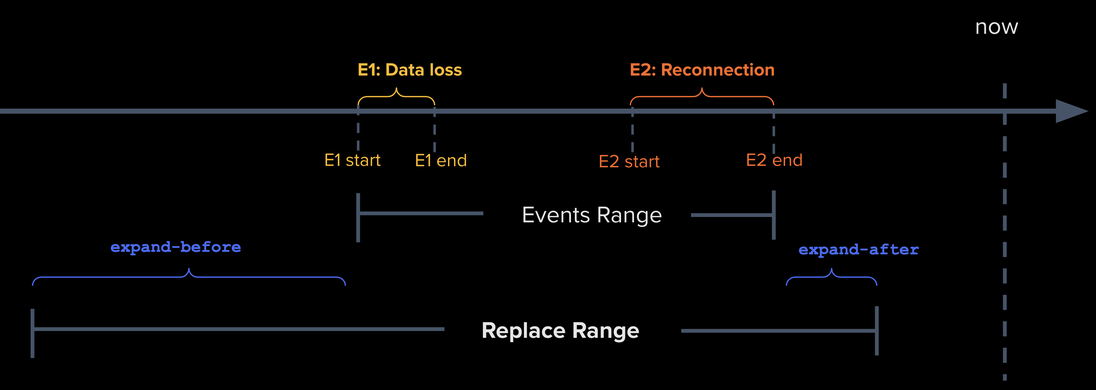
* If PI replace finds events, the replace range is calculated based on the event's `startTime` and `endTime`, and expanded using the `expand-before` and `expand-after` configuration. In this example, the start time of PI replace will be 5 hours before the event `startTime`, and the end time will be 10 minutes after the event `endTime`.
This figure illustrates how the replace range is calculated when two events are found.
 ## Updates and insertions of historical data points
PI DataPipe values can be lost if the PI extractor is down. When the extractor restarts, it refills any gaps from stop to now (frontfill). However, the lost values can also be updates or insertions of historical data points, meaning they're already extracted. The extractor isn't able to recover these values. In the case of data loss incidents reported by the PI server, such as data pipe buffer overflows, the extractor can lose real-time and historical updates.
The **Events Range** in the figure above covers the extractor downtime and the data loss period but doesn't account for lost historical updates and insertions.
Use the `expand-before` parameter to specify how far back PI replace will check for missing or wrong data points. The parameter settings depend on the PI setup. Determine the value for this parameter using the [pi\_extractor\_streamer\_oldest\_data\_point](/cdf/integration/guides/extraction/pi/pi_metrics#metrics) metrics from the PI extractor.
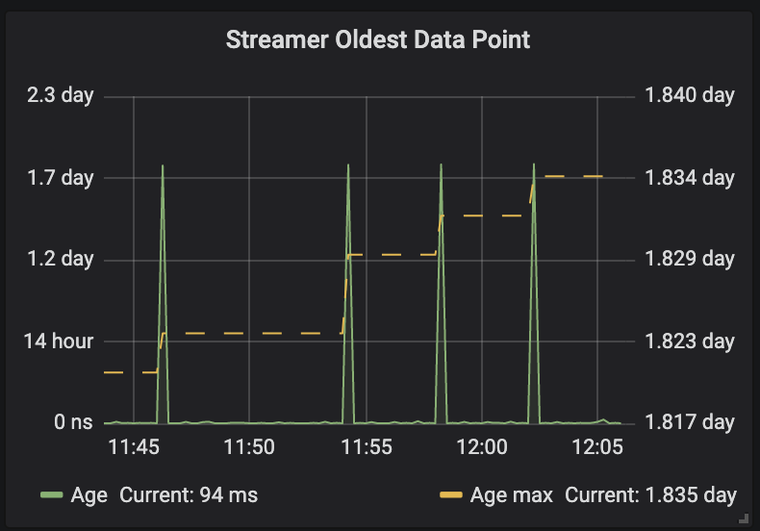
This metric shows how old the oldest data point received by the PI extractor streamer is. In the image below, the oldest data point is 1.8 days old. Therefore, we can assume that typically the oldest historical update is two days old and set the parameter `expand-before` to `2:00:00:00`, indicating going back 2 days before the start of the incident.
## Updates and insertions of historical data points
PI DataPipe values can be lost if the PI extractor is down. When the extractor restarts, it refills any gaps from stop to now (frontfill). However, the lost values can also be updates or insertions of historical data points, meaning they're already extracted. The extractor isn't able to recover these values. In the case of data loss incidents reported by the PI server, such as data pipe buffer overflows, the extractor can lose real-time and historical updates.
The **Events Range** in the figure above covers the extractor downtime and the data loss period but doesn't account for lost historical updates and insertions.
Use the `expand-before` parameter to specify how far back PI replace will check for missing or wrong data points. The parameter settings depend on the PI setup. Determine the value for this parameter using the [pi\_extractor\_streamer\_oldest\_data\_point](/cdf/integration/guides/extraction/pi/pi_metrics#metrics) metrics from the PI extractor.
This metric shows how old the oldest data point received by the PI extractor streamer is. In the image below, the oldest data point is 1.8 days old. Therefore, we can assume that typically the oldest historical update is two days old and set the parameter `expand-before` to `2:00:00:00`, indicating going back 2 days before the start of the incident.
 There is no guarantee that the oldest value lost during the incident is within the replace range. Use the `expand-before` configuration to mitigate the effects of a data loss. Still, this value should be low enough to allow PI replace to complete in a reasonable time. For instance, we don't recommend setting `expand-before` to a year.
## Processed events
PI replace adds metadata that indicates start time and completion time for the replaced data points to the extractor events:
```yaml theme={"languages":{"custom":["/_languages/kuiper.json","../_languages/kuiper.json"]}}
{
'externalId': 'cog-pi-events.Reconnection-2020-07-17 12:08:17.089(0)',
'dataSetId': 3258926993736049,
'startTime': 1594987632218,
'endTime': 1594987699519,
'type': 'Reconnection',
'subtype': 'ExtractorFailure',
'metadata':
{
'pi-replace-started': '2020-07-21 13:54:09.392',
'pi-replace-completed': '2020-07-21 14:15:18.595',
},
'source': 'PiExtractor',
'id': 4894105677746187,
'lastUpdatedTime': 1595340918756,
'createdTime': 1594987732877,
}
```
If the `pi-replace-completed` metadata is added to an event, this event will no longer be processed by PI replace.
There is no guarantee that the oldest value lost during the incident is within the replace range. Use the `expand-before` configuration to mitigate the effects of a data loss. Still, this value should be low enough to allow PI replace to complete in a reasonable time. For instance, we don't recommend setting `expand-before` to a year.
## Processed events
PI replace adds metadata that indicates start time and completion time for the replaced data points to the extractor events:
```yaml theme={"languages":{"custom":["/_languages/kuiper.json","../_languages/kuiper.json"]}}
{
'externalId': 'cog-pi-events.Reconnection-2020-07-17 12:08:17.089(0)',
'dataSetId': 3258926993736049,
'startTime': 1594987632218,
'endTime': 1594987699519,
'type': 'Reconnection',
'subtype': 'ExtractorFailure',
'metadata':
{
'pi-replace-started': '2020-07-21 13:54:09.392',
'pi-replace-completed': '2020-07-21 14:15:18.595',
},
'source': 'PiExtractor',
'id': 4894105677746187,
'lastUpdatedTime': 1595340918756,
'createdTime': 1594987732877,
}
```
If the `pi-replace-completed` metadata is added to an event, this event will no longer be processed by PI replace.