> ## Documentation Index
> Fetch the complete documentation index at: https://docs.cognite.com/llms.txt
> Use this file to discover all available pages before exploring further.
# About data extraction
> Understand how extractors connect to source systems and push data in its **original format** to Cognite Data Fusion using prebuilt extractors or custom solutions with Python and .NET utilities.
The prebuilt extractors can **stream or extract data in batches** to the [CDF staging area](/cdf/integration/guides/extraction/raw_explorer) or directly to a [CDF service](/dev/concepts/resource_types) with little or no data transformation.
The Cognite extractors only need read access to the source systems and never change the original data.
To integrate data into a data model, you can:
* Use Cognite's extractor and transformation components.
* Use 3rd party extractor and transformation components.
* Develop custom solutions.
You can also ingest data into CDF using the [Cognite API](/api-reference/concepts/20230101/api-description) or integrate Extract, Transform, Load (ETL) tools with the [PostgreSQL gateway](/cdf/integration/guides/interfaces/postgres_gateway/ingest_into_raw) if your data is already in the cloud.
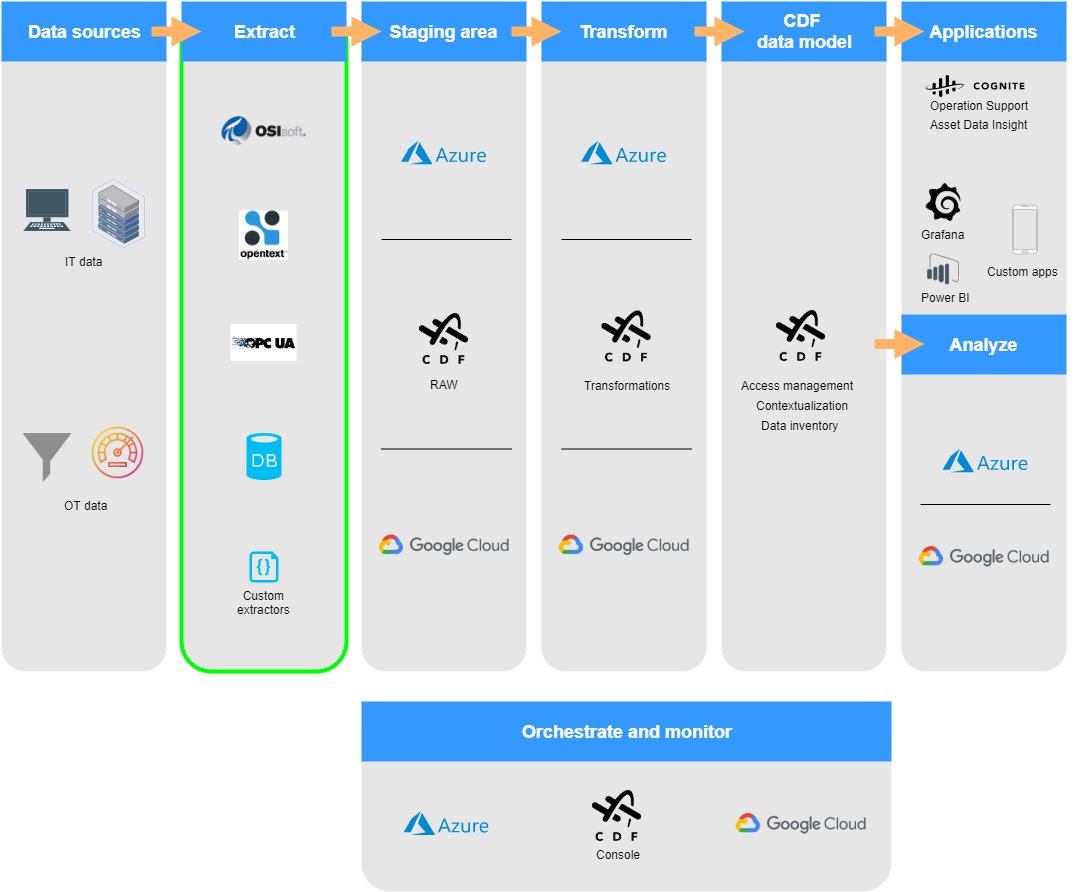 ## Cognite extractors
| Extractor | Description |
| --------------------------------------------------------------------------------------- | -------------------------------------------------------------------------------------------------------------------------------------------------------------------------------------------------------------------------------------------------------------------------------------------------------- |
| [Cognite DB extractor](/cdf/integration/guides/extraction/db) | Connects to databases using ODBC, runs queries, and batch extracts data into the CDF staging area or directly to the CDF time series service. Make sure you have ODBC drivers for the databases you're connecting to. This extractor is available as both a Windows service and a standalone executable. |
| [Cognite OPC UA extractor](/cdf/integration/guides/extraction/opc_ua) | Connects to the open OPC UA protocol and streams time series into the CDF time series service and events into the CDF events service. It batch extracts the OPC UA node hierarchy into the CDF staging area or as CDF assets and relationships. |
| [Cognite PI extractor](/cdf/integration/guides/extraction/pi) | Connects to the PI Data archive and streams time series into the CDF time series service. In parallel, the extractor ingests historical data (backfilling). |
| [Cognite PI AF extractor](/cdf/integration/guides/extraction/pi_af) | Connects to the PI Asset Framework and batch extracts Asset Framework elements and all their attributes. The extractor then builds a tree for each element in the CDF staging area. |
| [Cognite PI replace utility](/cdf/integration/guides/extraction/pi_replace) | Re-ingests time series to CDF. Use this utility if the PI extractor can't sync PI content due to invalid or missing data points. |
| [Cognite Studio For Petrel extractor](/cdf/integration/guides/extraction/petrel_studio) | Connects to SLB Studio For Petrel and extracts the records to CDF as protobuf objects. |
| [Cognite EDM extractor](/cdf/integration/guides/extraction/edm) | Connects to Landmark Engineers Data Model database and exports the data to the CDF staging area. |
| [Cognite WITSML extractor](/cdf/integration/guides/extraction/witsml) | Connects to [WITSML](https://www.energistics.org/witsml-data-standards) data sources and sends the data to CDF. |
| [Cognite OSDU extractor](/cdf/integration/guides/extraction/osdu) | Connects to [OSDU](https://osduforum.org) and sends the data to the CDF staging area. |
| [Cognite File extractor](/cdf/integration/guides/extraction/file) | Connects to local file systems, cloud storage, and network sharing protocols to upload files into CDF. You can also use this extractor to connect to OpenText Documentum and Documentum D2. It batch extracts documents into the CDF files service. |
| [Cognite SAP Extractor](/cdf/integration/guides/extraction/sap) | Connects to SAP through OData endpoints and batch extracts data into the CDF staging area. |
### Download installation files
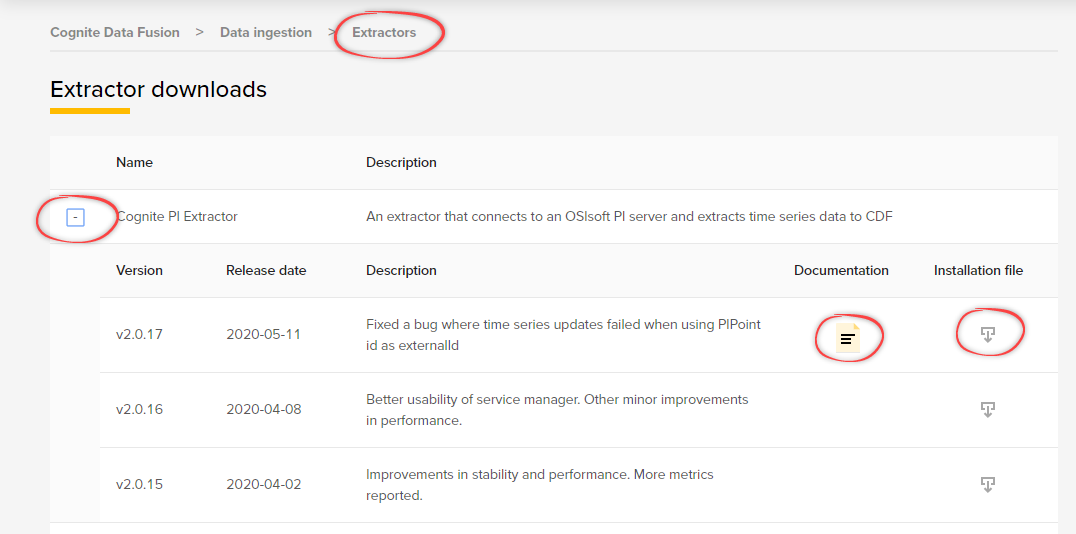
Navigate to Data fusion > Integrate > Extractors.
Select the extractor best suited to your source system.
Download the **Installation file** and, optionally, the PDF documentation.
## Cognite extractors
| Extractor | Description |
| --------------------------------------------------------------------------------------- | -------------------------------------------------------------------------------------------------------------------------------------------------------------------------------------------------------------------------------------------------------------------------------------------------------- |
| [Cognite DB extractor](/cdf/integration/guides/extraction/db) | Connects to databases using ODBC, runs queries, and batch extracts data into the CDF staging area or directly to the CDF time series service. Make sure you have ODBC drivers for the databases you're connecting to. This extractor is available as both a Windows service and a standalone executable. |
| [Cognite OPC UA extractor](/cdf/integration/guides/extraction/opc_ua) | Connects to the open OPC UA protocol and streams time series into the CDF time series service and events into the CDF events service. It batch extracts the OPC UA node hierarchy into the CDF staging area or as CDF assets and relationships. |
| [Cognite PI extractor](/cdf/integration/guides/extraction/pi) | Connects to the PI Data archive and streams time series into the CDF time series service. In parallel, the extractor ingests historical data (backfilling). |
| [Cognite PI AF extractor](/cdf/integration/guides/extraction/pi_af) | Connects to the PI Asset Framework and batch extracts Asset Framework elements and all their attributes. The extractor then builds a tree for each element in the CDF staging area. |
| [Cognite PI replace utility](/cdf/integration/guides/extraction/pi_replace) | Re-ingests time series to CDF. Use this utility if the PI extractor can't sync PI content due to invalid or missing data points. |
| [Cognite Studio For Petrel extractor](/cdf/integration/guides/extraction/petrel_studio) | Connects to SLB Studio For Petrel and extracts the records to CDF as protobuf objects. |
| [Cognite EDM extractor](/cdf/integration/guides/extraction/edm) | Connects to Landmark Engineers Data Model database and exports the data to the CDF staging area. |
| [Cognite WITSML extractor](/cdf/integration/guides/extraction/witsml) | Connects to [WITSML](https://www.energistics.org/witsml-data-standards) data sources and sends the data to CDF. |
| [Cognite OSDU extractor](/cdf/integration/guides/extraction/osdu) | Connects to [OSDU](https://osduforum.org) and sends the data to the CDF staging area. |
| [Cognite File extractor](/cdf/integration/guides/extraction/file) | Connects to local file systems, cloud storage, and network sharing protocols to upload files into CDF. You can also use this extractor to connect to OpenText Documentum and Documentum D2. It batch extracts documents into the CDF files service. |
| [Cognite SAP Extractor](/cdf/integration/guides/extraction/sap) | Connects to SAP through OData endpoints and batch extracts data into the CDF staging area. |
### Download installation files
Navigate to Data fusion > Integrate > Extractors.
Select the extractor best suited to your source system.
Download the **Installation file** and, optionally, the PDF documentation.
 ## Custom extractors
You can create custom extractors if your source system can't use any of the prebuilt extractors. Select **Create a custom extractor** to find Python and .NET utils packages and SDKs to get started.
### Cognite Python extractor-utils SDK
Use the [Python extractor-utils SDK](https://github.com/cognitedata/python-extractor-utils), an extension of the [Cognite Python SDK](/dev/sdks/python), to develop extractors in Python. For more information, see the [Python extractor-utils SDK documentation](https://cognite-extractor-utils.readthedocs-hosted.com/en/latest).
### Cognite .NET extractor utilities code
Use the [.NET extractor](https://github.com/cognitedata/dotnet-extractor-utils) to develop extractors in C#. For more information, see the [.NET utils documentation](https://cognitedata.github.io/dotnet-extractor-utils/tutorials/intro.html).
## Custom extractors
You can create custom extractors if your source system can't use any of the prebuilt extractors. Select **Create a custom extractor** to find Python and .NET utils packages and SDKs to get started.
### Cognite Python extractor-utils SDK
Use the [Python extractor-utils SDK](https://github.com/cognitedata/python-extractor-utils), an extension of the [Cognite Python SDK](/dev/sdks/python), to develop extractors in Python. For more information, see the [Python extractor-utils SDK documentation](https://cognite-extractor-utils.readthedocs-hosted.com/en/latest).
### Cognite .NET extractor utilities code
Use the [.NET extractor](https://github.com/cognitedata/dotnet-extractor-utils) to develop extractors in C#. For more information, see the [.NET utils documentation](https://cognitedata.github.io/dotnet-extractor-utils/tutorials/intro.html).