> ## Documentation Index
> Fetch the complete documentation index at: https://docs.cognite.com/llms.txt
> Use this file to discover all available pages before exploring further.
# Plan a dashboard app with spec-kit
> Learn to use spec-kit by running specify, clarify, and plan on a real Production Accounting dashboard — from a short description to a reviewable implementation plan.
You'll run the first three spec-kit commands — `/speckit.specify`, `/speckit.clarify`, and `/speckit.plan` — to plan a realistic Production Accounting dashboard. You will end with a `spec.md` that captures your intent, a Clarifications section that resolves every ambiguity, and a `plan.md` your agent can act on.
The last two commands, `/speckit.tasks` and `/speckit.implement`, are not covered. See [Spec-driven development](/cdf/flows/concepts/spec-driven-development) for the full flow.
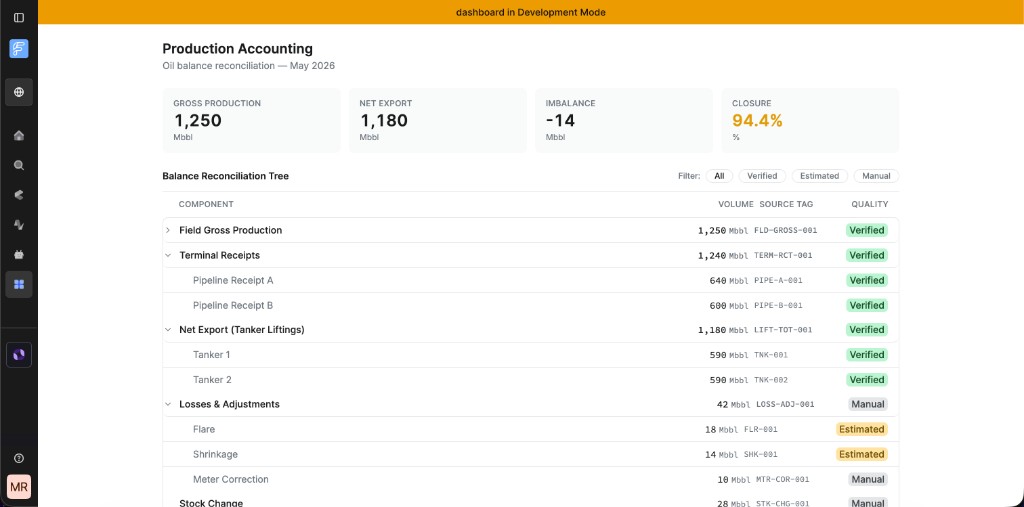
The spec you write in this walkthrough drives toward a finished app like the one below — a KPI bar and a Balance Reconciliation Tree with quality badges, running as a Flows app in development mode:
 ## Prerequisites
You need a **Flows** custom app with spec-kit enabled. If you don't have one yet:
1. Follow [Getting started with Flows custom apps](/cdf/flows/guides/getting-started) to create your app.
2. When prompted **Enable spec-driven development**, choose **Yes**, then choose **Yes** again when prompted to enable spec-kit.
Once your app is open in Cursor or Claude Code, the spec-kit slash commands are available in `.cursor/commands/` and `.claude/commands/`.
## Step 1: Specify your feature
Start with a short description of the app, then let spec-kit expand it into a structured spec.
Give spec-kit a short description of what you want to build. You don't need to fill in every detail — the template will prompt you for the rest:
```text wrap theme={"languages":{"custom":["/_languages/kuiper.json","../_languages/kuiper.json"]}}
/speckit.specify Build an Oil Balance Detail dashboard called 'Production Accounting'. Landing page shows a KPI bar (Gross Production, Net Export, Imbalance, Closure %) and a Balance Reconciliation Tree — hierarchical table of flow components with values, source tags, and quality badges (Verified/Estimated/Manual). Read flow components and KPI inputs from CDF data models. React + Tailwind.
```
The command creates `specs/001-production-accounting/spec.md` pre-populated with the spec-kit template.
Keep the one-liner focused on the surface and the key behavior. You will fill in edge cases and constraints during `/speckit.clarify`.
Open `specs/001-production-accounting/spec.md`. The template has generated User Stories, acceptance scenarios, and placeholder Functional Requirements from your description. An example of the populated output (trimmed):
```markdown wrap theme={"languages":{"custom":["/_languages/kuiper.json","../_languages/kuiper.json"]}}
# Feature Specification: Production Accounting Dashboard
**Feature Branch**: `001-production-accounting`
**Created**: 2026-06-08
**Status**: Draft
**Input**: User description: "Build an Oil Balance Detail dashboard
called 'Production Accounting'..."
## User Scenarios & Testing
### User Story 1 — View at-a-glance production KPIs (Priority: P1)
A production accountant opens the dashboard to get an immediate
snapshot of overall oil balance health. The KPI bar surfaces four
headline metrics — Gross Production, Net Export, Imbalance, and
Closure % — so the accountant can immediately identify if the period
is closing within acceptable tolerance.
**Acceptance Scenarios**:
1. **Given** the dashboard loads, **When** the landing page is
displayed, **Then** four KPI cards appear in a horizontal bar:
Gross Production (Mbbl), Net Export (Mbbl), Imbalance (Mbbl),
and Closure (%).
2. **Given** Imbalance is outside the acceptable threshold, **Then**
the Imbalance card renders in a warning or danger tone.
### User Story 2 — Explore the Balance Reconciliation Tree (Priority: P2)
The accountant needs to trace where production volumes come from and
where they go. The Balance Reconciliation Tree is a hierarchical table
listing all flow components (Wellhead Production → Field Gross →
Terminal Receipts → Pipeline Export → Losses). Each row shows the
component name, a numeric value with unit, a source tag, and a quality
badge (Verified / Estimated / Manual).
## Requirements
### Functional Requirements
- **FR-001**: The dashboard MUST display a KPI bar with four metrics:
Gross Production (Mbbl), Net Export (Mbbl), Imbalance (Mbbl), and
Closure (%). Closure % MUST equal Net Export / Gross Production × 100.
- **FR-004**: The Balance Reconciliation Tree MUST render as a
hierarchical table with collapsible parent rows.
- **FR-006**: Quality badges MUST support exactly three states:
Verified (success tone), Estimated (warning tone), Manual (neutral tone).
- **FR-009**: The dashboard MUST load flow components and balance
periods from the `production_accounting` data model and read the
values behind each source tag from `cdf_cdm.CogniteTimeSeries:v1`.
```
Fill in any sections the template left as placeholders, especially **Data Models & CDF Integration** and **Success Criteria**.
Complete these sections before running `/speckit.plan`. The plan command depends on them to generate an accurate implementation plan.
## Step 2: Clarify ambiguities
Resolve the open questions in the spec before you plan, so the implementation rests on explicit decisions.
```text theme={"languages":{"custom":["/_languages/kuiper.json","../_languages/kuiper.json"]}}
/speckit.clarify
```
The command reads your spec and runs an internal coverage scan across categories: functional scope, data model, integration, and edge cases. It then surfaces up to five questions that would block planning if left unanswered.
For each question, your agent presents a recommendation and an options table. The following example is from the Production Accounting spec:
```text wrap theme={"languages":{"custom":["/_languages/kuiper.json","../_languages/kuiper.json"]}}
**Question 3 of up to 5**
The spec doesn't define how Imbalance is derived. In oil balance
accounting this matters because the value could be computed from the
tree (Gross Production minus Net Export minus Losses) or it could be a
standalone value independent of the tree rows.
**Recommended:** Option B — derived from tree totals. This ensures the
KPI bar and the reconciliation tree are mathematically consistent
(Imbalance = Gross Production − Net Export − Losses), which is the
standard industry definition and keeps the dashboard internally
coherent.
| Option | Description |
|--------|-------------|
| A | Independent value — KPI bar values are all standalone, no formula |
| B | Derived: Imbalance = Gross Production − Net Export − sum of Losses nodes |
| C | Derived from tree totals but formula is an implementation detail |
Reply with the option letter, "yes" to accept the recommendation,
or a short answer (≤5 words).
```
Reply with the option letter or accept the recommendation. Your agent writes the answer directly back into the `spec.md` **Clarifications** section:
```markdown theme={"languages":{"custom":["/_languages/kuiper.json","../_languages/kuiper.json"]}}
## Clarifications
### Session 2026-06-08
- Q: What is the initial expand state of the Balance Reconciliation Tree
on load? → A: Top-level rows expanded, all children collapsed
(progressive disclosure).
- Q: Is the Imbalance warning threshold user-configurable or hardcoded?
→ A: Hardcoded constant (±5 Mbbl), not user-adjustable in v1.
- Q: Is the Imbalance KPI value derived from tree totals or independent
of the tree? → A: Derived — Imbalance = Gross Production − Net Export −
sum of Losses nodes; KPI bar and tree MUST be consistent.
- Q: Is the dashboard a standalone page or embedded in a Cognite Data Fusion
iframe? → A: Embedded in CDF iframe — use `@cognite/app-sdk`
(`connectToHostApp`) for host integration and layout.
- Q: Which UI state should be persisted in the CDF URL? → A: None —
dashboard always opens in its default state on reload.
```
When all questions are resolved, your agent outputs a summary:
```text wrap theme={"languages":{"custom":["/_languages/kuiper.json","../_languages/kuiper.json"]}}
## Clarification complete
5 of 5 questions asked and answered.
Spec: specs/001-production-accounting/spec.md
Sections touched: Functional Requirements (FR-001, FR-002, FR-007,
FR-011, FR-012), Key Entities (Imbalance derivation), Assumptions,
Clarifications.
All categories resolved. Suggested next command: /speckit.plan
```
At this point, `spec.md` is complete and ready for planning. Commit it before moving on so the decisions are in git history.
## Step 3: Generate the implementation plan
Turn the clarified spec into a concrete, reviewable plan your agent can act on.
```text theme={"languages":{"custom":["/_languages/kuiper.json","../_languages/kuiper.json"]}}
/speckit.plan
```
The command reads the clarified spec and generates `specs/001-production-accounting/plan.md`. For the Production Accounting dashboard, the output included the following sections (trimmed):
```markdown wrap theme={"languages":{"custom":["/_languages/kuiper.json","../_languages/kuiper.json"]}}
# Implementation Plan: Production Accounting Dashboard
**Branch**: `001-production-accounting` | **Date**: 2026-06-08
## Summary
Replace the current boilerplate App.tsx with a Production Accounting
dashboard embedded in the Cognite Data Fusion iframe. The dashboard renders
a KPI bar computed from the oil balance dataset, and a hierarchical
Balance Reconciliation Tree with expand/collapse rows, quality badges,
and a quality filter. Data is read from CDF data models through
`connectToHostApp`.
## Technical Context
Language/Version: TypeScript 5.x + React 18.3
Primary Dependencies: @cognite/aura/components, @cognite/app-sdk,
@cognite/sdk, Tailwind CSS 4, Vitest 4
Storage: CDF data models — production_accounting (FlowComponent,
BalancePeriod) and cdf_cdm (CogniteTimeSeries)
Testing: Vitest + @testing-library/react
Target Platform: Cognite Data Fusion iframe (desktop, 1280px+ viewport)
## Project Structure
src/
├── __mocks__/
│ └── balanceData.ts
├── types/
│ └── balance.ts
├── services/
│ ├── BalanceDataService.ts
│ └── CdfBalanceDataService.ts
├── state/
│ └── DashboardStateProvider.tsx
├── hooks/
│ ├── useDashboardStorage.ts
│ └── useProductionAccountingViewModel.ts
├── components/
│ ├── KpiBar/
│ │ ├── KpiBar.tsx
│ │ ├── KpiCard.tsx
│ │ └── KpiBar.test.tsx
│ ├── ReconciliationTree/
│ │ ├── ReconciliationTree.tsx
│ │ ├── TreeRow.tsx
│ │ ├── QualityBadge.tsx
│ │ ├── QualityFilter.tsx
│ │ └── ReconciliationTree.test.tsx
│ └── ProductionAccountingPage.tsx
├── App.tsx
└── App.test.tsx
```
The plan also includes a **Constitution Check** — a table verifying that the proposed implementation satisfies each rule in `AGENTS.md`, such as using `@cognite/aura/components` before raw HTML, following the ViewModel pattern, and writing tests for every hook and component that contains logic.
Review `plan.md` with your team before starting implementation. If anything looks off, update `spec.md` and re-run `/speckit.plan`. Commit both files together.
You don't have to use `/speckit.plan` to generate this file. You can write `plan.md` yourself or produce it through your agent's in-session plan mode — as long as the steps are numbered and ordered clearly enough for `/speckit.tasks` to split into a task list.
## Troubleshooting
The slash commands ship only when you enable spec-kit during `apps create`. Confirm that `.cursor/commands/` and `.claude/commands/` contain `speckit.*` files. If they're missing, you created the app without spec-kit — there is no retrofit command, so re-scaffold the app and choose **Yes** at the spec-kit prompt, or manually copy the spec-kit files into your app. See [Spec-driven development](/cdf/flows/concepts/spec-driven-development#spec-kit).
The command asks only about ambiguities it finds, up to five. If your `spec.md` is already specific, it may ask fewer questions or none. Review the coverage report it prints. If a category you care about is marked resolved but you disagree, add detail to `spec.md` and run `/speckit.clarify` again.
The plan is only as good as the clarified spec. Update `spec.md` — especially the Functional Requirements and the Data Models & CDF Integration section — then re-run `/speckit.plan`. Running the command again regenerates the plan from the current spec.
## What's next
You've run specify, clarify, and plan on a real feature and committed a `spec.md` and `plan.md` to your repository. Your agent now has the context it needs to implement the Production Accounting dashboard.
The next two spec-kit commands decompose the plan into executable tasks and run them in order:
* `/speckit.tasks` — writes an ordered `tasks.md` where each task maps back to a functional requirement.
* `/speckit.implement` — runs the tasks in sequence, stopping at each one to confirm before continuing.
See [Spec-driven development](/cdf/flows/concepts/spec-driven-development) for how these commands work and how they fit into the full flow.
## Prerequisites
You need a **Flows** custom app with spec-kit enabled. If you don't have one yet:
1. Follow [Getting started with Flows custom apps](/cdf/flows/guides/getting-started) to create your app.
2. When prompted **Enable spec-driven development**, choose **Yes**, then choose **Yes** again when prompted to enable spec-kit.
Once your app is open in Cursor or Claude Code, the spec-kit slash commands are available in `.cursor/commands/` and `.claude/commands/`.
## Step 1: Specify your feature
Start with a short description of the app, then let spec-kit expand it into a structured spec.
Give spec-kit a short description of what you want to build. You don't need to fill in every detail — the template will prompt you for the rest:
```text wrap theme={"languages":{"custom":["/_languages/kuiper.json","../_languages/kuiper.json"]}}
/speckit.specify Build an Oil Balance Detail dashboard called 'Production Accounting'. Landing page shows a KPI bar (Gross Production, Net Export, Imbalance, Closure %) and a Balance Reconciliation Tree — hierarchical table of flow components with values, source tags, and quality badges (Verified/Estimated/Manual). Read flow components and KPI inputs from CDF data models. React + Tailwind.
```
The command creates `specs/001-production-accounting/spec.md` pre-populated with the spec-kit template.
Keep the one-liner focused on the surface and the key behavior. You will fill in edge cases and constraints during `/speckit.clarify`.
Open `specs/001-production-accounting/spec.md`. The template has generated User Stories, acceptance scenarios, and placeholder Functional Requirements from your description. An example of the populated output (trimmed):
```markdown wrap theme={"languages":{"custom":["/_languages/kuiper.json","../_languages/kuiper.json"]}}
# Feature Specification: Production Accounting Dashboard
**Feature Branch**: `001-production-accounting`
**Created**: 2026-06-08
**Status**: Draft
**Input**: User description: "Build an Oil Balance Detail dashboard
called 'Production Accounting'..."
## User Scenarios & Testing
### User Story 1 — View at-a-glance production KPIs (Priority: P1)
A production accountant opens the dashboard to get an immediate
snapshot of overall oil balance health. The KPI bar surfaces four
headline metrics — Gross Production, Net Export, Imbalance, and
Closure % — so the accountant can immediately identify if the period
is closing within acceptable tolerance.
**Acceptance Scenarios**:
1. **Given** the dashboard loads, **When** the landing page is
displayed, **Then** four KPI cards appear in a horizontal bar:
Gross Production (Mbbl), Net Export (Mbbl), Imbalance (Mbbl),
and Closure (%).
2. **Given** Imbalance is outside the acceptable threshold, **Then**
the Imbalance card renders in a warning or danger tone.
### User Story 2 — Explore the Balance Reconciliation Tree (Priority: P2)
The accountant needs to trace where production volumes come from and
where they go. The Balance Reconciliation Tree is a hierarchical table
listing all flow components (Wellhead Production → Field Gross →
Terminal Receipts → Pipeline Export → Losses). Each row shows the
component name, a numeric value with unit, a source tag, and a quality
badge (Verified / Estimated / Manual).
## Requirements
### Functional Requirements
- **FR-001**: The dashboard MUST display a KPI bar with four metrics:
Gross Production (Mbbl), Net Export (Mbbl), Imbalance (Mbbl), and
Closure (%). Closure % MUST equal Net Export / Gross Production × 100.
- **FR-004**: The Balance Reconciliation Tree MUST render as a
hierarchical table with collapsible parent rows.
- **FR-006**: Quality badges MUST support exactly three states:
Verified (success tone), Estimated (warning tone), Manual (neutral tone).
- **FR-009**: The dashboard MUST load flow components and balance
periods from the `production_accounting` data model and read the
values behind each source tag from `cdf_cdm.CogniteTimeSeries:v1`.
```
Fill in any sections the template left as placeholders, especially **Data Models & CDF Integration** and **Success Criteria**.
Complete these sections before running `/speckit.plan`. The plan command depends on them to generate an accurate implementation plan.
## Step 2: Clarify ambiguities
Resolve the open questions in the spec before you plan, so the implementation rests on explicit decisions.
```text theme={"languages":{"custom":["/_languages/kuiper.json","../_languages/kuiper.json"]}}
/speckit.clarify
```
The command reads your spec and runs an internal coverage scan across categories: functional scope, data model, integration, and edge cases. It then surfaces up to five questions that would block planning if left unanswered.
For each question, your agent presents a recommendation and an options table. The following example is from the Production Accounting spec:
```text wrap theme={"languages":{"custom":["/_languages/kuiper.json","../_languages/kuiper.json"]}}
**Question 3 of up to 5**
The spec doesn't define how Imbalance is derived. In oil balance
accounting this matters because the value could be computed from the
tree (Gross Production minus Net Export minus Losses) or it could be a
standalone value independent of the tree rows.
**Recommended:** Option B — derived from tree totals. This ensures the
KPI bar and the reconciliation tree are mathematically consistent
(Imbalance = Gross Production − Net Export − Losses), which is the
standard industry definition and keeps the dashboard internally
coherent.
| Option | Description |
|--------|-------------|
| A | Independent value — KPI bar values are all standalone, no formula |
| B | Derived: Imbalance = Gross Production − Net Export − sum of Losses nodes |
| C | Derived from tree totals but formula is an implementation detail |
Reply with the option letter, "yes" to accept the recommendation,
or a short answer (≤5 words).
```
Reply with the option letter or accept the recommendation. Your agent writes the answer directly back into the `spec.md` **Clarifications** section:
```markdown theme={"languages":{"custom":["/_languages/kuiper.json","../_languages/kuiper.json"]}}
## Clarifications
### Session 2026-06-08
- Q: What is the initial expand state of the Balance Reconciliation Tree
on load? → A: Top-level rows expanded, all children collapsed
(progressive disclosure).
- Q: Is the Imbalance warning threshold user-configurable or hardcoded?
→ A: Hardcoded constant (±5 Mbbl), not user-adjustable in v1.
- Q: Is the Imbalance KPI value derived from tree totals or independent
of the tree? → A: Derived — Imbalance = Gross Production − Net Export −
sum of Losses nodes; KPI bar and tree MUST be consistent.
- Q: Is the dashboard a standalone page or embedded in a Cognite Data Fusion
iframe? → A: Embedded in CDF iframe — use `@cognite/app-sdk`
(`connectToHostApp`) for host integration and layout.
- Q: Which UI state should be persisted in the CDF URL? → A: None —
dashboard always opens in its default state on reload.
```
When all questions are resolved, your agent outputs a summary:
```text wrap theme={"languages":{"custom":["/_languages/kuiper.json","../_languages/kuiper.json"]}}
## Clarification complete
5 of 5 questions asked and answered.
Spec: specs/001-production-accounting/spec.md
Sections touched: Functional Requirements (FR-001, FR-002, FR-007,
FR-011, FR-012), Key Entities (Imbalance derivation), Assumptions,
Clarifications.
All categories resolved. Suggested next command: /speckit.plan
```
At this point, `spec.md` is complete and ready for planning. Commit it before moving on so the decisions are in git history.
## Step 3: Generate the implementation plan
Turn the clarified spec into a concrete, reviewable plan your agent can act on.
```text theme={"languages":{"custom":["/_languages/kuiper.json","../_languages/kuiper.json"]}}
/speckit.plan
```
The command reads the clarified spec and generates `specs/001-production-accounting/plan.md`. For the Production Accounting dashboard, the output included the following sections (trimmed):
```markdown wrap theme={"languages":{"custom":["/_languages/kuiper.json","../_languages/kuiper.json"]}}
# Implementation Plan: Production Accounting Dashboard
**Branch**: `001-production-accounting` | **Date**: 2026-06-08
## Summary
Replace the current boilerplate App.tsx with a Production Accounting
dashboard embedded in the Cognite Data Fusion iframe. The dashboard renders
a KPI bar computed from the oil balance dataset, and a hierarchical
Balance Reconciliation Tree with expand/collapse rows, quality badges,
and a quality filter. Data is read from CDF data models through
`connectToHostApp`.
## Technical Context
Language/Version: TypeScript 5.x + React 18.3
Primary Dependencies: @cognite/aura/components, @cognite/app-sdk,
@cognite/sdk, Tailwind CSS 4, Vitest 4
Storage: CDF data models — production_accounting (FlowComponent,
BalancePeriod) and cdf_cdm (CogniteTimeSeries)
Testing: Vitest + @testing-library/react
Target Platform: Cognite Data Fusion iframe (desktop, 1280px+ viewport)
## Project Structure
src/
├── __mocks__/
│ └── balanceData.ts
├── types/
│ └── balance.ts
├── services/
│ ├── BalanceDataService.ts
│ └── CdfBalanceDataService.ts
├── state/
│ └── DashboardStateProvider.tsx
├── hooks/
│ ├── useDashboardStorage.ts
│ └── useProductionAccountingViewModel.ts
├── components/
│ ├── KpiBar/
│ │ ├── KpiBar.tsx
│ │ ├── KpiCard.tsx
│ │ └── KpiBar.test.tsx
│ ├── ReconciliationTree/
│ │ ├── ReconciliationTree.tsx
│ │ ├── TreeRow.tsx
│ │ ├── QualityBadge.tsx
│ │ ├── QualityFilter.tsx
│ │ └── ReconciliationTree.test.tsx
│ └── ProductionAccountingPage.tsx
├── App.tsx
└── App.test.tsx
```
The plan also includes a **Constitution Check** — a table verifying that the proposed implementation satisfies each rule in `AGENTS.md`, such as using `@cognite/aura/components` before raw HTML, following the ViewModel pattern, and writing tests for every hook and component that contains logic.
Review `plan.md` with your team before starting implementation. If anything looks off, update `spec.md` and re-run `/speckit.plan`. Commit both files together.
You don't have to use `/speckit.plan` to generate this file. You can write `plan.md` yourself or produce it through your agent's in-session plan mode — as long as the steps are numbered and ordered clearly enough for `/speckit.tasks` to split into a task list.
## Troubleshooting
The slash commands ship only when you enable spec-kit during `apps create`. Confirm that `.cursor/commands/` and `.claude/commands/` contain `speckit.*` files. If they're missing, you created the app without spec-kit — there is no retrofit command, so re-scaffold the app and choose **Yes** at the spec-kit prompt, or manually copy the spec-kit files into your app. See [Spec-driven development](/cdf/flows/concepts/spec-driven-development#spec-kit).
The command asks only about ambiguities it finds, up to five. If your `spec.md` is already specific, it may ask fewer questions or none. Review the coverage report it prints. If a category you care about is marked resolved but you disagree, add detail to `spec.md` and run `/speckit.clarify` again.
The plan is only as good as the clarified spec. Update `spec.md` — especially the Functional Requirements and the Data Models & CDF Integration section — then re-run `/speckit.plan`. Running the command again regenerates the plan from the current spec.
## What's next
You've run specify, clarify, and plan on a real feature and committed a `spec.md` and `plan.md` to your repository. Your agent now has the context it needs to implement the Production Accounting dashboard.
The next two spec-kit commands decompose the plan into executable tasks and run them in order:
* `/speckit.tasks` — writes an ordered `tasks.md` where each task maps back to a functional requirement.
* `/speckit.implement` — runs the tasks in sequence, stopping at each one to confirm before continuing.
See [Spec-driven development](/cdf/flows/concepts/spec-driven-development) for how these commands work and how they fit into the full flow.