> ## Documentation Index
> Fetch the complete documentation index at: https://docs.cognite.com/llms.txt
> Use this file to discover all available pages before exploring further.
# Search
> Search and discover industrial data, assets, and engineering diagrams across your organization.
## Start a search
In the Flows workspace, navigate to the Home page or the Search tool:
Click the Search field, type what you're looking for, and press Enter.
Search returns data that matches your query precisely. For example, searching for `21-PT-10-19` returns results that contain all four parts (`21`, `PT`, `10`, `19`). If you find a pump, you'll also find associated assets, documents, sensor data, and engineering diagrams.
Use [filters](#filter-and-sort-your-search-results) to refine your search results further.
Select a result to [preview](#preview-your-search-results) more details and open in Charts or Canvas for further analysis.
## Filter and sort your search results
To help you find exactly what you need, you can filter and sort your search results.
 ➀ **Categories** — filter the results by data **categories**, for example, to see only matching time series.
➁ **Location** — select the **locations** you want to see results from.
➂ **Filters** — select one or more Filters to further refine the results for a category.
➃ **Sort** — click any of the **column headings** to sort the results.
➄ **3D** — open a 3D model to explore physical assets, such as rigs or locations. Refer to [Browse 3D](/cdf/explore/navigate_3d) for more information.
## Preview your search results
Select a result to preview the details in the right-hand sidebar, and open the item in Charts or Canvas for further analysis.
➀ **Categories** — filter the results by data **categories**, for example, to see only matching time series.
➁ **Location** — select the **locations** you want to see results from.
➂ **Filters** — select one or more Filters to further refine the results for a category.
➃ **Sort** — click any of the **column headings** to sort the results.
➄ **3D** — open a 3D model to explore physical assets, such as rigs or locations. Refer to [Browse 3D](/cdf/explore/navigate_3d) for more information.
## Preview your search results
Select a result to preview the details in the right-hand sidebar, and open the item in Charts or Canvas for further analysis.
 ➀ **Overview** — see an **overview of the information** about a search result.
➁ **Details tabs** — view **detailed information** about the search result. The tabs vary by category. For example, Tree view is only available for hierarchical data like *assets*.
➂ **Open** — view the item in full screen and close the sidebar.
➃ **Open in Charts/Canvas** — open the item in Charts or Canvas for further analysis, or **download** a file.
## Download instances and relationship lists
You can download lists of data instances from search results and instance page widgets as a CSV file.
All CSV files include audit information: who downloaded, when, and a source URL that links back to the search page in CDF. Anyone with permission to view those search results can follow the link.
Downloads from instance page widgets also include the properties (metadata) of the instance that owns the relationship.
* **Files**: Only file metadata is exported, not the file itself.
* **Time series**: Data points are not exported.
Both search results and downloads are limited to 1,000 instances due to an API limit, even if the total number of matches exceeds that.
### Download instances
Enter your search term in the Search field and press Enter. Then use [filters](#filter-and-sort-your-search-results), sorting, and column selection to refine your results.
Click the download button to download the search results as a CSV file.
### Download relationship lists
Select a relationship widget from the instance page, for example, **Assets** > **Path**.
Click the download button to download the relationship list as a CSV file.
## Upload files
To upload files directly in Search, an admin must configure the space for file uploads.
Go to **Admin** > **Project settings** > **Locations** > **Configure** > **Space for file upload**, set the space for file uploads. Only one space can be set per location.
Upload is only available for data model views.
Once the space is configured, you can upload files directly in Search. Files may take a moment to appear after uploading.
## Work with PDF files
You can find information in PDF files using AI document analysis and text search.
➀ **Overview** — see an **overview of the information** about a search result.
➁ **Details tabs** — view **detailed information** about the search result. The tabs vary by category. For example, Tree view is only available for hierarchical data like *assets*.
➂ **Open** — view the item in full screen and close the sidebar.
➃ **Open in Charts/Canvas** — open the item in Charts or Canvas for further analysis, or **download** a file.
## Download instances and relationship lists
You can download lists of data instances from search results and instance page widgets as a CSV file.
All CSV files include audit information: who downloaded, when, and a source URL that links back to the search page in CDF. Anyone with permission to view those search results can follow the link.
Downloads from instance page widgets also include the properties (metadata) of the instance that owns the relationship.
* **Files**: Only file metadata is exported, not the file itself.
* **Time series**: Data points are not exported.
Both search results and downloads are limited to 1,000 instances due to an API limit, even if the total number of matches exceeds that.
### Download instances
Enter your search term in the Search field and press Enter. Then use [filters](#filter-and-sort-your-search-results), sorting, and column selection to refine your results.
Click the download button to download the search results as a CSV file.
### Download relationship lists
Select a relationship widget from the instance page, for example, **Assets** > **Path**.
Click the download button to download the relationship list as a CSV file.
## Upload files
To upload files directly in Search, an admin must configure the space for file uploads.
Go to **Admin** > **Project settings** > **Locations** > **Configure** > **Space for file upload**, set the space for file uploads. Only one space can be set per location.
Upload is only available for data model views.
Once the space is configured, you can upload files directly in Search. Files may take a moment to appear after uploading.
## Work with PDF files
You can find information in PDF files using AI document analysis and text search.
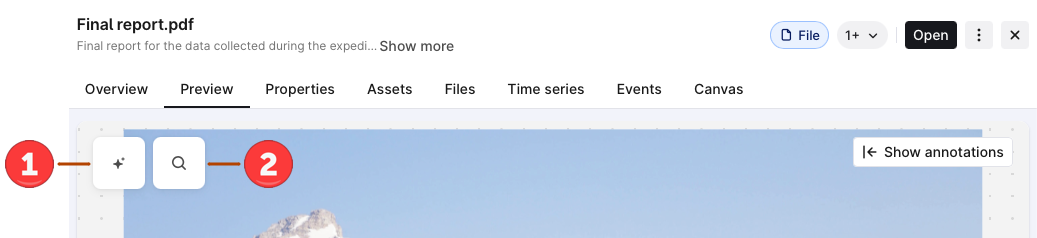 On the Preview tab, you can:
➀ **[Explore with AI](/cdf/flows_workspace/flows_workspace#ai-document-analysis)** — use AI to summarize and ask questions about the PDF file.
➁ **Find text** — search for a specific word within the PDF file. Matches are highlighted, and you can browse through the results.
## Not finding what you're looking for?
Check your spelling and make sure you've selected the correct [location](#filter-and-sort-your-search-results).
You'll only see items that you have access to. Verify with your internal help desk or the CDF admin that you have access to the data you're looking for.
## Supported file formats
Documents **Preview** supports the following file formats:
| MIME type | Extensions | Name |
| :-------------------------------------------------------------------------- | :--------------------- | :-------------------------------------------------- |
| `application/cdf` | `.cdr` | CorelDRAW Image |
| `application/dicom` | `.dicom` | Digital Imaging and Communications in Medicine |
| `application/epub+zip` | `.epub` | Electronic Publication |
| `application/json` | `.json` | JavaScript Object Notation |
| `application/msword` | `.doc`, `.dot` | Microsoft Word document (older format) |
| `application/pdf` | `.pdf` | Portable Document Format |
| `application/postscript` | `.eps`, `.ps` | PostScript |
| `application/rtf` | `.rtf` | Rich Text Format |
| `application/vnd.apple.numbers` | `.numbers` | Apple Numbers spreadsheet |
| `application/vnd.hp-pcl` | `.pcl` | Printer Command Language |
| `application/vnd.ms-excel` | `.xls`, `.xlt` | Microsoft Excel spreadsheet (older format) |
| `application/vnd.ms-excel.sheet.binary.macroEnabled.12` | `.xlsb` | Microsoft Excel Binary Workbook |
| `application/vnd.ms-excel.sheet.macroEnabled.12` | `.xlsm` | Microsoft Excel Macro-Enabled Workbook |
| `application/vnd.ms-excel.template.macroEnabled.12` | `.xltm` | Microsoft Excel Macro-Enabled Template |
| `application/vnd.ms-htmlhelp` | `.chm` | Microsoft Compiled HTML Help |
| `application/vnd.ms-powerpoint` | `.pot`, `.pps`, `.ppt` | Microsoft PowerPoint presentation (older format) |
| `application/vnd.ms-powerpoint.presentation.macroEnabled.12` | `.pptm` | Microsoft PowerPoint Macro-Enabled Presentation |
| `application/vnd.ms-powerpoint.slideshow.macroEnabled.12` | `.ppsm` | Microsoft PowerPoint Macro-Enabled Slide Show |
| `application/vnd.ms-powerpoint.template.macroEnabled.12` | `.potm` | Microsoft PowerPoint Macro-Enabled Template |
| `application/vnd.ms-word.document.macroEnabled.12` | `.docm` | Microsoft Word Macro-Enabled Document |
| `application/vnd.ms-word.template.macroEnabled.12` | `.dotm` | Microsoft Word Macro-Enabled Template |
| `application/vnd.ms-xpsdocument` | `.xps` | XML Paper Specification |
| `application/vnd.oasis.opendocument.graphics` | `.odg` | OpenDocument Graphics |
| `application/vnd.oasis.opendocument.graphics-template` | `.otg` | OpenDocument Graphics Template |
| `application/vnd.oasis.opendocument.presentation` | `.odp` | OpenDocument Presentation |
| `application/vnd.oasis.opendocument.presentation-template` | `.otp` | OpenDocument Presentation template |
| `application/vnd.oasis.opendocument.spreadsheet` | `.ods` | OpenDocument Spreadsheet |
| `application/vnd.oasis.opendocument.text` | `.odt` | OpenDocument Text document |
| `application/vnd.oasis.opendocument.text-template` | `.ott` | OpenDocument Text document template |
| `application/vnd.openxmlformats-officedocument.presentationml.presentation` | `.pptx` | Microsoft PowerPoint Open XML presentation |
| `application/vnd.openxmlformats-officedocument.presentationml.slideshow` | `.ppsx` | Microsoft PowerPoint Open XML slideshow |
| `application/vnd.openxmlformats-officedocument.presentationml.template` | `.potx` | Microsoft PowerPoint Open XML presentation template |
| `application/vnd.openxmlformats-officedocument.spreadsheetml.sheet` | `.xlsx` | Microsoft Excel Open XML spreadsheet |
| `application/vnd.openxmlformats-officedocument.spreadsheetml.template` | `.xltx` | Microsoft Excel Open XML spreadsheet template |
| `application/vnd.openxmlformats-officedocument.wordprocessingml.document` | `.docx` | Microsoft Word Open XML document |
| `application/vnd.openxmlformats-officedocument.wordprocessingml.template` | `.dotx` | Microsoft Word Open XML document template |
| `application/vnd.sun.xml.calc` | `.sxc` | StarOffice Calc Spreadsheet |
| `application/x-mobipocket-ebook` | `.mobi` | Mobipocket eBook |
| `application/x-ms-wmz` | `.wmz` | Windows Media Player Skin |
| `application/x-tex` | `.tex` | TeX Source |
| `application/xml` | `.xml` | XML Document |
| `image/bmp` | `.bmp` | Bitmap Image |
| `image/dib` | `.dib` | Device Independent Bitmap |
| `image/dng` | `.dng` | Digital Negative |
| `image/jpeg` | `.jpg`, `.jpeg` | Joint Photographic Experts Group image |
| `image/png` | `.png` | Portable Network Graphics image |
| `image/svg+xml` | `.svg`, `.svgz` | Scalable Vector Graphics image |
| `image/tga` | `.tga` | Truevision TGA |
| `image/tiff` | `.tif`, `.tiff` | Tagged Image File Format |
| `image/vnd.djvu` | `.djvu` | DjVu Image |
| `image/vnd.mozilla.apng` | `.apng` | Animated Portable Network Graphics |
| `image/webp` | `.webp` | Web Picture format |
| `message/rfc822` | `.mht`, `.mhtml` | MHTML Web Archive |
| `text/csv` | `.csv` | Comma-Separated Values |
| `text/html` | `.html` | HTML Document |
| `text/markdown` | `.md` | Markdown Document |
| `text/plain` | `.txt` | Plain text document |
| `text/tab-separated-values` | `.tsv` | Tab-Separated Values |
On the Preview tab, you can:
➀ **[Explore with AI](/cdf/flows_workspace/flows_workspace#ai-document-analysis)** — use AI to summarize and ask questions about the PDF file.
➁ **Find text** — search for a specific word within the PDF file. Matches are highlighted, and you can browse through the results.
## Not finding what you're looking for?
Check your spelling and make sure you've selected the correct [location](#filter-and-sort-your-search-results).
You'll only see items that you have access to. Verify with your internal help desk or the CDF admin that you have access to the data you're looking for.
## Supported file formats
Documents **Preview** supports the following file formats:
| MIME type | Extensions | Name |
| :-------------------------------------------------------------------------- | :--------------------- | :-------------------------------------------------- |
| `application/cdf` | `.cdr` | CorelDRAW Image |
| `application/dicom` | `.dicom` | Digital Imaging and Communications in Medicine |
| `application/epub+zip` | `.epub` | Electronic Publication |
| `application/json` | `.json` | JavaScript Object Notation |
| `application/msword` | `.doc`, `.dot` | Microsoft Word document (older format) |
| `application/pdf` | `.pdf` | Portable Document Format |
| `application/postscript` | `.eps`, `.ps` | PostScript |
| `application/rtf` | `.rtf` | Rich Text Format |
| `application/vnd.apple.numbers` | `.numbers` | Apple Numbers spreadsheet |
| `application/vnd.hp-pcl` | `.pcl` | Printer Command Language |
| `application/vnd.ms-excel` | `.xls`, `.xlt` | Microsoft Excel spreadsheet (older format) |
| `application/vnd.ms-excel.sheet.binary.macroEnabled.12` | `.xlsb` | Microsoft Excel Binary Workbook |
| `application/vnd.ms-excel.sheet.macroEnabled.12` | `.xlsm` | Microsoft Excel Macro-Enabled Workbook |
| `application/vnd.ms-excel.template.macroEnabled.12` | `.xltm` | Microsoft Excel Macro-Enabled Template |
| `application/vnd.ms-htmlhelp` | `.chm` | Microsoft Compiled HTML Help |
| `application/vnd.ms-powerpoint` | `.pot`, `.pps`, `.ppt` | Microsoft PowerPoint presentation (older format) |
| `application/vnd.ms-powerpoint.presentation.macroEnabled.12` | `.pptm` | Microsoft PowerPoint Macro-Enabled Presentation |
| `application/vnd.ms-powerpoint.slideshow.macroEnabled.12` | `.ppsm` | Microsoft PowerPoint Macro-Enabled Slide Show |
| `application/vnd.ms-powerpoint.template.macroEnabled.12` | `.potm` | Microsoft PowerPoint Macro-Enabled Template |
| `application/vnd.ms-word.document.macroEnabled.12` | `.docm` | Microsoft Word Macro-Enabled Document |
| `application/vnd.ms-word.template.macroEnabled.12` | `.dotm` | Microsoft Word Macro-Enabled Template |
| `application/vnd.ms-xpsdocument` | `.xps` | XML Paper Specification |
| `application/vnd.oasis.opendocument.graphics` | `.odg` | OpenDocument Graphics |
| `application/vnd.oasis.opendocument.graphics-template` | `.otg` | OpenDocument Graphics Template |
| `application/vnd.oasis.opendocument.presentation` | `.odp` | OpenDocument Presentation |
| `application/vnd.oasis.opendocument.presentation-template` | `.otp` | OpenDocument Presentation template |
| `application/vnd.oasis.opendocument.spreadsheet` | `.ods` | OpenDocument Spreadsheet |
| `application/vnd.oasis.opendocument.text` | `.odt` | OpenDocument Text document |
| `application/vnd.oasis.opendocument.text-template` | `.ott` | OpenDocument Text document template |
| `application/vnd.openxmlformats-officedocument.presentationml.presentation` | `.pptx` | Microsoft PowerPoint Open XML presentation |
| `application/vnd.openxmlformats-officedocument.presentationml.slideshow` | `.ppsx` | Microsoft PowerPoint Open XML slideshow |
| `application/vnd.openxmlformats-officedocument.presentationml.template` | `.potx` | Microsoft PowerPoint Open XML presentation template |
| `application/vnd.openxmlformats-officedocument.spreadsheetml.sheet` | `.xlsx` | Microsoft Excel Open XML spreadsheet |
| `application/vnd.openxmlformats-officedocument.spreadsheetml.template` | `.xltx` | Microsoft Excel Open XML spreadsheet template |
| `application/vnd.openxmlformats-officedocument.wordprocessingml.document` | `.docx` | Microsoft Word Open XML document |
| `application/vnd.openxmlformats-officedocument.wordprocessingml.template` | `.dotx` | Microsoft Word Open XML document template |
| `application/vnd.sun.xml.calc` | `.sxc` | StarOffice Calc Spreadsheet |
| `application/x-mobipocket-ebook` | `.mobi` | Mobipocket eBook |
| `application/x-ms-wmz` | `.wmz` | Windows Media Player Skin |
| `application/x-tex` | `.tex` | TeX Source |
| `application/xml` | `.xml` | XML Document |
| `image/bmp` | `.bmp` | Bitmap Image |
| `image/dib` | `.dib` | Device Independent Bitmap |
| `image/dng` | `.dng` | Digital Negative |
| `image/jpeg` | `.jpg`, `.jpeg` | Joint Photographic Experts Group image |
| `image/png` | `.png` | Portable Network Graphics image |
| `image/svg+xml` | `.svg`, `.svgz` | Scalable Vector Graphics image |
| `image/tga` | `.tga` | Truevision TGA |
| `image/tiff` | `.tif`, `.tiff` | Tagged Image File Format |
| `image/vnd.djvu` | `.djvu` | DjVu Image |
| `image/vnd.mozilla.apng` | `.apng` | Animated Portable Network Graphics |
| `image/webp` | `.webp` | Web Picture format |
| `message/rfc822` | `.mht`, `.mhtml` | MHTML Web Archive |
| `text/csv` | `.csv` | Comma-Separated Values |
| `text/html` | `.html` | HTML Document |
| `text/markdown` | `.md` | Markdown Document |
| `text/plain` | `.txt` | Plain text document |
| `text/tab-separated-values` | `.tsv` | Tab-Separated Values |