> ## Documentation Index
> Fetch the complete documentation index at: https://docs.cognite.com/llms.txt
> Use this file to discover all available pages before exploring further.
# Query features
> Learn how to query your industrial knowledge graph using filters, parameters, recursive edge traversal, and subscriptions to changes.
> For the complete Cognite documentation index, see [/llms.txt](/llms.txt). For full page content, see [/llms-full.txt](/llms-full.txt).
The query interface has these endpoints:
* `/query` - graph query to retrieve instances matching a query.
* `/sync` - graph query to retrieve instances matching a query that have changed since the
previously issued cursor.
* `/search` - retrieve instances matching full-text search queries.
* `/aggregate` - aggregate instance data.
A few higher level query endpoints, like `/byids` and `/list`, provide simpler
interfaces building on the `/query` endpoint.
The query interface supports a wide array of features.
* [Advanced filters](#compound-filters)
* [Parameterization](#parameters)
* [Recursive edge traversal](#graph-traversal)
* [Chaining of result sets](#node-result-set-expressions)
* [Granular property selection](#selects)
* [Subscribing to changes](#syncing---subscribing-to-changes)
## How to define a graph query
You can use a query in both the `/query` and the `/sync` endpoints.
Queries are composed of:
* A `with` section defining result expressions that describe which instances to retrieve.
* A `parameters` section with optional parameter substitutions if the query is parameterized.
* A `select` section that defines which properties to return as part of the result.
The below examples use a pump and valve example, represented as two sets of nodes with edges between them indicating which pumps flow to which valves.
```mermaid theme={"languages":{"custom":["/_languages/kuiper.json","../_languages/kuiper.json"]}}
%%{init: {'theme':'base', 'themeVariables': { 'lineColor':'#8b949e'}}}%%
graph LR
Pump(("Pump
externalId: pump42"))
Valve1(("Valve
externalId: valve1"))
Valve2(("Valve
externalId: valve2"))
PumpValve1Edge("FlowsTo
externalId: 42To1")
PumpValve2Edge("FlowsTo
externalId: 42To2")
Pump---PumpValve1Edge
Pump---PumpValve2Edge
PumpValve1Edge-->Valve1
PumpValve2Edge-->Valve2
```
This query fetches a specific pump as well as the valves it flows to:
```yaml wrap theme={"languages":{"custom":["/_languages/kuiper.json","../_languages/kuiper.json"]}}
with: # Define the result expressions
pumps:
nodes:
filter:
equals:
property: ['node', 'externalId']
value: { 'parameter': 'pumpExternalId' }
limit: 1
pump_flows_to_valves:
edges:
from: pumps
maxDistance: 1
direction: outwards
filter:
equals:
property: ['edge', 'type']
value: { 'space': 'types', 'externalId': 'flows-to' }
valves:
nodes:
from: pump_flows_to_valves
parameters: # Provide parameter values
pumpExternalId: pump42
select: # Define the result sets to return
pumps: {}
valves: {}
```
The query returns a result similar to this:
```yaml theme={"languages":{"custom":["/_languages/kuiper.json","../_languages/kuiper.json"]}}
items:
pumps:
- instanceType: node
version: 1
space: equipment
externalId: pump42
createdTime: 123
lastUpdatedTime: 456
valves:
- instanceType: node
version: 2
space: equipment
externalId: valve1
createdTime: 321
lastUpdatedTime: 654
- instanceType: node
version: 3
space: equipment
externalId: valve2
createdTime: 213
lastUpdatedTime: 546
nextCursor:
pumps: cursorForPumps
valves: cursorForValves
```
## Result expressions
Result expressions appear directly below `with` in a query, and define a set of either nodes or
edges. You can use the set to return results, as stepping stones to derive other sets from, or both.
Result expressions are named and can be chained.
A result expression can also define `sort` order and a `limit`. See [sorting](#sorting-and-limiting) for more details.
Result expressions can relate to each other via chaining, but they don't have to. You can query for unrelated items in the same query, but you'll generally use different sets to power graph traversals.
A set either queries nodes **or** edges, possibly recursively.
All fields:
* `nodes`: An object to specify a result set of matching nodes.
* `edges`: An object to specify a result set of matching edges.
* `sort`: A list of sort configurations.
* `limit`: How many nodes or edges to return in the result. Default: 100.
### Pagination
The max limit you can set for any result expression is 10,000. To retrieve the entire result set, queries accept a `cursor` object mapping result sets to cursors. Pagination cursors in the `nextCursor` object are emitted for each result set, allowing you to page through everything.
You can't combine pagination cursors with custom sorts, unless they are backed by a cursorable index. If no pagination cursor is present for a given result expression in the response, there is no more matching data.
We do **not** recommend paging through result sets repeatedly using the `/query` endpoint. Instead, use [sync](#syncing---subscribing-to-changes), which is designed to keep clients up to date with changes.
### Node result expressions
A `nodes` statement in your result expression makes the set contain nodes.
A node result expression can be chained off an optional node or edge result expression.
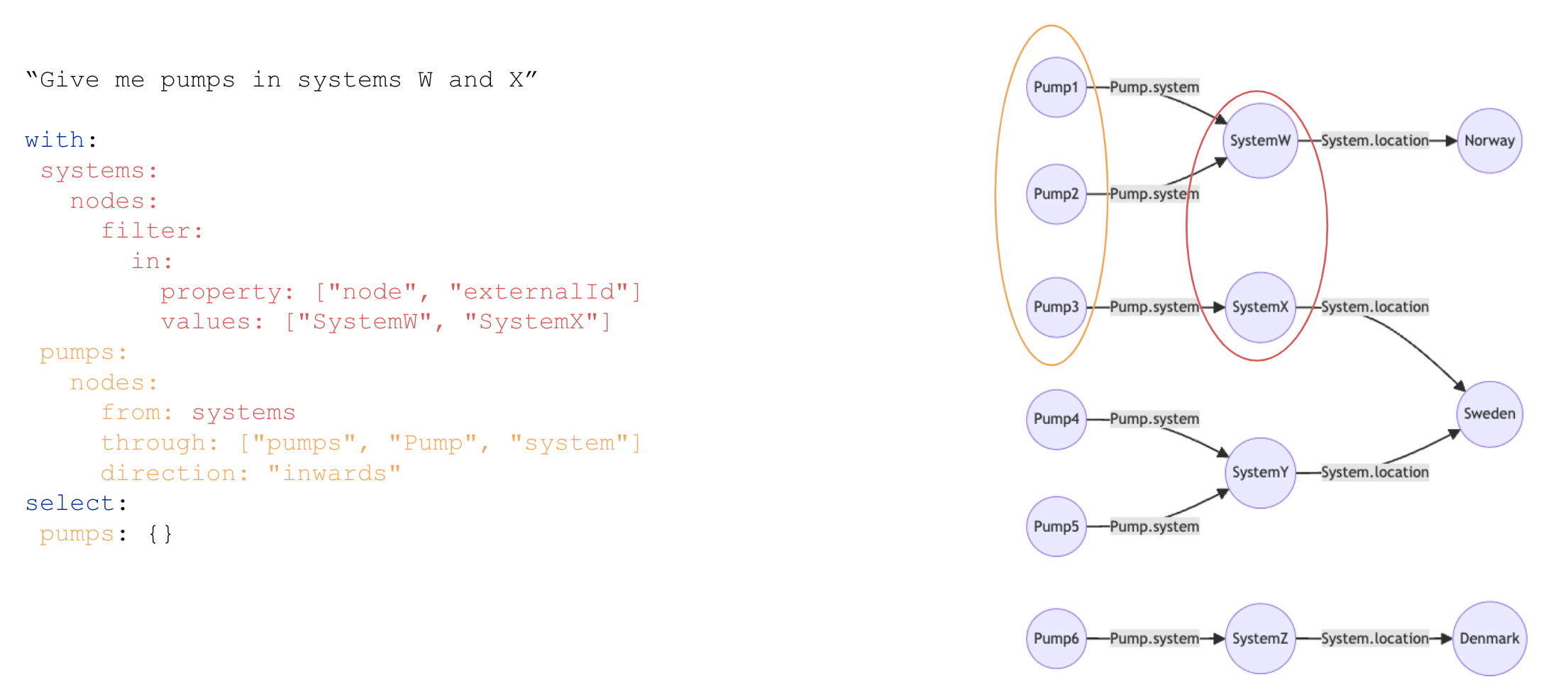
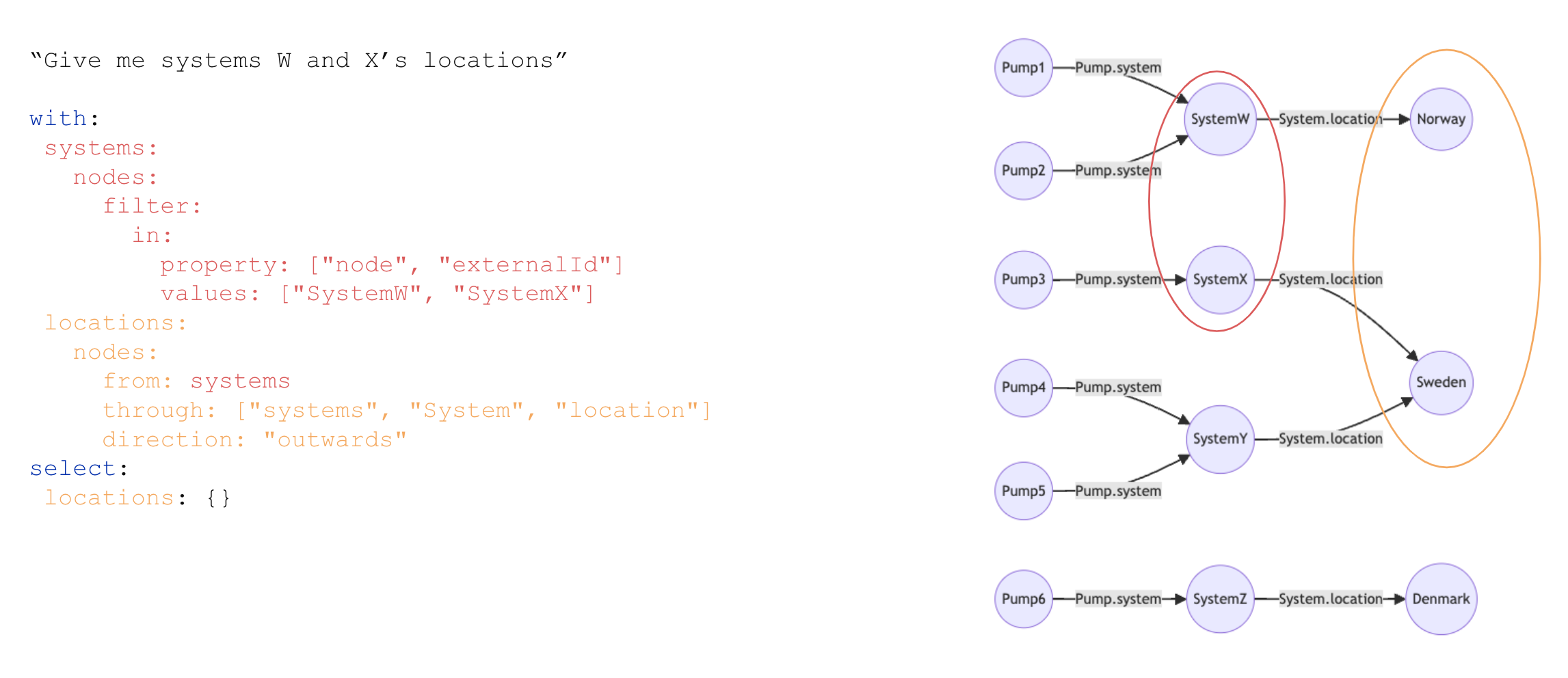
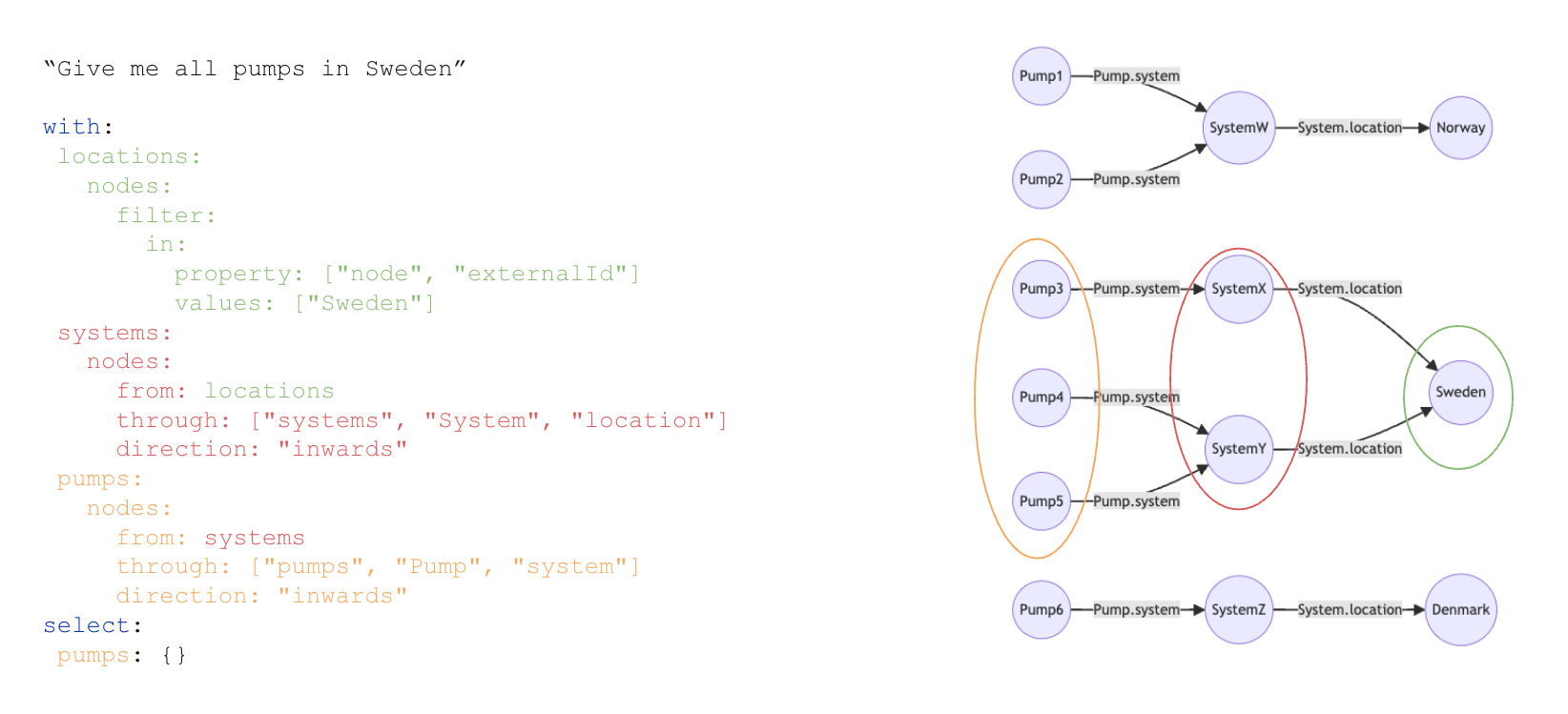
When chaining off another **node result set**, you'll retrieve the nodes pointed to by a direct relation property. The direct relation property is defined using the `through` field.
When chaining off an **edge result set**, you'll retrieve the end nodes defined by the edges in the set.
* `from`: an optional result expression to chain from.
* `filter`: restrict which nodes to return in the result set.
* `through`: required when `from` is a node result expression. Specify a direct relation property to traverse.
* `direction`: applicable when `through` is defined. Specify which direction to traverse the direct relation.
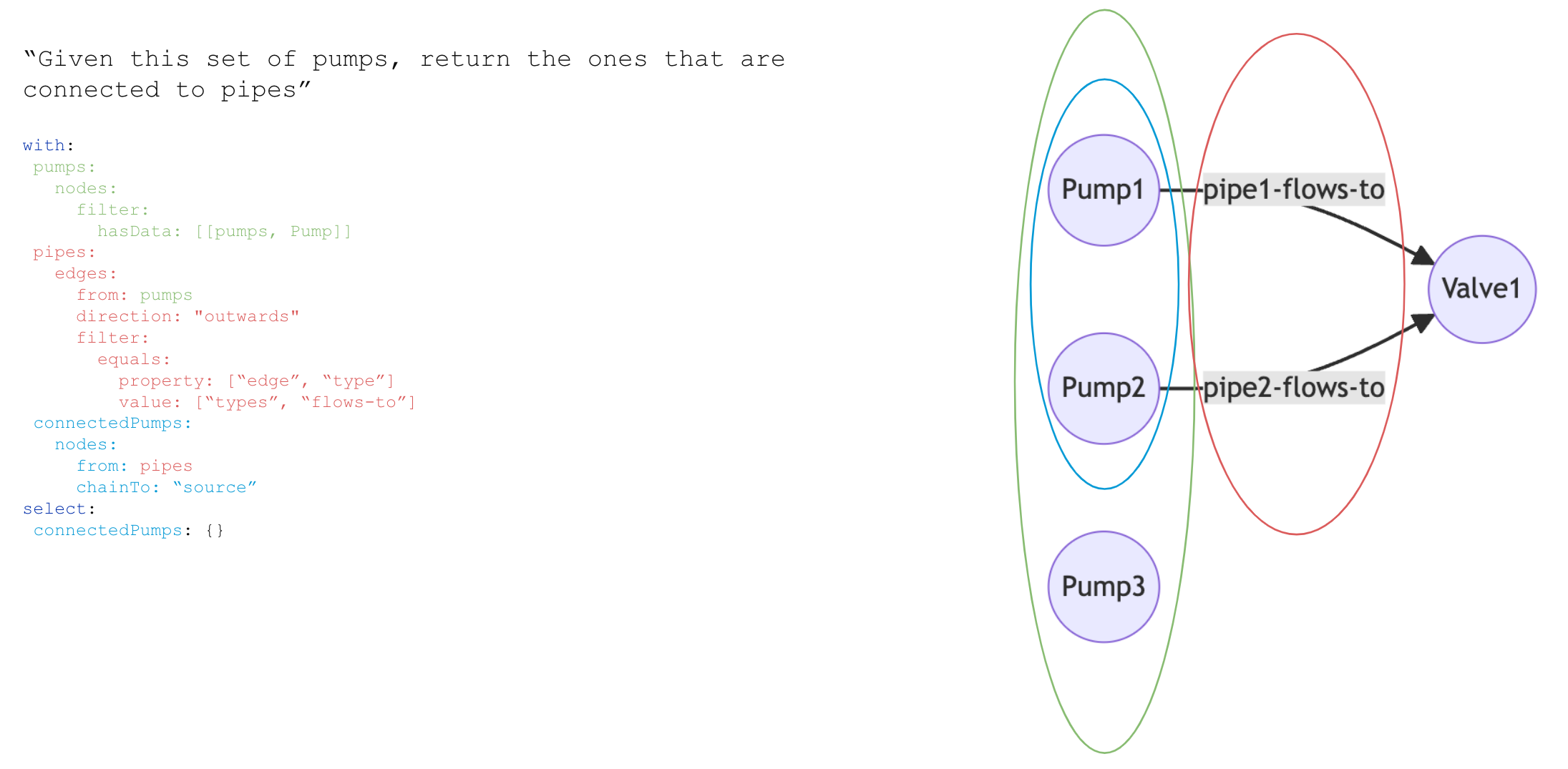
* `chainTo`: applicable when `from` is an edge result expression. Control which side of the edges in `from` to chain to. The behavior depends on the `direction` setting in the `from` result expression:
* If `from` follows edges outwards, `direction="outwards"` (default), then `"source"` selects `startNode` and `"destination"` selects `endNode`.
* If `from` follows edges inwards, `direction="inwards"`, then `"source"` selects `endNode` and `"destination"` selects `startNode`.
### Edge result expressions
An `edges` statement in a result expression makes the set contain edges, and the statement
defines the rules the graph traversal will follow.
A graph traversal can start from an initial set, defined by `from`, which names another result expression.
The graph traversal follows edges in a particular direction, controlled by `direction` (Default: `outwards`.)
```
Alice -is_parent-> Bob
Bob -fancies-> Mallory
```
In the above graph, if you follow any edge from `Bob` **outwards** (the default), you'll get
the edge `Bob -fancies-> Mallory`.
If you follow edges **inwards**, `direction=inwards`, you'll
get `Alice -is-parent-> Bob`.
The traversal happens breadth-first. See [limitations](#limitations) for more details.
A traversal is defined by what edges to follow, what nodes to match, and what nodes to terminate
the traversal at. This is controlled by `filter`, `nodeFilter` and `terminationFilter`:
* `filter` is a filter on edges. You would typically filter on the property `[edge, type]`, but you can filter on any property on an edge.
* `nodeFilter` is a node filter, which the node on the "other" side must match.
* With `direction: outwards`, that means the "end node" of the edge must match.
* With `direction: inwards`, the "start node" must match.
* `terminationFilter` is similar to `nodeFilter`, except if it matches, the traversal ends. A node must also match `nodeFilter` (if any) to steer the traversal to the node to terminate at in the first place.
`maxDistance` controls how many hops away from the initial set traversal will go. `maxDistance` defaults to unlimited (but the set must respect its `limit`, defined on the result expression). If `maxDistance` is 1, execution might be faster. If you know there will only be one level, use `maxDistance: 1`.
Full options:
| Option | |
| ------------------- | -------------------------------------------------------------------------------------------------------------------------------------------------------------------------------------------------------------------------------------------------------------------------------------------------------------------------------------------------------------------------------------------------------------------------------------------------------------------------------------------------------------- |
| `from` | Result expression to chain from. |
| `filter` | Edges traversed must match this filter. |
| `nodeFilter` | Nodes on the "other" side of the edge must match this filter. |
| `terminationFilter` | Do not traverse beyond nodes matching this filter. |
| `maxDistance` | How many levels to traverse. Default unlimited. |
| `direction` | Whether to traverse edges pointing out of the initial set, or **into** the initial set. |
| `limitEach` | Limit the number of returned edges for each of the source nodes in the result set.
The indicated uniform limit applies to the result set from the referenced from. `limitEach` only has meaning when you also specify `maxDistance=1` and `from`. |
| `chainTo` | applicable when `from` is an edge result expression. Control which side of the edges in `from` to chain to. The behavior depends on the `direction` setting in the `from` result expression:
- If `from` follows edges outwards, `direction="outwards"` (default), then `"source"` selects `startNode` and `"destination"` selects `endNode`.
- If `from` follows edges inwards, `direction="inwards"`, then `"source"` selects `endNode` and `"destination"` selects `startNode`. |
## Selects
Select configurations appear directly below `select` in a query and specify which data to retrieve for the respective result expression. The configuration specifies a number of sources (views) and a property selector for each. The property selectors define which view properties to emit in the query result.
You can have sets whose properties aren't emitted. This is useful if the sets are necessary for chaining, but can be excluded in the final results. Sets that are neither chained nor selected aren't run, but they'll cause a slight query processing overhead.
The results are grouped by their respective sets and contain properties that match the property selectors for the set.
## Filters
Filters define what a part of the query matches. Filters are tree structures where the operator comes first and then the parameters for that operator.
A simple example is the `in` filter:
```yaml theme={"languages":{"custom":["/_languages/kuiper.json","../_languages/kuiper.json"]}}
in:
property: [node, name]
values: [movie]
```
If the property `node.name`, which is a text property, is equal to any of the values in the provided list, the node will match. Properties are typed, and what query operators you can use on a property depends on its type. These are the supported filters.
### Equals
The `equals` filter performs exact matches
```yaml theme={"languages":{"custom":["/_languages/kuiper.json","../_languages/kuiper.json"]}}
equals:
property: ['node', 'space']
value: 'someSpace'
```
### In
The `in` filter matches if any of the elements in the list of values match the property.
```yaml theme={"languages":{"custom":["/_languages/kuiper.json","../_languages/kuiper.json"]}}
in:
property: ['node', 'name']
values: ['movie', 'actor']
```
If the property is an array, it will match if any of the stored values matches any of the provided values.
### ContainsAny
The `containsAny` filter matches if *any* of the stored values matches any of the provided values. The property must be an array.
```yaml theme={"languages":{"custom":["/_languages/kuiper.json","../_languages/kuiper.json"]}}
containsAny:
property: ['someSpace', 'someContainer', 'someArrayProperty']
values: ['movie', 'actor']
```
### ContainsAll
The `containsAll` filter matches if the stored array contains *all* the provided values. The property must be an array.
```yaml theme={"languages":{"custom":["/_languages/kuiper.json","../_languages/kuiper.json"]}}
containsAll:
property: ['someSpace', 'someContainer', 'someArrayProperty']
values: ['value1', 'value2']
```
### Range
The `range` filter matches if the stored value is within the provided bounds. The property must be a number or timestamp.
```yaml theme={"languages":{"custom":["/_languages/kuiper.json","../_languages/kuiper.json"]}}
range:
property: ['node', 'createdTime']
gte: 2022-08-09T11:39:48+0000
lt: 2024-08-09T11:39:48+0000
```
The supported parameters are `gt` (greater than), `gte` (greater than or equal to), `lt` (less than), and `lte` (less than or equal to).
### Overlaps
The `range` filter matches if the range made up of the two properties `startProperty` and `endProperty` overlap with the provided range. The properties must be numbers or timestamps.
```yaml theme={"languages":{"custom":["/_languages/kuiper.json","../_languages/kuiper.json"]}}
range:
startProperty: ['someSpace', 'someContainer', 'startTime']
endProperty: ['someSpace', 'someContainer', 'endEndTime']
gte: 2022-08-09T11:39:48+0000
lt: 2024-08-09T11:39:48+0000
```
The supported parameters are `gt` (greater than), `gte` (greater than or equal to), `lt` (less than), and `lte` (less than or equal to).
### Exists
The `exists` filter matches if the stored value is not null.
```yaml theme={"languages":{"custom":["/_languages/kuiper.json","../_languages/kuiper.json"]}}
exists:
property: ['node', 'type']
```
### Prefix
The `prefix` filter matches if the stored value has the provided prefix. The property must be a string or an array.
```yaml theme={"languages":{"custom":["/_languages/kuiper.json","../_languages/kuiper.json"]}}
prefix:
property: ['someSpace', 'someContainer', 'someArray']
value: [1, 2]
```
```yaml theme={"languages":{"custom":["/_languages/kuiper.json","../_languages/kuiper.json"]}}
prefix:
property: ['someSpace', 'someContainer', 'someString']
value: 'myPrefix'
```
### HasData filter
A `hasData` filter matches if data is present in a set of **containers** or **views**.
There is an implicit `AND` between the containers and views referenced in the filter, and the filter matches only if the node or edge has data in **all** the specified containers and views.
When you specify a **container**, the filter matches if the instance has all required properties populated for the container.
When you specify a **view**, the filter matches nodes with data in all the containers that the view maps. If the view has an explicit filter defined, that filter is used instead.
The following example matches instances that have data in both the container `my_space.my_container` and the view `my_space.my_view.v1`:
```yaml theme={"languages":{"custom":["/_languages/kuiper.json","../_languages/kuiper.json"]}}
hasData:
- type: container
space: my_space
externalId: my_container
- type: view
space: my_space
externalId: my_view
version: v1
```
For a **view**, the `hasData` filter behaves differently based on the view's configuration:
* **No explicit filter on the view**: The `hasData` filter checks that data exists in all containers the view maps from. The filter matches if there is data in `my_space.my_container AND (my_space.c1 AND my_space.c2)`.
* **Explicit filter on the view**: The `hasData` filter uses the view's filter instead. The filter matches if there is data in `my_space.my_container` and the data satisfies the conditions defined in `my_space.my_view.v1.filter`.
### Nested
Use a `nested` filter to apply the filter on the node pointed to by a direct relation. `scope` specifies the direct relation property you want use as the filtering property.
```yaml theme={"languages":{"custom":["/_languages/kuiper.json","../_languages/kuiper.json"]}}
nested:
scope: ['some', 'directRelation', 'property']
filter:
equals:
property: ['node', 'name']
value: 'ACME'
```
### Instance references
The `instanceReferences` filter matches instances with fully qualified references (space + externalId) equal to *any* of the provided references.
```yaml theme={"languages":{"custom":["/_languages/kuiper.json","../_languages/kuiper.json"]}}
instanceReferences:
- space: 'my_space'
externalId: 'my_instance'
- space: 'my_space'
externalId: 'my_other_instance'
- space: 'another_space'
externalId: 'another_instance'
```
### Compound filters
You can combine filters with `and`, `or`, `not`:
```yaml theme={"languages":{"custom":["/_languages/kuiper.json","../_languages/kuiper.json"]}}
and:
- not:
in:
property: ['node', 'type']
values: ['movie']
- range:
property: ['imdb', 'movie', 'released']
gte: { parameter: start }
```
This corresponds to `(NOT node.type in ('movie')) AND imdb.movie.released >= $start`.
### Parameters
You can use parameters for values in filters. The parameters are provided as part of the query object, not in the filter itself.
This filter is parameterized:
```yaml theme={"languages":{"custom":["/_languages/kuiper.json","../_languages/kuiper.json"]}}
range:
property: [imdb, movie, released]
gte: { parameter: start }
```
A query containing this filter will only run if you provide the `start` parameter. The parameter must be compatible with all the types and operators that refer to the parameter. In the above example, the "released" property is a date, and the start parameter must be compatible with the date type. Otherwise, the query will fail, even if the range filter is optional because it's OR-.ed
We recommend that you parameterize queries that take user input. This allows you to reuse query plans across queries with a noticable effect on read-heavy workloads.
## Sorting and limiting
Sorting and limiting can happen in different places in a query:
* In **the result expression**, that is, in the `with` object that defines a node or edge set.
* In **the result selection**, that is, under `select` where you can define sets to emit as results.
Sorting and limiting the set definitions under `with` transitively affects dependent sets. If you only change the sort order of a `with` expression, dependent sets will not (necessarily) change (based on how the dependent sets are defined). If you, however, put a limit on an expression, all dependent sets will inherit the limit and consequently change. This is also true for sets that aren't emitted via `select`, that is, for sets that are only defined as stepping-stones for other sets.
Sorts and limits defined under `select` change the result appearing order for that set only, **not** for dependent sets.
This example query would let `some_edges` and `target_nodes` pull from the full amount of nodes in `some_nodes`, even if what's returned as a result for `some_nodes` is capped at 100:
```yaml theme={"languages":{"custom":["/_languages/kuiper.json","../_languages/kuiper.json"]}}
with:
some_nodes: … # Omitted. No sorting here.
some_edges:
from: some_nodes
# Omitted. Also no sorting.
target_nodes:
from: some_edges
# …
select:
some_nodes:
sources: ...
sort:
- property: ['node', 'space']
direction: descending
limit: 100
```
### Order of sorting and limiting
A limit in an edge traversal applies to when to start traversing, which happens before sorting.
Nodes and edges have different sorting and limiting behavior: Nodes sort and limit **simultaneously**, while recursive edge exploration do **limited traversal** ***then* sort**.
The top-n set of nodes sorted by some property will be guaranteed to have the top-n of that property for the set.
For edges found through traversal, that is, via `edges`, the `limit` applies to how many edges to discover. This may not be all the edges that **could** be discovered in a full traversal. If you start traversing from some node and ask for 100 edges sorted by creation timestamp, the 100 edges discovered before the traversal stops get sorted. The full graph is **not** traversed to find the 100 newest edges in the graph defined by the traversal filters.
To sort with a recursive graph traversal, you'll need to specify the sort configuration via `postSort`.
An edge traversal with `maxDistance=1` can take a standard `sort` configuration.
## Syncing - subscribing to changes
The [`/sync`](/api-reference/concepts/20230101/instances) endpoint lets you subscribe to changes on instances, matching an arbitrary filter. The interface for the `/sync` endpoint is largely similar to the `/query` endpoint but differs in a few ways:
* It always returns a value for `nextCursor`.
* It returns instances that have changed since the provided cursor.
* It returns soft-deleted instances until they have been hard-deleted. These will have a `deletedTime` property set to a non-null timestamp value. Read more about soft deletion [here](/cdf/dm/dm_concepts/dm_ingestion#soft-deletion).
* Cursors from `/sync` are valid for a soft deletion grace period, three days by default.
* A cursor older than the soft deletion grace period (3 days) may not pick up all changes, especially the deletions.
* If the cursor is too old, you must restart the sync or set `allowExpiredCursorsAndAcceptMissedDeletes` to `true` (see #allowing-the-use-of-outdated-sync-cursors).
This endpoint is helpful to avoid continuously pulling a full set of instances and putting unnecessary load on the system. Instead, you can use the `/sync` endpoint to subscribe to changes. You'll pull everything once and then keep that state updated incrementally. The Python SDK documentation has [an example](https://cognite-sdk-python.readthedocs-hosted.com/en/latest/data_modeling.html#example-on-syncing-instances-to-local-sqlite) of how to do this.
The endpoint also enables you to sync a subgraph into memory and then use libraries like [NetworkX](https://networkx.org) to perform various specialized graph analysis tasks on live data.
You can also use the endpoint to keep specialized dashboards up to date by syncing out all data about a data model.
### Sync modes
There are some performance pitfalls when combining sync with filters. The system cannot easily make use of indexes while determining which instances have changed since the sync started. Therefore, the default way of syncing may not be performant if using filters other than a single space filter. Also, sorting is not supported while syncing because any sort would conflict with the order of yielding new changes.
Before the sync endpoint yields new changes, it backfills the data that existed before starting the sync. The system needs to scan through all the data to determine which data matches the provided filter. You can use the `mode` parameter to control the backfill phase:
* `onePhase` (default): Don't distinguish between the backfill phase and subsequent changes. Use this mode if you sync without a filter or with a single space filter.
* `twoPhase`: Split the sync into two stages. This allows the system to take advantage of an index, either the default index or a custom cursorable index, in the backfill stage. This should be used if syncing with e.g. a `hasData` filter. If you want to use a custom cursorable index, you can provide the `backfillSort` parameter which must match the sort of the desired cursorable index.
* `noBackfill`: Skip the backfill stage and yield only instances that have changed since the sync started.
### Allowing the use of outdated sync cursors
Sync cursors will expire after 3 days. This is because soft-deleted instances are cleaned up after this grace period, so a client using a cursor older than that risks missing deletes. If the `allowExpiredCursorsAndAcceptMissedDeletes` flag is set to true, the API will allow the use of expired cursors.
## Limitations
### Graph traversal
Any query that involves a graph traversal will force nested loop-style execution. This will work well enough for traversals limited to a few hundred thousand unique paths.
The graph traversal is **breadth**-first, and all possible paths are traversed. This is especially important to keep in mind with traversals across loops. For example, a query that follows all the possible paths of a fully connected graph will likely be terminated due to constraints on either time, memory, or temporary disk usage.
### Timeout errors
Queries get canceled with a `408 Request Timeout` error if they take longer than the timeout. If you hit a timeout like this, you must reduce the load or contention or optimize your query.
### Reverse direct relations targeting lists can't be traversed using the graph query endpoint
You can't traverse reverse direct relations which target *lists* of direct relations—reverse direct relations with `targetsList=true`—using the `/query` endpoint. You must use the `/search` endpoint instead.
Let's say you have an `Activity` with a list of direct relations pointing to nodes which have data in an `Asset` view. The `Asset` view has a reverse direct relation pointing to a set of nodes with data in the `Activity` view. To retrieve the activies related to an asset, you must send a request to the `/search` endpoint where you filter on the `space`+`externalId` combinations of those assets. For example:
```yaml theme={"languages":{"custom":["/_languages/kuiper.json","../_languages/kuiper.json"]}}
view:
space: schema
externalId: Activity
version: v1
filter:
and:
- containsAny:
property: ['schema', 'Activity/v1', 'assets']
values:
- { 'space': 'assets', 'externalId': 'asset1' }
- { 'space': 'assets', 'externalId': 'asset2' }
- { 'space': 'assets', 'externalId': 'asset3' }
```
## Graph query examples
### Simple retrieval by `node.type`
This is an example query to retrieve all nodes of type `Pump`, and all the properties on the `Pump/v1` view.
```yaml wrap theme={"languages":{"custom":["/_languages/kuiper.json","../_languages/kuiper.json"]}}
with:
pumps:
nodes:
filter:
equals:
property: ['node', 'type']
value: { 'space': 'types', 'externalId': 'pump' }
select:
pumps:
sources:
- source:
type: view
space: equipment
externalId: Pump
version: v1
properties: ['*'] # All properties
```
### Retrieve everything in a space
This is an example query to retrieve all nodes in the `equipment` space and retrieve the `manufacturer` property on the `Equipment/v1` view. This query is parameterized and can be used for both the `/query` and the `/sync` endpoints.
```yaml wrap theme={"languages":{"custom":["/_languages/kuiper.json","../_languages/kuiper.json"]}}
with:
pumps:
nodes:
filter:
equals:
property: ['node', 'space']
value: { 'parameter': 'space' }
select:
pumps:
sources:
- source:
type: view
space: equipment
externalId: Equipment
version: v1
properties: [manufacturer] # Only the manufacturer property
parameters:
space: equipment
```
### Traverse edges to retrieve workorders related to a set of assets
This query retrieves all work orders related to the set of assets with external IDs `asset1`, `asset2`, and `asset3`. It traverses edges of the type `relates-to` that point from work orders to assets.
```yaml wrap theme={"languages":{"custom":["/_languages/kuiper.json","../_languages/kuiper.json"]}}
with:
assets:
nodes:
filter:
and:
- equals:
property: ['node', 'space']
value: 'assets'
- in:
property: ['node', 'externalId']
values: ['asset1', 'asset2', 'asset3']
assets_relate_to_workorders:
edges:
from: assets # chain off the assets result expression
direction: inwards # the edges point from the workorders to the assets
filter:
equals:
property: ['edge', 'type']
value: 'relates-to'
workorders:
nodes:
from: assets_relate_to_workorders
filter: # only get active workorders
equals:
property: ['workorders', '', 'status']
value: 'active'
select:
workorders: # only select the workorders
sources:
- source:
type: view
space: workorders
externalId: WorkOrder
version: v1
properties: ['*'] # get all the properties
```
### Traverse direct relations to retrieve the locations of a set of sites
Consider a scenario where there are two sets of nodes representing sites and locations, respectively. The sites are connected to the locations using a direct relation property. This query retrieves the set of location nodes related to a set of sites.
To traverse direct relation properties performantly, make sure that the property is associated with a b-tree index.
```yaml wrap theme={"languages":{"custom":["/_languages/kuiper.json","../_languages/kuiper.json"]}}
with:
sites:
nodes:
filter:
and:
- hasData:
- type: container
space: sites
externalId: Site
- in:
property: ['node', 'externalId']
values: ['site1', 'site2', 'site3']
locations:
nodes:
from: sites
direction: outwards
through:
source: # The view mapping the direct relation property to traverse
type: view
space: sites
externalId: Site
version: v1
identifier: location # the identifier of the direct relation property to traverse
select:
locations:
sources:
- source:
type: view
space: locations
externalId: Location
version: v1
properties: ['*']
```
### Traverse direct relations inwards
 ### Traverse direct relations outwards
 ### Traverse direct relations multiple levels
 ### Traverse edges single hop
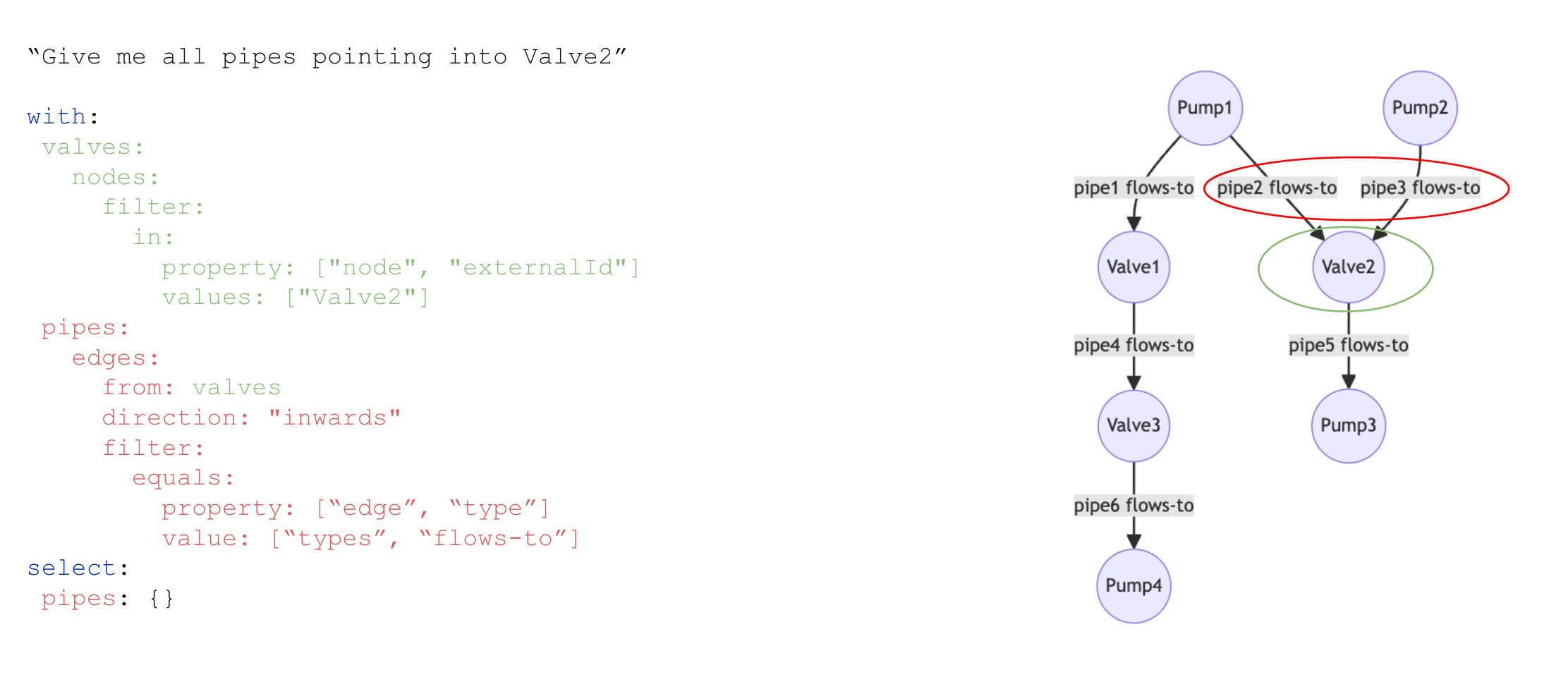 ### Traverse edges recursively
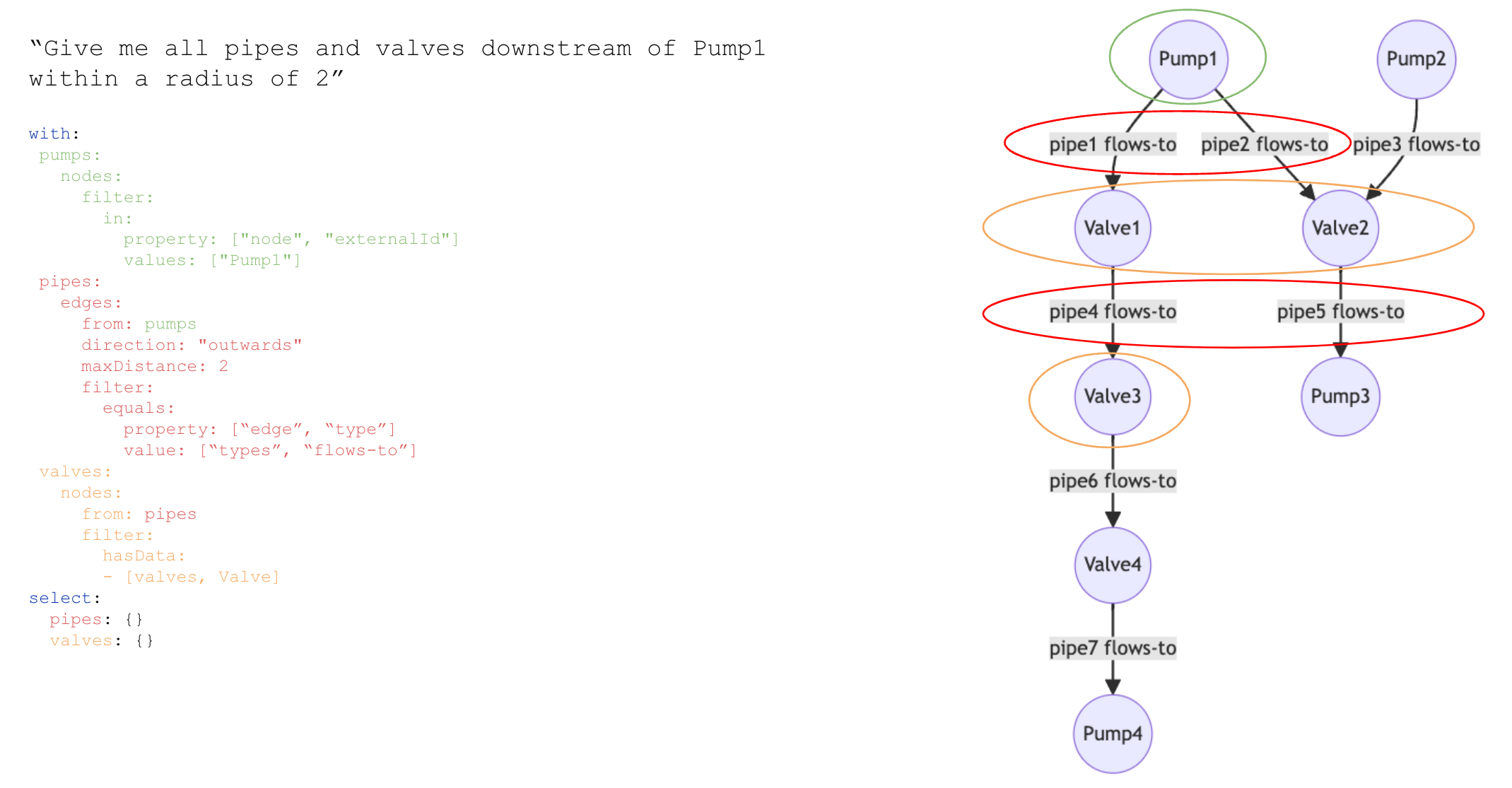 ### Traverse edges recursively with a node filter
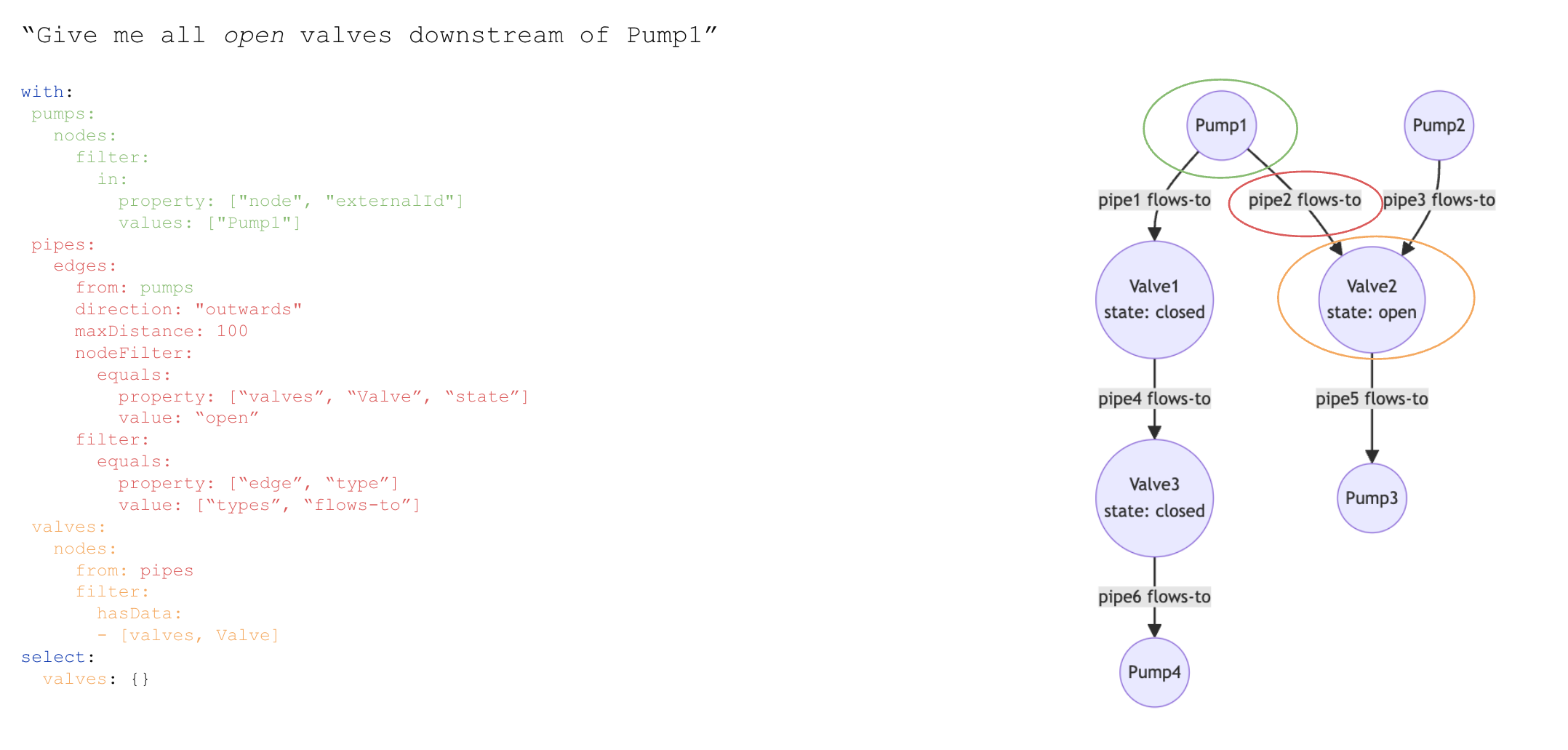 ### Traverse edges recursively with a termination filter
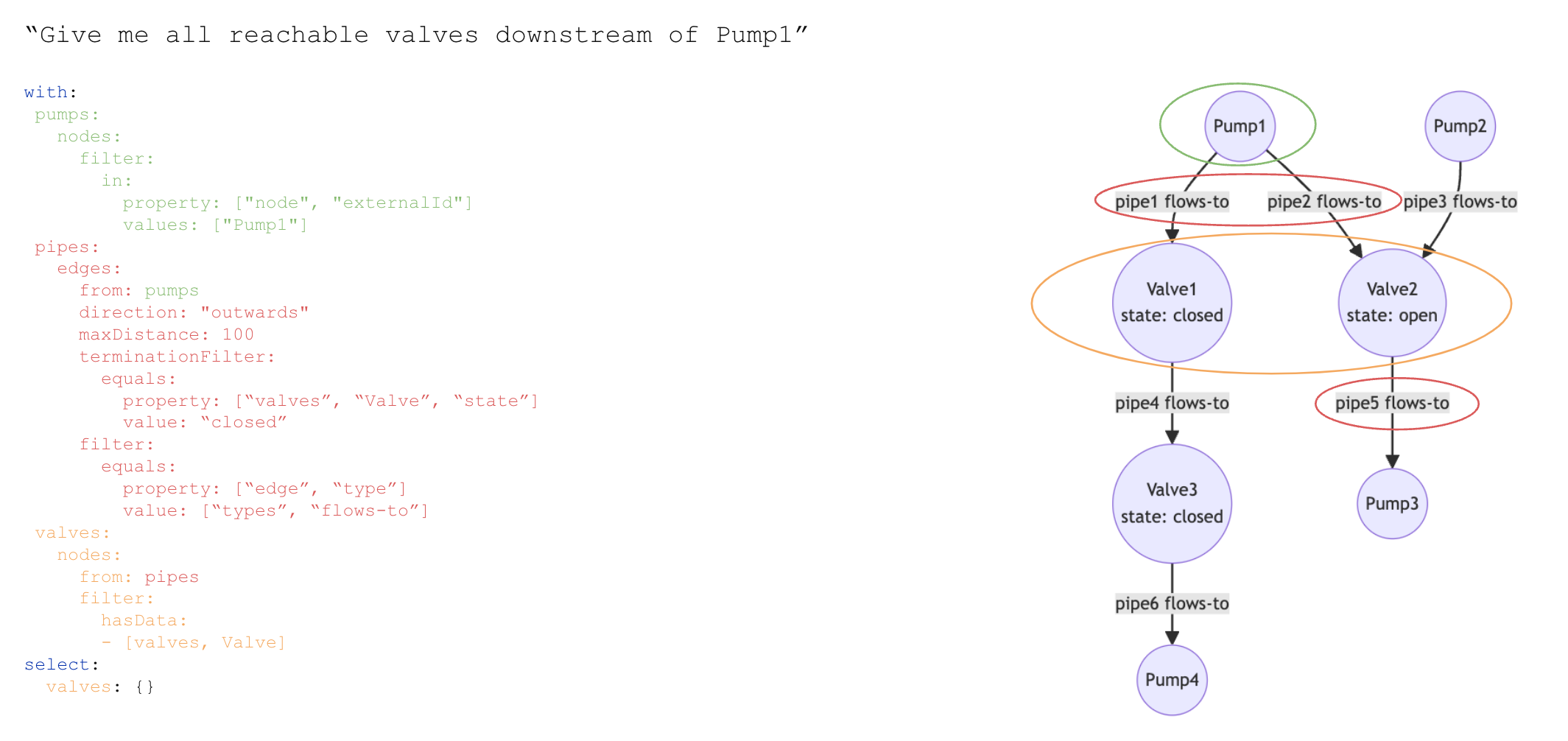 ### Traversing edges using the chainTo parameter