> ## Documentation Index
> Fetch the complete documentation index at: https://docs.cognite.com/llms.txt
> Use this file to discover all available pages before exploring further.
# Read and write CDF data models with NEAT
> Learn to read and write CDF physical data models using NeatSession, explore validator insights, and perform dry-run deployments.
This tutorial is for data engineers who want to work with physical data models in Cognite Data Fusion (CDF). You will use `NeatSession` to read a data model from CDF, explore validator insights, and perform a dry-run write to inspect deployment plans. By the end, you will have read the Cognite Core Data Model, reviewed its validator findings, and seen what would be deployed without making changes.
**Prerequisites**:
* NEAT installed. See [Installation](/cdf/deploy/neat/installation)
* Launched a notebook environment
**Interactive format**: This tutorial is also available as a [Jupyter notebook](https://github.com/cognitedata/neat/blob/main/docs/tutorials/introduction.ipynb) you can run and edit in CDF Notebooks or Jupyter Lab.
`NeatSession` is the main interface for NEAT. It guides you through capabilities and helps avoid mistakes. See the [NeatSession reference](/cdf/deploy/neat/reference/session) and [configuration documentation](/cdf/deploy/neat/reference/config) for details.
Import and create a client:
```python theme={"languages":{"custom":["/_languages/kuiper.json","../_languages/kuiper.json"]}}
from cognite.neat import NeatSession, get_cognite_client
client = get_cognite_client(".env")
```
Alternatively, use the Python SDK to create `CogniteClient`. `get_cognite_client` picks up credentials from a `.env` file or guides you through setup.
Start a session with the `legacy-additive` profile, which uses [additive mode](/cdf/deploy/neat/data_modeling/modes#additive-mode) and a legacy validator set:
```python theme={"languages":{"custom":["/_languages/kuiper.json","../_languages/kuiper.json"]}}
neat = NeatSession(client=client, config="legacy-additive")
```
Read the Cognite Core Data Model. Validators run during the read and produce insights:
```python theme={"languages":{"custom":["/_languages/kuiper.json","../_languages/kuiper.json"]}}
neat.physical_data_model.read.cdf("cdf_cdm", "CogniteCore", "v1")
```
To enable more validators, switch to `deep-additive` and read again:
```python theme={"languages":{"custom":["/_languages/kuiper.json","../_languages/kuiper.json"]}}
neat = NeatSession(client=client, config="deep-additive")
neat.physical_data_model.read.cdf("cdf_cdm", "CogniteCore", "v1")
```
Use `neat.issues` to open a web UI where insights are grouped by validator code:
```python theme={"languages":{"custom":["/_languages/kuiper.json","../_languages/kuiper.json"]}}
neat.issues
```
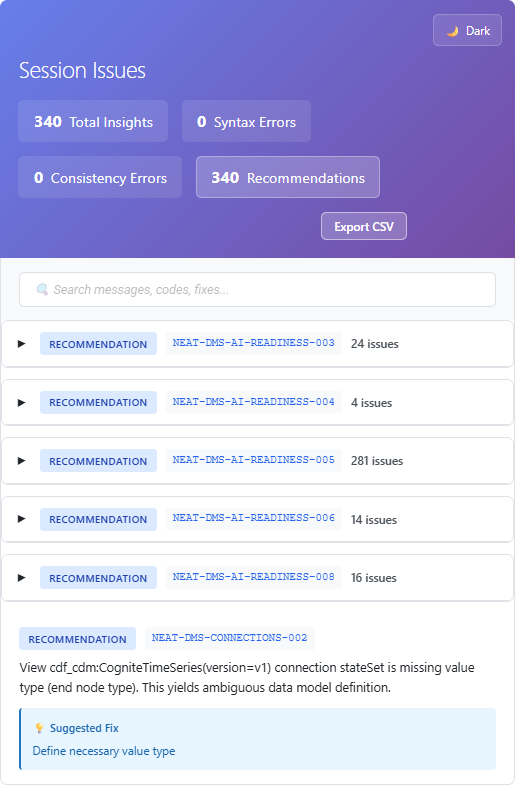 You can read from Excel, JSON, or YAML using the appropriate reader in `neat.physical_data_model.read`. See [reading physical data models](/cdf/deploy/neat/reference/session#reading-physical-data-models).
Write the model back to CDF in dry-run mode. No data is written; you only see the planned changes:
```python theme={"languages":{"custom":["/_languages/kuiper.json","../_languages/kuiper.json"]}}
neat.physical_data_model.write.cdf()
```
Use `neat.result` to open a web UI showing what would be created, updated, deleted, unchanged, or skipped:
```python theme={"languages":{"custom":["/_languages/kuiper.json","../_languages/kuiper.json"]}}
neat.result
```
You can read from Excel, JSON, or YAML using the appropriate reader in `neat.physical_data_model.read`. See [reading physical data models](/cdf/deploy/neat/reference/session#reading-physical-data-models).
Write the model back to CDF in dry-run mode. No data is written; you only see the planned changes:
```python theme={"languages":{"custom":["/_languages/kuiper.json","../_languages/kuiper.json"]}}
neat.physical_data_model.write.cdf()
```
Use `neat.result` to open a web UI showing what would be created, updated, deleted, unchanged, or skipped:
```python theme={"languages":{"custom":["/_languages/kuiper.json","../_languages/kuiper.json"]}}
neat.result
```
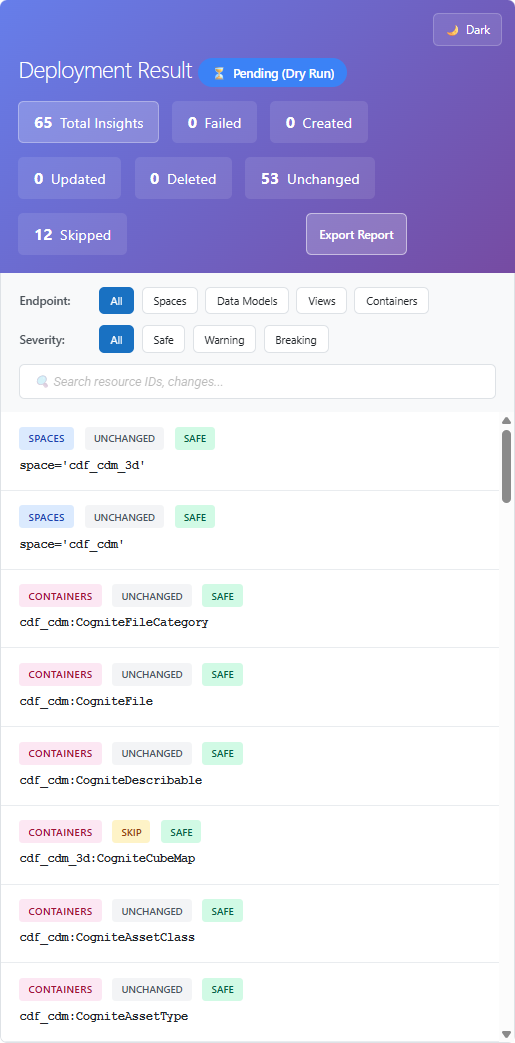 In non-dry-run mode, `neat.result` shows the actual deployment outcome. You can also write to Excel, JSON, or YAML using `neat.physical_data_model.write`. See [writing physical data models](/cdf/deploy/neat/reference/session#writing-physical-data-models).
## Troubleshooting
If `NeatSession` initialization fails with a connection error, you may have ad-blockers blocking NEAT's usage analytics. See [Known issues with NEAT](/cdf/deploy/neat/known_issues) for workarounds.
## What you accomplished
You read the Cognite Core Data Model from CDF, explored validator insights via `neat.issues`, and ran a dry-run write to inspect the deployment plan without applying changes.
## Next steps
* [Data modeling in Excel](/cdf/deploy/neat/data_modeling/excel/overview) — Define physical data models in spreadsheets
* [Validation](/cdf/deploy/neat/validation/index) — Learn about validators and how to interpret findings
* [NeatSession reference](/cdf/deploy/neat/reference/session) — Full API for reading and writing data models
In non-dry-run mode, `neat.result` shows the actual deployment outcome. You can also write to Excel, JSON, or YAML using `neat.physical_data_model.write`. See [writing physical data models](/cdf/deploy/neat/reference/session#writing-physical-data-models).
## Troubleshooting
If `NeatSession` initialization fails with a connection error, you may have ad-blockers blocking NEAT's usage analytics. See [Known issues with NEAT](/cdf/deploy/neat/known_issues) for workarounds.
## What you accomplished
You read the Cognite Core Data Model from CDF, explored validator insights via `neat.issues`, and ran a dry-run write to inspect the deployment plan without applying changes.
## Next steps
* [Data modeling in Excel](/cdf/deploy/neat/data_modeling/excel/overview) — Define physical data models in spreadsheets
* [Validation](/cdf/deploy/neat/validation/index) — Learn about validators and how to interpret findings
* [NeatSession reference](/cdf/deploy/neat/reference/session) — Full API for reading and writing data models