> ## Documentation Index
> Fetch the complete documentation index at: https://docs.cognite.com/llms.txt
> Use this file to discover all available pages before exploring further.
# Configure, build, and deploy modules
> With the Cognite Toolkit, you configure access to the CDF project(s), define and configure modules, build artifacts, and deploy them to your CDF project.
With the Cognite Toolkit, you **first** configure access to the CDF project(s) you'll administer. **Next**,
you **define** and **configure** the modules you want to build and deploy. **Then**, you run the `cdf build` command
to **build** the necessary artifacts to deploy the modules.
Before you deploy the artifacts, we recommend that you always do a **dry-run** deployment to verify
that the configurations and deployment perform as expected.
When you've verified the configuration, you run the `cdf deploy` command to **deploy** the artifacts to the CDF project using the CDF SDK and APIs.
```mermaid theme={"languages":{"custom":["/_languages/kuiper.json","../_languages/kuiper.json"]}}
flowchart LR
A[cdf build --config-yaml=config.dev.yaml] -->|parse global config| B(Gather modules)
B -->|replace template variables| C(Validate syntax)
D[cdf deploy --dry-run] -->E{Verify}
F[cdf deploy]
F --> |replace
environment variables| G(success: apply)
F --> H(failure)
```
You must set up authentication for the Cognite Toolkit to access the target CDF Project. Check the
[Authentication](/cdf/deploy/cdf_toolkit/guides/auth) section for details.
To configure the modules to deploy to a CDF project:
1. The `cdf modules init` command will usually have created a `config..yaml` file for each of your environnments.
You need one *config.\.yaml* file for each CDF project you deploy to. For example, if you have `prod`, `staging`, and `dev` projects/environments, you need *config.prod.yaml*, *config.staging.yaml*, and *config.dev.yaml* configuration files.
2. Open the configuration file, and edit the `project` property to match the name of your CDF project (line 3 in this example):
```yaml showLineNumbers theme={"languages":{"custom":["/_languages/kuiper.json","../_languages/kuiper.json"]}}
environment:
name: dev
project:
validation-type: dev
selected:
- cdf_demo_infield
- cdf_oid_example_data
```
3. In the `selected` property, list the modules you want to deploy (lines 6-7 above).
You can list any of the modules in the *modules* sub-directory.
4. Update the variables in the `variables` section to match the CDF project you're deploying to, for example, to change the name of your default location.
Make sure that you update all the variables that are set to *\*. If not, the module won't be deployed correctly.
5) Save the configuration file.
To build the artifacts to deploy for the modules you have configured:
1. In a terminal, run these commands:
```sh theme={"languages":{"custom":["/_languages/kuiper.json","../_languages/kuiper.json"]}}
cd
cdf build --config-yaml=config.dev.yaml
```
The `--config-yaml=` parameter specifies which configuration file to use, in this example *config.dev.yaml*.
The Cognite Toolkit substitutes the variables in the templates and creates a *build/* output directory with the artifacts to deploy.
During the build, the Toolkit produces **insights** that help you create good configurations. Insights include recommendations for best practices, syntax warnings, and consistency checks. If [Neat](https://docs.cognite.com/cdf/deploy/neat/) is installed, the build also validates your data models and reports any issues.
To deploy the configured artifacts to your CDF project:
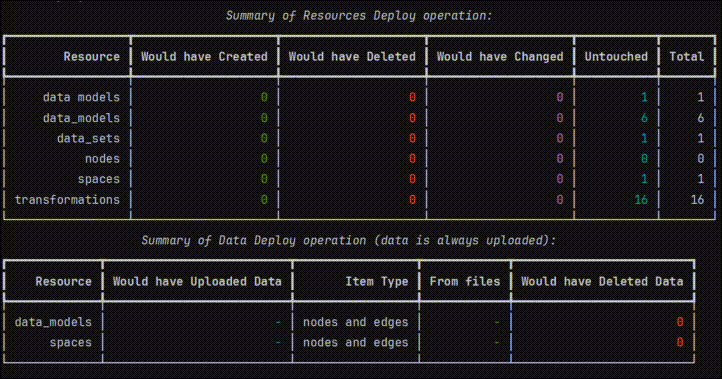
1. In a terminal, run these commands to do a dry-run of the deployment:
```sh theme={"languages":{"custom":["/_languages/kuiper.json","../_languages/kuiper.json"]}}
cdf deploy --dry-run
```
2. Inspect the output from the dry run and verify that the configurations and deployment perform as expected.
 3. Run this command to deploy the artifacts to your CDF project:
```sh theme={"languages":{"custom":["/_languages/kuiper.json","../_languages/kuiper.json"]}}
cdf deploy
```
To ensure that history and logs are not overwritten, the Cognite Toolkit deploys only configurations that have changed since the last run, and updates the configurations in the CDF project.
From v0.8, the `cdf deploy` command sends all content from YAML files to CDF, including parameters the Toolkit doesn't explicitly know about. This ensures forward compatibility with new CDF API fields without waiting for a Toolkit update.
### Clean up configurations and data
To deploy from a clean state, you can remove configurations and data before you deploy. This is typically not
necessary for regular deployments, but can be useful, for example, for resources that rejects updates, and
you want to force a clean deployment.
One use case is data modeling views. Views can reject an update as the change might require a version bump. If
you want to delete and recreate the view, which is common in development, you can use the `--drop` option to
remove the view before deploying it again.
Use these commands with caution to be sure that you do not accidentally delete configurations and data.
Always run the commands first with the `--dry-run` option to inspect the potential impact.
#### Remove and redeploy configurations and data
To remove and redeploy configurations, but **keep the data**, run this command:
```sh theme={"languages":{"custom":["/_languages/kuiper.json","../_languages/kuiper.json"]}}
cdf deploy --drop
```
To also remove and redeploy the data, add the `--drop-data` option:
```sh theme={"languages":{"custom":["/_languages/kuiper.json","../_languages/kuiper.json"]}}
cdf deploy --drop --drop-data
```
To **delete everything** in your project that is managed by your configurations:
```sh theme={"languages":{"custom":["/_languages/kuiper.json","../_languages/kuiper.json"]}}
cdf clean --dry-run
```
3. Run this command to deploy the artifacts to your CDF project:
```sh theme={"languages":{"custom":["/_languages/kuiper.json","../_languages/kuiper.json"]}}
cdf deploy
```
To ensure that history and logs are not overwritten, the Cognite Toolkit deploys only configurations that have changed since the last run, and updates the configurations in the CDF project.
From v0.8, the `cdf deploy` command sends all content from YAML files to CDF, including parameters the Toolkit doesn't explicitly know about. This ensures forward compatibility with new CDF API fields without waiting for a Toolkit update.
### Clean up configurations and data
To deploy from a clean state, you can remove configurations and data before you deploy. This is typically not
necessary for regular deployments, but can be useful, for example, for resources that rejects updates, and
you want to force a clean deployment.
One use case is data modeling views. Views can reject an update as the change might require a version bump. If
you want to delete and recreate the view, which is common in development, you can use the `--drop` option to
remove the view before deploying it again.
Use these commands with caution to be sure that you do not accidentally delete configurations and data.
Always run the commands first with the `--dry-run` option to inspect the potential impact.
#### Remove and redeploy configurations and data
To remove and redeploy configurations, but **keep the data**, run this command:
```sh theme={"languages":{"custom":["/_languages/kuiper.json","../_languages/kuiper.json"]}}
cdf deploy --drop
```
To also remove and redeploy the data, add the `--drop-data` option:
```sh theme={"languages":{"custom":["/_languages/kuiper.json","../_languages/kuiper.json"]}}
cdf deploy --drop --drop-data
```
To **delete everything** in your project that is managed by your configurations:
```sh theme={"languages":{"custom":["/_languages/kuiper.json","../_languages/kuiper.json"]}}
cdf clean --dry-run
```