> ## Documentation Index
> Fetch the complete documentation index at: https://docs.cognite.com/llms.txt
> Use this file to discover all available pages before exploring further.
# Migrating source systems
> Step-by-step guide to create CogniteSourceSystem nodes from the source field on assets, events, and files.
The migration plugin is an experimental feature. Updates to the Cognite Toolkit are likely to introduce changes to the described commands and processes.
This guide walks data engineers through creating **CogniteSourceSystem** nodes from the `source` field on assets, events, and files in Cognite Data Fusion (CDF).
## Prerequisites
Before migrating source systems, complete the following:
1. [Deploying the CogniteMigration data model](/cdf/deploy/cdf_toolkit/guides/plugins/migration_plugin/prepare)
2. [Migrating data sets](/cdf/deploy/cdf_toolkit/guides/plugins/migration_plugin/datasets)
## Required capabilities
The following capabilities are required to run `cdf migrate source-systems`:
| Capability type | Action | Scope | Description |
| -------------------- | -------------------------- | ----------------------------- | ---------------------------------------------- |
| Assets | `assets:read` | The selected asset data sets | From data set where you read the source assets |
| Events | `events:read` | The selected events data sets | From data set where you read the source events |
| Files | `files:read` | The selected files data sets | From data set where you read the source files |
| Data model instances | `datamodelinstances:write` | The selected instance space | To space where you create the source systems |
## Source systems in data modeling
A **source system** is a data modeling concept that did not exist in the asset-centric model. It is part of the
[CogniteCore data model](/cdf/dm/dm_reference/dm_core_data_model#cognitesourcesystem). A source system represents
the source of the data, such as a specific ERP system, SCADA system, or any other data source.
In the asset-centric model, assets, events, and files could be tagged with a text field called `source`
to indicate the source of the data. For example, an asset could have a `source` field with the value "SCADA System A".
```yaml title="asset_schema.yaml" theme={"languages":{"custom":["/_languages/kuiper.json","../_languages/kuiper.json"]}}
...
source: string
...
```
## Migrating source systems
The Cognite Toolkit reads unique `source` values from assets, events, and files in the selected data sets and creates a **CogniteSourceSystem** node for each value.
Run the command in interactive mode to select which data sets to read `source` values from, or pass the data sets and options as arguments. See `cdf migrate source-systems --help`.
```bash theme={"languages":{"custom":["/_languages/kuiper.json","../_languages/kuiper.json"]}}
cdf migrate source-systems
```
Confirm that each unique `source` value has a `CogniteSourceSystem` node and a matching lineage node. See [Verify the migration](#verify-the-migration).
The command writes source system nodes to `tmp/` (by default). Move them into the Cognite Toolkit `modules/` folder. See [Governing source system nodes](#governing-source-system-nodes).
## Verify the migration
For example, in the Kelmarsh example project, migrating the `zenodo` source produces this lineage node:
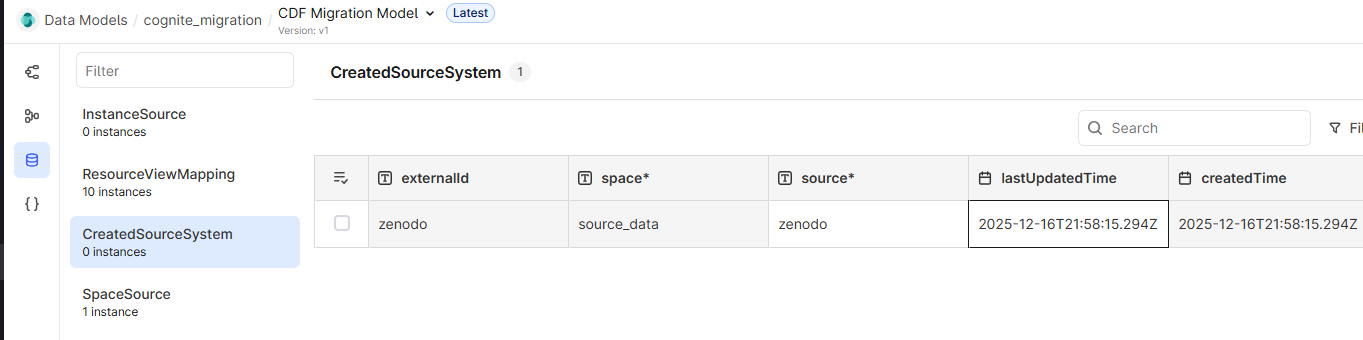 The lineage node shows that the source property value `zenodo` was migrated to a `CogniteSourceSystem` in space `source_data` with external ID `zenodo`.
Deploy all `CogniteSourceSystem` nodes before creating any nodes that reference them. The `CogniteSourceable` container has a required constraint that the referenced source system must already exist.
## Governing source system nodes
After you run `cdf migrate source-systems`, the Cognite Toolkit writes source system node files to the `tmp/` folder (by default). Move these files into the Cognite Toolkit `modules/` folder and govern them going forward.
For the Kelmarsh example, move the files from `tmp/data_modeling/` to:
```shell wrap theme={"languages":{"custom":["/_languages/kuiper.json","../_languages/kuiper.json"]}}
modules/
kelmarsh/
data_modeling/
zenodo.Node.yaml
```
The content of `zenodo.Node.yaml` is:
```yaml title="zenodo.Node.yaml" wrap theme={"languages":{"custom":["/_languages/kuiper.json","../_languages/kuiper.json"]}}
space: source_data
externalId: zenodo
instanceType: node
sources:
- properties:
name: zenodo
source:
space: cdf_cdm
externalId: CogniteSourceSystem
version: v1
type: view
```
## What `cdf migrate source-systems` does
When you run `cdf migrate source-systems`, the Cognite Toolkit performs the following steps:
The Cognite Toolkit reads all unique values stored in the `source` property on assets, events, and files in the selected data sets.
It uses the respective `/aggregate` endpoint to read unique values. That endpoint does not preserve
casing, so if you have the same source value with different casing, you end up with one source system with the
value lowercased. For example, source values `SCADA System A` and `scada system a` produce one source system with the value `scada system a`.
For each unique value, the Cognite Toolkit creates a `CogniteSourceSystem` node in the target instance space with the
`externalId` and `name` set to the source value. The `space` of the new nodes is set by the `--instance-space`
argument when you run the command.
For each created source system, the Cognite Toolkit creates a lineage node in the `CogniteMigration` data model that
represents the migration of the source system. The lineage node connects to the created source system
and stores the original source value in a property.
The Cognite Toolkit writes node configuration files to the `tmp/` folder by default. See [Governing source system nodes](#governing-source-system-nodes).
## Further reading
* [Migrating assets](/cdf/deploy/cdf_toolkit/guides/plugins/migration_plugin/assets)
* [Migrating data sets](/cdf/deploy/cdf_toolkit/guides/plugins/migration_plugin/datasets)
* [Kelmarsh example](/cdf/deploy/cdf_toolkit/guides/plugins/migration_plugin/example)
* [Migration overview](/cdf/deploy/cdf_toolkit/guides/plugins/migration_plugin/steps)
The lineage node shows that the source property value `zenodo` was migrated to a `CogniteSourceSystem` in space `source_data` with external ID `zenodo`.
Deploy all `CogniteSourceSystem` nodes before creating any nodes that reference them. The `CogniteSourceable` container has a required constraint that the referenced source system must already exist.
## Governing source system nodes
After you run `cdf migrate source-systems`, the Cognite Toolkit writes source system node files to the `tmp/` folder (by default). Move these files into the Cognite Toolkit `modules/` folder and govern them going forward.
For the Kelmarsh example, move the files from `tmp/data_modeling/` to:
```shell wrap theme={"languages":{"custom":["/_languages/kuiper.json","../_languages/kuiper.json"]}}
modules/
kelmarsh/
data_modeling/
zenodo.Node.yaml
```
The content of `zenodo.Node.yaml` is:
```yaml title="zenodo.Node.yaml" wrap theme={"languages":{"custom":["/_languages/kuiper.json","../_languages/kuiper.json"]}}
space: source_data
externalId: zenodo
instanceType: node
sources:
- properties:
name: zenodo
source:
space: cdf_cdm
externalId: CogniteSourceSystem
version: v1
type: view
```
## What `cdf migrate source-systems` does
When you run `cdf migrate source-systems`, the Cognite Toolkit performs the following steps:
The Cognite Toolkit reads all unique values stored in the `source` property on assets, events, and files in the selected data sets.
It uses the respective `/aggregate` endpoint to read unique values. That endpoint does not preserve
casing, so if you have the same source value with different casing, you end up with one source system with the
value lowercased. For example, source values `SCADA System A` and `scada system a` produce one source system with the value `scada system a`.
For each unique value, the Cognite Toolkit creates a `CogniteSourceSystem` node in the target instance space with the
`externalId` and `name` set to the source value. The `space` of the new nodes is set by the `--instance-space`
argument when you run the command.
For each created source system, the Cognite Toolkit creates a lineage node in the `CogniteMigration` data model that
represents the migration of the source system. The lineage node connects to the created source system
and stores the original source value in a property.
The Cognite Toolkit writes node configuration files to the `tmp/` folder by default. See [Governing source system nodes](#governing-source-system-nodes).
## Further reading
* [Migrating assets](/cdf/deploy/cdf_toolkit/guides/plugins/migration_plugin/assets)
* [Migrating data sets](/cdf/deploy/cdf_toolkit/guides/plugins/migration_plugin/datasets)
* [Kelmarsh example](/cdf/deploy/cdf_toolkit/guides/plugins/migration_plugin/example)
* [Migration overview](/cdf/deploy/cdf_toolkit/guides/plugins/migration_plugin/steps)