> ## Documentation Index
> Fetch the complete documentation index at: https://docs.cognite.com/llms.txt
> Use this file to discover all available pages before exploring further.
# Migrating files and time series
> Step-by-step guide to migrate files and time series from an asset-centric to a data modeling-based Cognite Data Fusion (CDF) project.
The migration plugin is an experimental feature. Updates to the Cognite Toolkit are likely to introduce changes to the described commands and processes.
This guide walks data engineers through migrating **files** and **time series** from an asset-centric Cognite Data Fusion (CDF) project to data modeling instances and recording lineage in the `CogniteMigration` data model.
## Prerequisites
Before migrating files and time series, complete the following:
1. [Creating a data model and mappings](/cdf/deploy/cdf_toolkit/guides/plugins/migration_plugin/data_model_migration)
2. [Deploying the CogniteMigration data model](/cdf/deploy/cdf_toolkit/guides/plugins/migration_plugin/prepare)
3. [Migrating data sets](/cdf/deploy/cdf_toolkit/guides/plugins/migration_plugin/datasets)
4. [Migrating source systems](/cdf/deploy/cdf_toolkit/guides/plugins/migration_plugin/source_systems)
5. [Migrating assets](/cdf/deploy/cdf_toolkit/guides/plugins/migration_plugin/assets)
## Required capabilities
### Time series
The following capabilities are required to run `cdf migrate timeseries`:
| Capability type | Action | Scope | Description |
| -------------------- | ------------------------------------- | ---------------------------------- | --------------------------------------------------- |
| Time Series | `timeseries:read`, `timeseries:write` | The selected time series data sets | From data set where you read the source time series |
| Data model instances | `datamodelinstances:write` | The selected instance space | To space where you create the time series nodes |
| Data model instances | `datamodelinstances:write` | cognite\_migration | To create the lineage nodes |
The `timeseries:write` permission is only required when you do not use `--skip-linking`. Linking time series to data modeling requires updating the original time series resource.
### Files
The following capabilities are required to run `cdf migrate files`:
| Capability type | Action | Scope | Description |
| -------------------- | --------------------------- | ---------------------------- | --------------------------------------------- |
| Files | `files:read`, `files:write` | The selected files data sets | From data set where you read the source files |
| Data model instances | `datamodelinstances:write` | The selected instance space | To space where you create the file nodes |
| Data model instances | `datamodelinstances:write` | cognite\_migration | To create the lineage nodes |
The `files:write` permission is only required when you do not use `--skip-linking`. Linking files to data modeling requires updating the original file resource.
## Migrating files and time series
Migrating files and time series differs from migrating assets and events. For assets and events, the Cognite Toolkit creates independent data modeling nodes and leaves the original resources unchanged. For files and time series, the default behavior **links** the original resource to data modeling and **locks** it so most changes must go through data modeling APIs.
Read [Link vs copy](#link-vs-copy) and the [data modeling syncers documentation](/cdf/deploy/cdf_toolkit/guides/plugins/migration_plugin/syncers) before you migrate in production.
Select resources by data set or CSV file, then run `cdf migrate timeseries` or `cdf migrate files`.
Use [data set selection](#data-set-selection) if all resources in the data set go to the same view, mapping, and instance space. Use [CSV file selection](#csv-file-selection) to map specific resources to different views, such as time series in the [Kelmarsh example](/cdf/deploy/cdf_toolkit/guides/plugins/migration_plugin/example).
Run the command in interactive mode, or pass the options as arguments. See `cdf migrate timeseries --help` and `cdf migrate files --help`.
```bash Time series theme={"languages":{"custom":["/_languages/kuiper.json","../_languages/kuiper.json"]}}
cdf migrate timeseries
```
```bash Files theme={"languages":{"custom":["/_languages/kuiper.json","../_languages/kuiper.json"]}}
cdf migrate files
```
Confirm that lineage nodes exist in the `InstanceSource` view. See [Verify the migration](#verify-the-migration).
## Data set selection
To migrate all time series or files in a data set, run the command in interactive mode:
```bash theme={"languages":{"custom":["/_languages/kuiper.json","../_languages/kuiper.json"]}}
cdf migrate timeseries
```
For files:
```bash theme={"languages":{"custom":["/_languages/kuiper.json","../_languages/kuiper.json"]}}
cdf migrate files
```
The command prompts you to select the source data set, resource view mapping, target instance space, and other options. You can also pass all options as command-line arguments. See `cdf migrate timeseries --help` and `cdf migrate files --help` for details.
The disadvantage of data set selection is that all time series or files in the data set must use the same resource view mapping, target view, and instance space.
## CSV file selection
To migrate time series using a CSV file, run:
```bash theme={"languages":{"custom":["/_languages/kuiper.json","../_languages/kuiper.json"]}}
cdf migrate timeseries --mapping-file
```
For files:
```bash theme={"languages":{"custom":["/_languages/kuiper.json","../_languages/kuiper.json"]}}
cdf migrate files --mapping-file
```
Replace `` with a path relative to your Cognite Toolkit project root.
This CSV file migrates a time series:
```csv title="migration.timeseries.csv" wrap theme={"languages":{"custom":["/_languages/kuiper.json","../_languages/kuiper.json"]}}
space,externalId,id,ingestionMapping,consumerViewSpace,consumerViewExternalId,consumerViewVersion
source_data,my_timeseries_external_id,1234567890,cognite_timeseries_mapping,sp_schema,CogniteTimeSeries,v1
```
Required columns:
* `space`: The target instance space where the time series or file will be created.
* `externalId`: The external ID of the resulting time series or file.
* `id`: The integer **internal ID** of the source time series or file to migrate. This ID appears in the asset-centric API response and remains the same after linking to data modeling.
Optional columns:
* `ingestionMapping`: The resource view mapping to use. If omitted, the default mapping for the resource type is used (typically the [CogniteTimeSeries](/cdf/dm/dm_reference/dm_core_data_model#timeseries) or [CogniteFile](/cdf/dm/dm_reference/dm_core_data_model#file) view in the [CogniteCore model](/cdf/dm/dm_reference/dm_core_data_model)). The Cognite Toolkit reads mappings from the `ResourceViewMapping` view in the `CogniteMigration` data model. Deploy custom mappings with `cdf build` and `cdf deploy` using the [Resource view mapping](/cdf/deploy/cdf_toolkit/references/resource_library#resource-view-mapping) resource type.
* `consumerViewSpace`, `consumerViewExternalId`, `consumerViewVersion`: The preferred consumer view for the time series or file. Canvas and Charts use this setting when they display the resource.
## Verify the migration
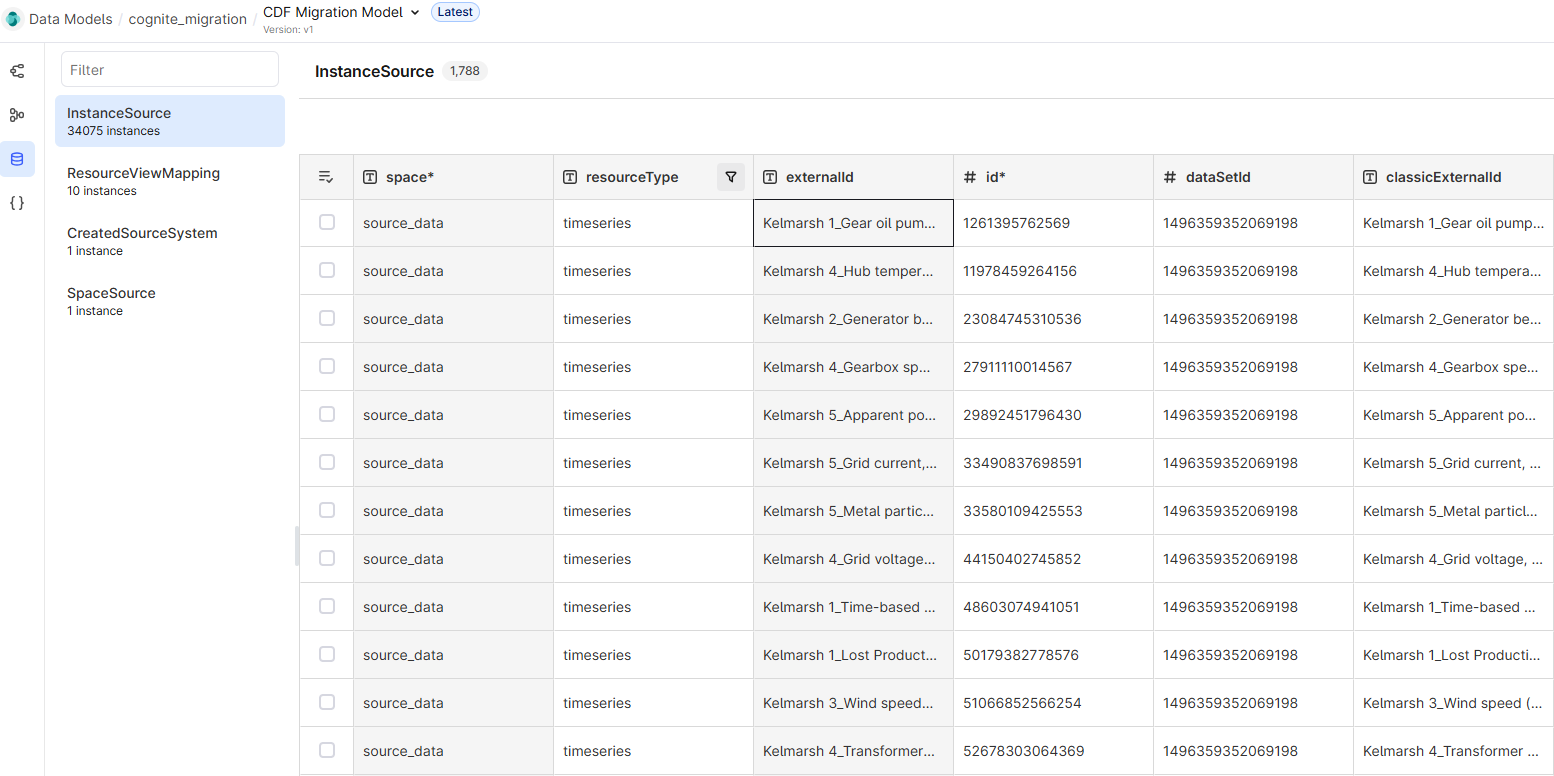
After a successful run, the Cognite Toolkit stores lineage for migrated time series and files in the `InstanceSource` view in the `CogniteMigration` data model.
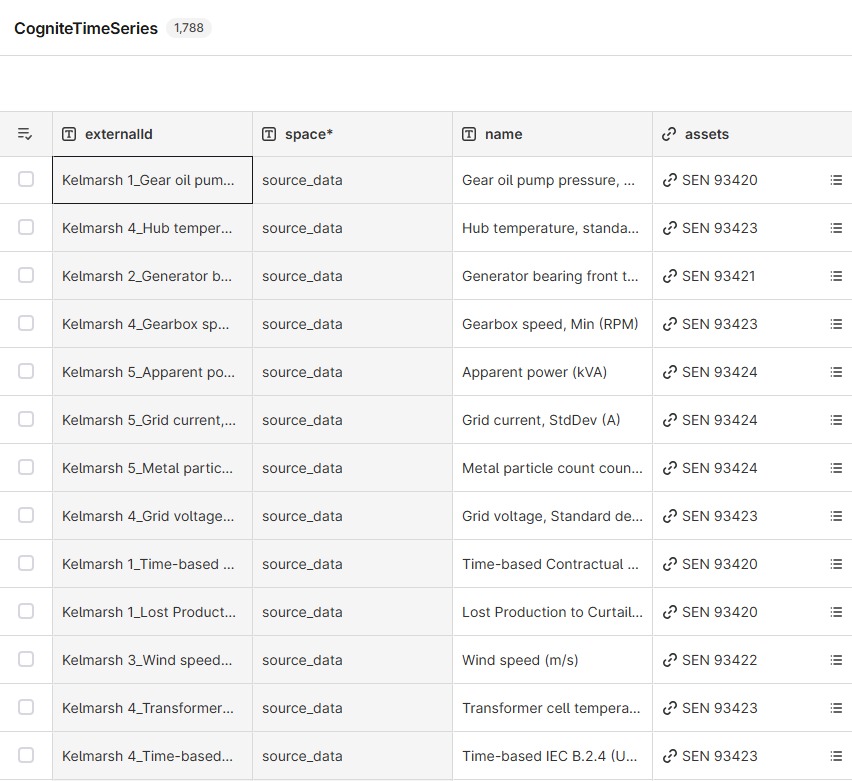
In the Kelmarsh example, lineage nodes for time series look like this:
 The lineage nodes are the same instances as the created `CogniteTimeSeries` nodes:
 File migration follows the same lineage pattern in `InstanceSource`, but this guide does not include a file screenshot.
## What `cdf migrate timeseries` does
When you run `cdf migrate timeseries`, the migration plugin performs the following steps on batches of time series:
The Cognite Toolkit reads time series metadata from the asset-centric `/timeseries/byids` or `/timeseries/list` endpoints, depending on the selection method.
The Cognite Toolkit looks up the mapping and converts each time series to an instance node. Mappings are defined
by `externalId` in the `ResourceViewMapping` view in the `CogniteMigration` data model. The mapping for each time series comes from the `ingestionMapping` column in the CSV file or from the `--ingestion-mapping`
CLI argument. If no mapping is specified, the default mapping is used.
Unless you use `--skip-linking`, the Cognite Toolkit updates the original time series with the expected ID of the new node to link it to data modeling.
Call `/timeseries/list` or `/timeseries/byids` with the `alpha` flag set to inspect `pendingInstanceId`, which shows the expected data modeling node ID.
The Cognite Toolkit writes the created instance nodes to CDF using the `/models/instances` endpoint.
While writing instances, the Cognite Toolkit creates lineage nodes in the `InstanceSource` view in the `CogniteMigration` data model
to record the lineage from source time series to the created instance nodes.
## What `cdf migrate files` does
When you run `cdf migrate files`, the migration plugin performs the following steps on batches of files:
The Cognite Toolkit reads file metadata from the asset-centric `/files/byids` or `/files/list` endpoints, depending on the selection method.
The Cognite Toolkit looks up the mapping and converts each file to an instance node. Mappings are defined
by `externalId` in the `ResourceViewMapping` view in the `CogniteMigration` data model. The mapping for each file comes from the `ingestionMapping` column in the CSV file or from the `--ingestion-mapping`
CLI argument. If no mapping is specified, the default mapping is used.
Unless you use `--skip-linking`, the Cognite Toolkit updates the original file with the expected ID of the new node to link it to data modeling.
Call `/files/list` or `/files/byids` with the `alpha` flag set to inspect `pendingInstanceId`, which shows the expected data modeling node ID.
The Cognite Toolkit writes the created instance nodes to CDF using the `/models/instances` endpoint.
While writing instances, the Cognite Toolkit creates lineage nodes in the `InstanceSource` view in the `CogniteMigration` data model
to record the lineage from source files to the created instance nodes.
## Link vs copy
When you run `cdf migrate assets` or `cdf migrate events`, the Cognite Toolkit:
1. Downloads the asset or event resources.
2. Defines a node in data modeling using the mapping you provided.
3. Uploads **new, independent nodes** in data modeling. The original assets or events remain unchanged.
When you run `cdf migrate files` or `cdf migrate timeseries`, the Cognite Toolkit by default **links** the original resources to data modeling:
1. Downloads file or time series metadata.
2. Defines a node in data modeling using the mapping you provided.
3. **Updates the original resource** with the expected **instance ID** of the new node.
4. Uploads the new node to data modeling.
This process links the data modeling nodes to the original file or time series resources. The original resources are locked: only certain fields can be modified through the asset-centric API, and the resource **cannot be deleted** through that API. These resources are now part of data modeling and follow data modeling access control.
Use `--skip-linking` to skip linking and create independent copies instead. See [Underlying syncing mechanism](#underlying-syncing-mechanism-for-files-and-time-series) for implications.
After linking, deleting a linked instance through the data modeling API **deletes the original file or time series**, including file contents and time series datapoints. Asset and event migration does not have this behavior unless you delete the original resources separately.
After linking, you can still modify these fields through the asset-centric API:
**Time series:** `externalId`, `metadata`, `assetId`, `dataSetId`
**Files:** `externalId`, `metadata`, `assetIds`, `dataSetId`, `labels`, `geoLocation`
Other metadata is locked and can only be changed through data modeling. This list of modifiable fields may change in future releases. After linking, prefer the data modeling API for metadata changes instead of continuing to use the asset-centric API.
## Underlying syncing mechanism for files and time series
File contents and time series datapoints use specialized storage and are not stored directly in the data modeling service.
Data modeling syncers keep files and time series in sync with `CogniteFile` and `CogniteTimeSeries` instances. When you create or update such an instance, the syncer creates or updates the corresponding file or time series resource in CDF.
If you run `cdf migrate files --skip-linking` or `cdf migrate timeseries --skip-linking`, the syncer creates a new file or time series with copied metadata but **without file data or datapoints**. You must download and re-upload the data to the new resources.
For more information, see the [data modeling syncers documentation](/cdf/deploy/cdf_toolkit/guides/plugins/migration_plugin/syncers).
## Unlinking resources
If you linked files or time series to data modeling and need to migrate them to a different node, you **cannot delete the data modeling node** without also deleting the original resource, file contents, and datapoints. **Unlink** the resources first to restore the original asset-centric state.
Use `cdf data purge instances`, which includes guardrails against accidental data loss. Do **not** use `cdf data purge spaces` for unlinking; it deletes all instances and other data modeling resources in a space and does not support unlinking.
To unlink and then delete all time series nodes in instance space `my_timeseries_space`, run:
```bash theme={"languages":{"custom":["/_languages/kuiper.json","../_languages/kuiper.json"]}}
cdf data purge instances cdf_cdm:CogniteTimeSeries/v1 --instance-space my_timeseries_space
```
`cdf data purge spaces` skips time series and files by default to avoid accidental deletion of underlying data, but it still removes other data modeling resources in the space. Use `cdf data purge instances` for unlinking.
## Further reading
* [About data modeling syncers](/cdf/deploy/cdf_toolkit/guides/plugins/migration_plugin/syncers)
* [Migrating annotations](/cdf/deploy/cdf_toolkit/guides/plugins/migration_plugin/annotations)
* [Migrating Canvas](/cdf/deploy/cdf_toolkit/guides/plugins/migration_plugin/canvas)
* [Kelmarsh example](/cdf/deploy/cdf_toolkit/guides/plugins/migration_plugin/example)
* [Migration overview](/cdf/deploy/cdf_toolkit/guides/plugins/migration_plugin/steps)
File migration follows the same lineage pattern in `InstanceSource`, but this guide does not include a file screenshot.
## What `cdf migrate timeseries` does
When you run `cdf migrate timeseries`, the migration plugin performs the following steps on batches of time series:
The Cognite Toolkit reads time series metadata from the asset-centric `/timeseries/byids` or `/timeseries/list` endpoints, depending on the selection method.
The Cognite Toolkit looks up the mapping and converts each time series to an instance node. Mappings are defined
by `externalId` in the `ResourceViewMapping` view in the `CogniteMigration` data model. The mapping for each time series comes from the `ingestionMapping` column in the CSV file or from the `--ingestion-mapping`
CLI argument. If no mapping is specified, the default mapping is used.
Unless you use `--skip-linking`, the Cognite Toolkit updates the original time series with the expected ID of the new node to link it to data modeling.
Call `/timeseries/list` or `/timeseries/byids` with the `alpha` flag set to inspect `pendingInstanceId`, which shows the expected data modeling node ID.
The Cognite Toolkit writes the created instance nodes to CDF using the `/models/instances` endpoint.
While writing instances, the Cognite Toolkit creates lineage nodes in the `InstanceSource` view in the `CogniteMigration` data model
to record the lineage from source time series to the created instance nodes.
## What `cdf migrate files` does
When you run `cdf migrate files`, the migration plugin performs the following steps on batches of files:
The Cognite Toolkit reads file metadata from the asset-centric `/files/byids` or `/files/list` endpoints, depending on the selection method.
The Cognite Toolkit looks up the mapping and converts each file to an instance node. Mappings are defined
by `externalId` in the `ResourceViewMapping` view in the `CogniteMigration` data model. The mapping for each file comes from the `ingestionMapping` column in the CSV file or from the `--ingestion-mapping`
CLI argument. If no mapping is specified, the default mapping is used.
Unless you use `--skip-linking`, the Cognite Toolkit updates the original file with the expected ID of the new node to link it to data modeling.
Call `/files/list` or `/files/byids` with the `alpha` flag set to inspect `pendingInstanceId`, which shows the expected data modeling node ID.
The Cognite Toolkit writes the created instance nodes to CDF using the `/models/instances` endpoint.
While writing instances, the Cognite Toolkit creates lineage nodes in the `InstanceSource` view in the `CogniteMigration` data model
to record the lineage from source files to the created instance nodes.
## Link vs copy
When you run `cdf migrate assets` or `cdf migrate events`, the Cognite Toolkit:
1. Downloads the asset or event resources.
2. Defines a node in data modeling using the mapping you provided.
3. Uploads **new, independent nodes** in data modeling. The original assets or events remain unchanged.
When you run `cdf migrate files` or `cdf migrate timeseries`, the Cognite Toolkit by default **links** the original resources to data modeling:
1. Downloads file or time series metadata.
2. Defines a node in data modeling using the mapping you provided.
3. **Updates the original resource** with the expected **instance ID** of the new node.
4. Uploads the new node to data modeling.
This process links the data modeling nodes to the original file or time series resources. The original resources are locked: only certain fields can be modified through the asset-centric API, and the resource **cannot be deleted** through that API. These resources are now part of data modeling and follow data modeling access control.
Use `--skip-linking` to skip linking and create independent copies instead. See [Underlying syncing mechanism](#underlying-syncing-mechanism-for-files-and-time-series) for implications.
After linking, deleting a linked instance through the data modeling API **deletes the original file or time series**, including file contents and time series datapoints. Asset and event migration does not have this behavior unless you delete the original resources separately.
After linking, you can still modify these fields through the asset-centric API:
**Time series:** `externalId`, `metadata`, `assetId`, `dataSetId`
**Files:** `externalId`, `metadata`, `assetIds`, `dataSetId`, `labels`, `geoLocation`
Other metadata is locked and can only be changed through data modeling. This list of modifiable fields may change in future releases. After linking, prefer the data modeling API for metadata changes instead of continuing to use the asset-centric API.
## Underlying syncing mechanism for files and time series
File contents and time series datapoints use specialized storage and are not stored directly in the data modeling service.
Data modeling syncers keep files and time series in sync with `CogniteFile` and `CogniteTimeSeries` instances. When you create or update such an instance, the syncer creates or updates the corresponding file or time series resource in CDF.
If you run `cdf migrate files --skip-linking` or `cdf migrate timeseries --skip-linking`, the syncer creates a new file or time series with copied metadata but **without file data or datapoints**. You must download and re-upload the data to the new resources.
For more information, see the [data modeling syncers documentation](/cdf/deploy/cdf_toolkit/guides/plugins/migration_plugin/syncers).
## Unlinking resources
If you linked files or time series to data modeling and need to migrate them to a different node, you **cannot delete the data modeling node** without also deleting the original resource, file contents, and datapoints. **Unlink** the resources first to restore the original asset-centric state.
Use `cdf data purge instances`, which includes guardrails against accidental data loss. Do **not** use `cdf data purge spaces` for unlinking; it deletes all instances and other data modeling resources in a space and does not support unlinking.
To unlink and then delete all time series nodes in instance space `my_timeseries_space`, run:
```bash theme={"languages":{"custom":["/_languages/kuiper.json","../_languages/kuiper.json"]}}
cdf data purge instances cdf_cdm:CogniteTimeSeries/v1 --instance-space my_timeseries_space
```
`cdf data purge spaces` skips time series and files by default to avoid accidental deletion of underlying data, but it still removes other data modeling resources in the space. Use `cdf data purge instances` for unlinking.
## Further reading
* [About data modeling syncers](/cdf/deploy/cdf_toolkit/guides/plugins/migration_plugin/syncers)
* [Migrating annotations](/cdf/deploy/cdf_toolkit/guides/plugins/migration_plugin/annotations)
* [Migrating Canvas](/cdf/deploy/cdf_toolkit/guides/plugins/migration_plugin/canvas)
* [Kelmarsh example](/cdf/deploy/cdf_toolkit/guides/plugins/migration_plugin/example)
* [Migration overview](/cdf/deploy/cdf_toolkit/guides/plugins/migration_plugin/steps)