> ## Documentation Index
> Fetch the complete documentation index at: https://docs.cognite.com/llms.txt
> Use this file to discover all available pages before exploring further.
# Migrating Canvas
> Step-by-step guide to migrate asset-centric Canvas configurations to a data modeling-based Cognite Data Fusion (CDF) project.
The migration plugin is an experimental feature. Updates to the Cognite Toolkit are likely to introduce changes to the described commands and processes.
This guide walks data engineers through migrating **Canvas** configurations from asset-centric resource references to data modeling node references in Cognite Data Fusion (CDF).
## Prerequisites
Before migrating Canvas, complete the following:
1. [Migrating assets](/cdf/deploy/cdf_toolkit/guides/plugins/migration_plugin/assets)
2. [Migrating files and time series](/cdf/deploy/cdf_toolkit/guides/plugins/migration_plugin/files_timeseries)
3. [Migrating events](/cdf/deploy/cdf_toolkit/guides/plugins/migration_plugin/events)
If you have not completed some prerequisites, see [Manually populate the CogniteMigration data model](/cdf/deploy/cdf_toolkit/guides/plugins/migration_plugin/prepare#manual-population-of-the-cognitemigration-data-model).
## Required capabilities
The following capabilities are required to run `cdf migrate canvas`:
| Capability type | Action | Scope | Description |
| -------------------- | ----------------------------------------------------- | ----------------------------------------------------------------------------------------------------------------------------- | --------------------------------------------------------------------------------------------------------------------------------- |
| Data models | `datamodels:read` | `cdf_industrial_canvas`, `cdf_apps_shared`, `IndustrialCanvasInstanceSpace` | Scope `IndustrialCanvasInstanceSpace` to set up the Canvas tool. |
| Data model instances | `datamodelinstances:read`, `datamodelinstances:write` | `cdf_industrial_canvas`, `cdf_apps_shared`, `IndustrialCanvasInstanceSpace`, `SolutionTagsInstanceSpace`, `RuleInstanceSpace` | Scope `SolutionTagsInstanceSpace` to create, edit, and delete canvas labels. Scope `RuleInstanceSpace` to set up threshold rules. |
## Migrating Canvas
The Cognite Toolkit reads each canvas, replaces asset-centric references with data modeling node references found through the `InstanceSource` view in the `CogniteMigration` data model, and creates a backup before uploading the updated configuration.
Run the command in interactive mode to select which canvases to migrate, or pass the options as arguments. See `cdf migrate canvas --help`.
```bash theme={"languages":{"custom":["/_languages/kuiper.json","../_languages/kuiper.json"]}}
cdf migrate canvas
```
Open a migrated canvas and confirm that asset-centric references now point to data modeling nodes through their consumption views. The command also creates a backup under **Version history** in the Canvas UI.
## How the migration works
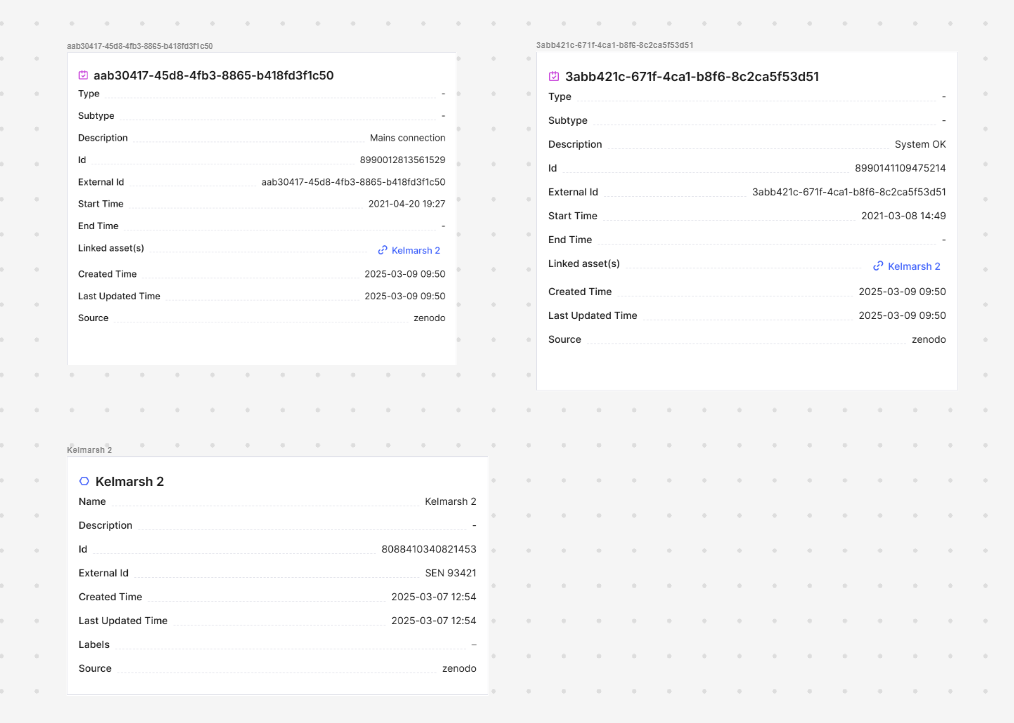
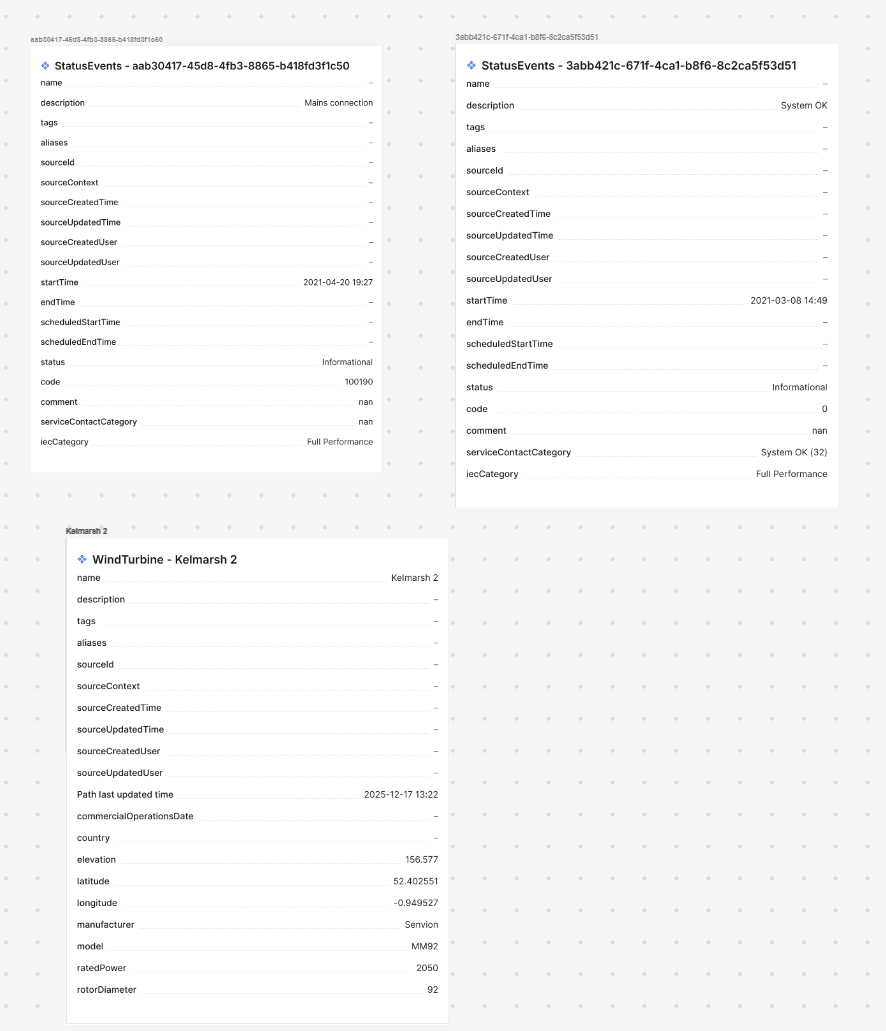
The Cognite Toolkit reads the selected canvases and finds each reference to an asset-centric asset, time series, event, or file. For each reference, it looks up the corresponding data modeling node and consumption view in the `InstanceSource` view in the `CogniteMigration` data model, and replaces the reference.
For example, a canvas with an asset and two event elements before migration:
 After migration, the asset and events are replaced with data modeling nodes viewed through their consumption views. In the Kelmarsh example, the asset becomes a `WindTurbine` node and the events become `StatusEvent` nodes:
 ## What `cdf migrate canvas` does
When you run `cdf migrate canvas`, the migration plugin performs the following steps:
The Cognite Toolkit downloads the nodes and edges in the `cdf_industrial_canvas:Canvas(version=v7)` data model for each selected canvas.
For each canvas, the Cognite Toolkit iterates through the `ContainerReference` view and finds all asset-centric references to assets, time series, events, and files. For each reference, it looks up the corresponding data modeling node and consumption view in the `InstanceSource` view in the `CogniteMigration` data model, then replaces the `ContainerReference` with a `FdmInstanceContainerReference` pointing to the data modeling node with the consumption view set as the `view` property.
Before uploading, the Cognite Toolkit creates a backup of the existing canvas configuration. The backup appears under **Version history** in the Canvas UI, so you can restore the canvas if anything goes wrong during migration. There is no automatic restore tool in the Cognite Toolkit itself.
The Cognite Toolkit updates the nodes and edges of each selected canvas in the `cdf_industrial_canvas:Canvas` data model with the migrated configuration.
## Further reading
* [Migrating Charts](/cdf/deploy/cdf_toolkit/guides/plugins/migration_plugin/charts)
* [Migrating annotations](/cdf/deploy/cdf_toolkit/guides/plugins/migration_plugin/annotations)
* [Kelmarsh example](/cdf/deploy/cdf_toolkit/guides/plugins/migration_plugin/example)
* [Migration overview](/cdf/deploy/cdf_toolkit/guides/plugins/migration_plugin/steps)
## What `cdf migrate canvas` does
When you run `cdf migrate canvas`, the migration plugin performs the following steps:
The Cognite Toolkit downloads the nodes and edges in the `cdf_industrial_canvas:Canvas(version=v7)` data model for each selected canvas.
For each canvas, the Cognite Toolkit iterates through the `ContainerReference` view and finds all asset-centric references to assets, time series, events, and files. For each reference, it looks up the corresponding data modeling node and consumption view in the `InstanceSource` view in the `CogniteMigration` data model, then replaces the `ContainerReference` with a `FdmInstanceContainerReference` pointing to the data modeling node with the consumption view set as the `view` property.
Before uploading, the Cognite Toolkit creates a backup of the existing canvas configuration. The backup appears under **Version history** in the Canvas UI, so you can restore the canvas if anything goes wrong during migration. There is no automatic restore tool in the Cognite Toolkit itself.
The Cognite Toolkit updates the nodes and edges of each selected canvas in the `cdf_industrial_canvas:Canvas` data model with the migrated configuration.
## Further reading
* [Migrating Charts](/cdf/deploy/cdf_toolkit/guides/plugins/migration_plugin/charts)
* [Migrating annotations](/cdf/deploy/cdf_toolkit/guides/plugins/migration_plugin/annotations)
* [Kelmarsh example](/cdf/deploy/cdf_toolkit/guides/plugins/migration_plugin/example)
* [Migration overview](/cdf/deploy/cdf_toolkit/guides/plugins/migration_plugin/steps)