> ## Documentation Index
> Fetch the complete documentation index at: https://docs.cognite.com/llms.txt
> Use this file to discover all available pages before exploring further.
# Setting up GitHub Actions
> Configure GitHub Actions to build and deploy Cognite Toolkit modules. You create a workflow with jobs, add environment variables and secrets, run a dry run, and verify deployments on the main branch.
## Add actions to your repository
In a terminal, run these commands and select GitHub Actions as the CI/CD provider to create a folder with example actions:
```sh theme={"languages":{"custom":["/_languages/kuiper.json","../_languages/kuiper.json"]}}
git switch -c add-gh-actions
cdf repo init
```
The command creates the example actions "**deploy**" and "**dry run**" in a `.github/workflows` folder. Adapt the actions to your requirements.
```yaml theme={"languages":{"custom":["/_languages/kuiper.json","../_languages/kuiper.json"]}}
name: Toolkit Deploy
on:
push:
branches:
- main
```
Use the `on:` section to specify when the action should run. In this example, it runs on every push to the `main` branch. Use GitHub's branch protection rules to prevent direct pushes to the `main` branch and require pull requests for changes. This ensures that all changes can be reviewed before they're deployed.
You can also set `workflow_dispatch` to allow the action to be triggered manually. See GitHub's [Events that trigger workflows](https://docs.github.com/en/actions/writing-workflows/choosing-when-your-workflow-runs/events-that-trigger-workflows) article for more options.
Use `build` or `deploy` actions with the `--dry-run` flag to validate modules on any branch. You can configure these as pull request checks.
```yaml theme={"languages":{"custom":["/_languages/kuiper.json","../_languages/kuiper.json"]}}
jobs:
build-modules:
runs-on: ubuntu-latest
# refers to the Environment concept in GitHub
environment: dev
name: Deploy
container:
image: cognite/toolkit:0.0.0
env:
CDF_CLUSTER: ${{ vars.CDF_CLUSTER }}
CDF_PROJECT: ${{ vars.CDF_PROJECT }}
IDP_CLIENT_ID: ${{ vars.IDP_CLIENT_ID }}
IDP_CLIENT_SECRET: ${{ secrets.IDP_CLIENT_SECRET }}
IDP_TENANT_ID: ${{ vars.IDP_TENANT_ID }}
```
The `environment` property lets you keep different secrets and values for variables like `IDP_CLIENT_SECRET` and `IDP_TENANT_ID` for each CDF environment (for example, *dev*, *staging*, *prod*) you're deploying to.
```yaml theme={"languages":{"custom":["/_languages/kuiper.json","../_languages/kuiper.json"]}}
steps:
- uses: actions/checkout@v4
- name: Build the modules
run: cdf build
- name: Deploy the modules
run: cdf deploy
```
You can also add flags and arguments to the `cdf build` and `cdf deploy` commands. For example, you can add `--verbose` to get richer logs.
## Add environment variables and secrets
To use the GitHub Actions, you need to set up [environment variables](https://docs.github.com/en/actions/managing-workflow-runs-and-deployments/managing-deployments/managing-environments-for-deployment#environment-variables) and [secrets](https://docs.github.com/en/actions/managing-workflow-runs-and-deployments/managing-deployments/managing-environments-for-deployment#environment-secrets) in your repository settings.
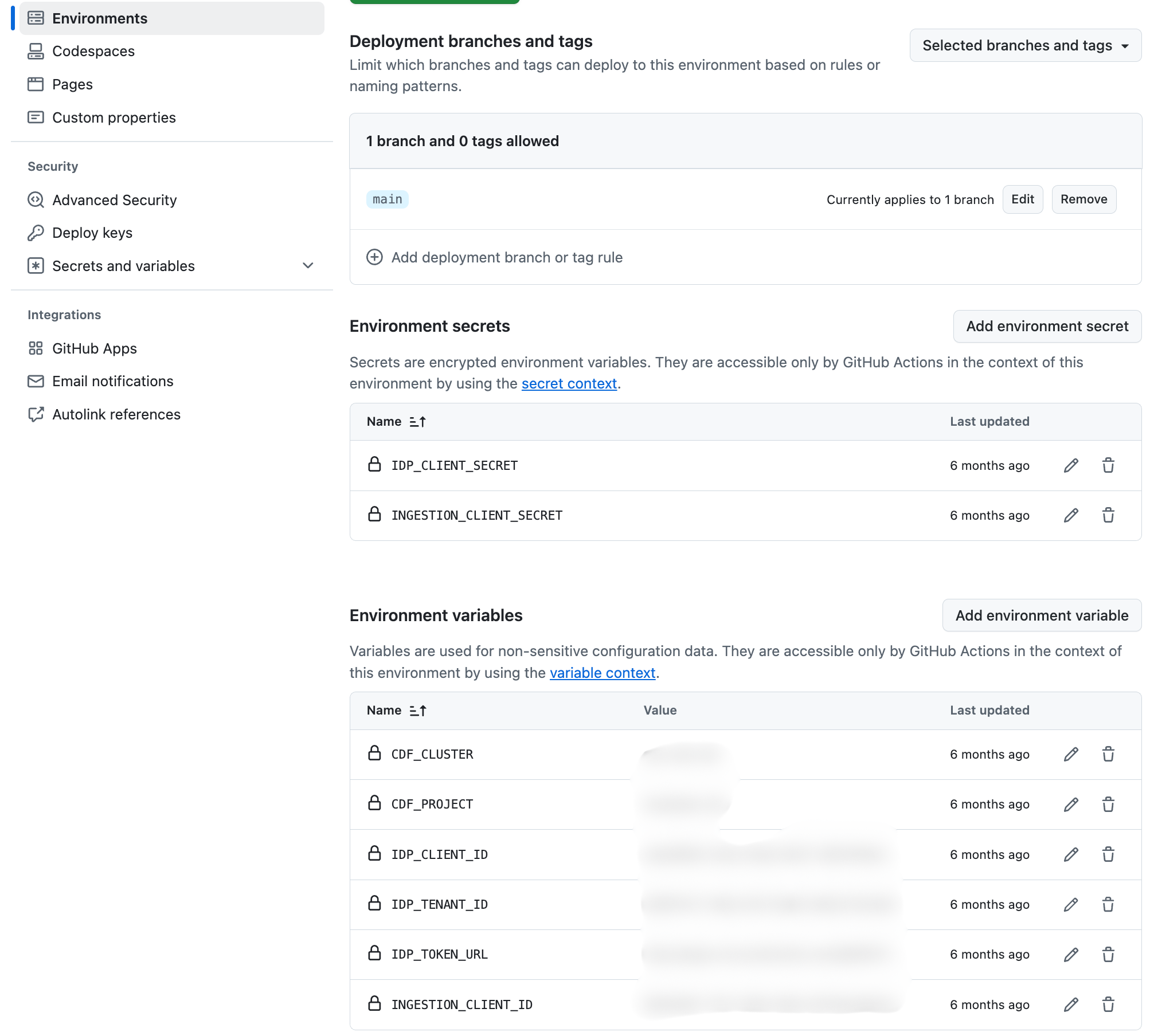 The values are used in the GitHub Actions workflow file. **Environment** variables (for example `${{ vars.CDF_CLUSTER }}`) are visible to anyone with access to the repository. **Secrets** (for example `${{ secrets.IDP_CLIENT_SECRET }}`) are encrypted and only available to the GitHub Actions workflow.
A standard **client credentials flow** requires these environment variables and secrets:
**Variables**
* CDF\_CLUSTER
* CDF\_PROJECT
* LOGIN\_FLOW: (client\_credentials)
* IDP\_CLIENT\_ID
* IDP\_TOKEN\_URL (if you're not using Entra ID)
**Secrets**
* IDP\_CLIENT\_SECRET
## View Action run details
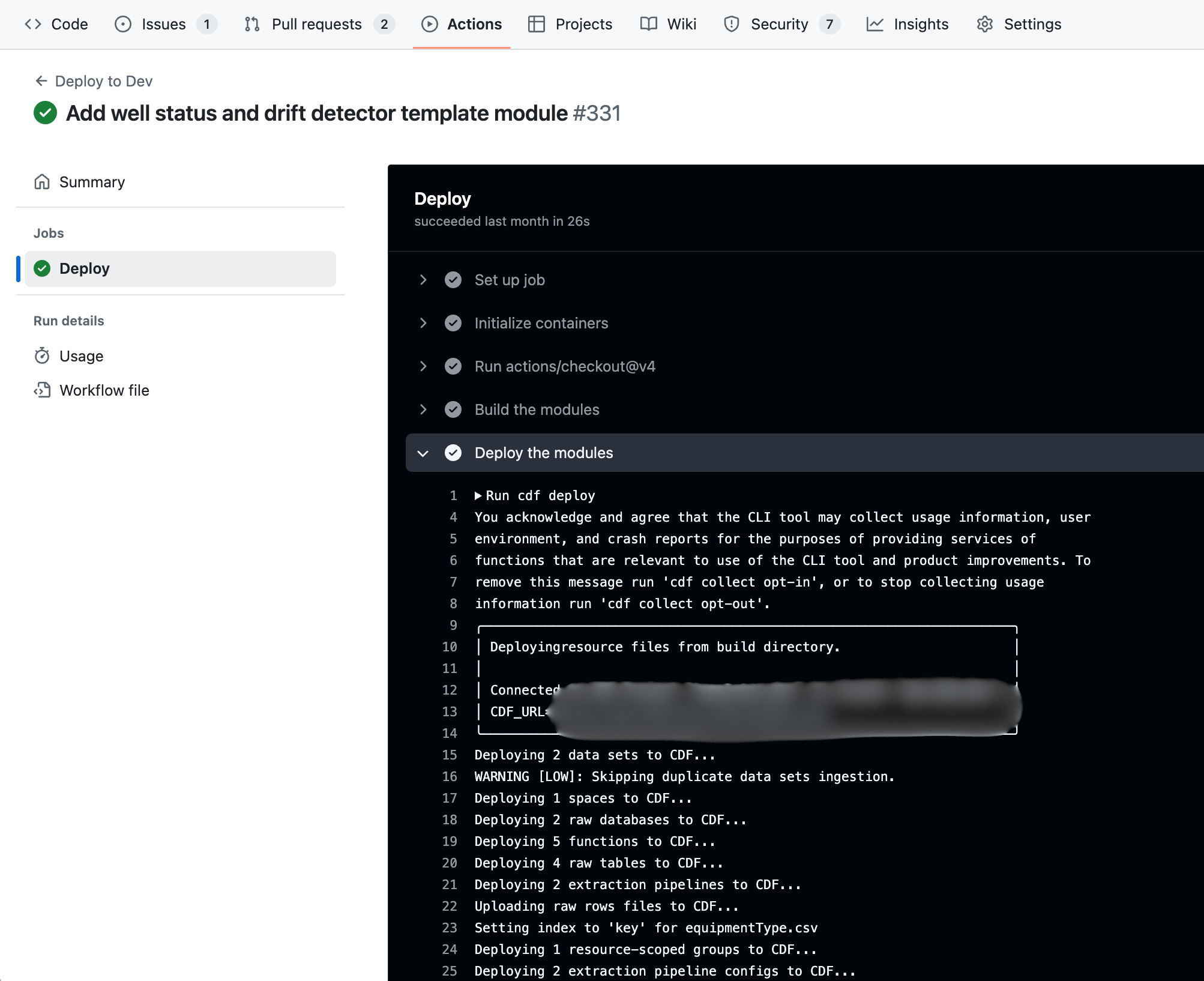
You can see the status of each run and step of the actions in the **Actions** tab of your repository. Click a step to see the logs.
The values are used in the GitHub Actions workflow file. **Environment** variables (for example `${{ vars.CDF_CLUSTER }}`) are visible to anyone with access to the repository. **Secrets** (for example `${{ secrets.IDP_CLIENT_SECRET }}`) are encrypted and only available to the GitHub Actions workflow.
A standard **client credentials flow** requires these environment variables and secrets:
**Variables**
* CDF\_CLUSTER
* CDF\_PROJECT
* LOGIN\_FLOW: (client\_credentials)
* IDP\_CLIENT\_ID
* IDP\_TOKEN\_URL (if you're not using Entra ID)
**Secrets**
* IDP\_CLIENT\_SECRET
## View Action run details
You can see the status of each run and step of the actions in the **Actions** tab of your repository. Click a step to see the logs.