> ## Documentation Index
> Fetch the complete documentation index at: https://docs.cognite.com/llms.txt
> Use this file to discover all available pages before exploring further.
# About data sets
> Data sets let you document and track data lineage, ensure data integrity, and allow 3rd parties to write their insights to your Cognite Data Fusion (CDF) project securely.
## What is a data set?
Data sets group and track data by **its source**. For example, a data set can contain all work orders originating from SAP or the output data from a 3rd party partner's machine-learning model. Typically, organizations have one data set for each data ingestion pipeline in CDF.
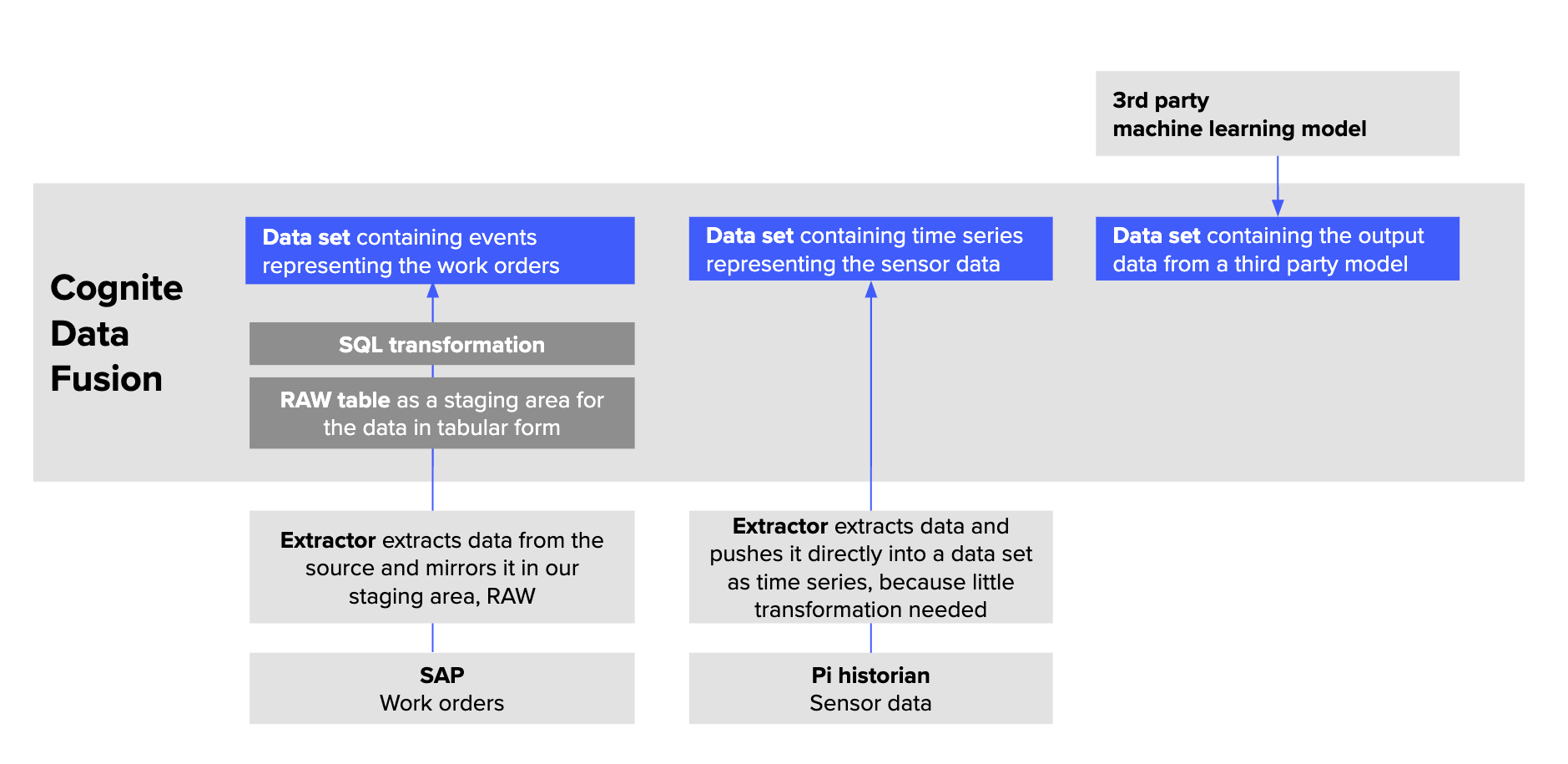 A **data set** is a container for data objects with metadata about the data it contains. For example, you can use the data set metadata to document who is responsible for the data, upload documentation files, and describe the data lineage. In CDF, data sets are a separate resource type with a `/datasets` API endpoint.
To define which **data objects**, such as events, files, and time series, belong to a data set, you specify the relevant `dataSetId` field for each data object. This is typically done programmatically in the data ingestion pipelines. Data objects can belong to only one data set so you can unambiguously trace the data lineage for each data object.
You can organize the following resource types into data sets:
* Assets
* Events
* Files
* Time series
* Sequences
## Why use data sets?
For proper data governance, you need to trace the **data lineage** to understand where data originates from and be confident that the data is reliable. Data managers need to ensure **data integrity** and let **3rd parties write data** to CDF.
### Trace data lineage
* **IT managers** need to know which data is currently available in their CDF project.
* **Data scientists** need to know if they can rely on the input data for the use cases they're solving and who to contact if they need more information.
* **IT support staff** need to know how the data is integrated to help troubleshoot any issues.
### Ensure data integrity
* When **data engineers** and **IT managers** have designed, implemented, and approved the data ingestion pipelines, they need to protect the pipelines from accidental changes to keep the data valid and accurate.
### Let 3rd parties write data securely back to CDF
* When you want **3rd parties** to write their insights back to your CDF project, you need to provide a safe container to hold their data and, at the same time, safeguard data from your other data pipelines.
## Data set concepts
### Write-protection
We recommend that you **write-protect** data sets that contain production-critical data to preserve the integrity of the data.
Only members of groups you explicitly grant access can write data to a write-protected data set. Other users, apps, or services can not change the data in the data set even if they have the necessary access rights to change the data objects contained in the data set.
**To write-protect a data set:**
[Create](/cdf/data_governance/guides/datasets/create_data_sets) or [edit](/cdf/data_governance/guides/datasets/edit_explore_data_sets) a data set and mark it as write protected.
In [access management](/cdf/access/entra/guides/create_groups_oidc), use the **datasets** capability to set the **owner** action for a group and **scope** it to the `dataSetId`.
| Desired access | Capability | Action | Scope |
| -------------------------------------------- | ---------- | ------ | --------- |
| Write to a specific write-protected data set | datasets | owner | dataSetId |
### Governance status
Set the governance status to define if the data set is **Governed** or **Ungoverned**.
* **Governed** data sets have a designated owner and follow the governance processes for data in your organization.
* **Ungoverned** data sets indicate to users that the data may not be reliable. If you want to use data from an ungoverned data set, we recommend contacting the owner or creator of the data set to learn more about the data.
### Labels
Use labels to make data sets more discoverable and to group similar data sets. For example, you can use labels to specify the type of data it contains, the geographical region covered by the data, or which business unit uses the data. You can search for data sets by their labels.
### Archiving
You can archive data sets to hide them from the user interface and make the data set unavailable to users. The data set and the data it contains won't be deleted, and you can always restore archived data sets later.
### Lineage
Data lineage helps you be confident that the data in a data set is reliable. On the **lineage tab** for each data set, you can see who has created a data set, where the data comes from, and how the data has been processed.
You can provide information about the lineage when you [create](/cdf/data_governance/guides/datasets/create_data_sets) or [edit](/cdf/data_governance/guides/datasets/edit_explore_data_sets) the data set.
A **data set** is a container for data objects with metadata about the data it contains. For example, you can use the data set metadata to document who is responsible for the data, upload documentation files, and describe the data lineage. In CDF, data sets are a separate resource type with a `/datasets` API endpoint.
To define which **data objects**, such as events, files, and time series, belong to a data set, you specify the relevant `dataSetId` field for each data object. This is typically done programmatically in the data ingestion pipelines. Data objects can belong to only one data set so you can unambiguously trace the data lineage for each data object.
You can organize the following resource types into data sets:
* Assets
* Events
* Files
* Time series
* Sequences
## Why use data sets?
For proper data governance, you need to trace the **data lineage** to understand where data originates from and be confident that the data is reliable. Data managers need to ensure **data integrity** and let **3rd parties write data** to CDF.
### Trace data lineage
* **IT managers** need to know which data is currently available in their CDF project.
* **Data scientists** need to know if they can rely on the input data for the use cases they're solving and who to contact if they need more information.
* **IT support staff** need to know how the data is integrated to help troubleshoot any issues.
### Ensure data integrity
* When **data engineers** and **IT managers** have designed, implemented, and approved the data ingestion pipelines, they need to protect the pipelines from accidental changes to keep the data valid and accurate.
### Let 3rd parties write data securely back to CDF
* When you want **3rd parties** to write their insights back to your CDF project, you need to provide a safe container to hold their data and, at the same time, safeguard data from your other data pipelines.
## Data set concepts
### Write-protection
We recommend that you **write-protect** data sets that contain production-critical data to preserve the integrity of the data.
Only members of groups you explicitly grant access can write data to a write-protected data set. Other users, apps, or services can not change the data in the data set even if they have the necessary access rights to change the data objects contained in the data set.
**To write-protect a data set:**
[Create](/cdf/data_governance/guides/datasets/create_data_sets) or [edit](/cdf/data_governance/guides/datasets/edit_explore_data_sets) a data set and mark it as write protected.
In [access management](/cdf/access/entra/guides/create_groups_oidc), use the **datasets** capability to set the **owner** action for a group and **scope** it to the `dataSetId`.
| Desired access | Capability | Action | Scope |
| -------------------------------------------- | ---------- | ------ | --------- |
| Write to a specific write-protected data set | datasets | owner | dataSetId |
### Governance status
Set the governance status to define if the data set is **Governed** or **Ungoverned**.
* **Governed** data sets have a designated owner and follow the governance processes for data in your organization.
* **Ungoverned** data sets indicate to users that the data may not be reliable. If you want to use data from an ungoverned data set, we recommend contacting the owner or creator of the data set to learn more about the data.
### Labels
Use labels to make data sets more discoverable and to group similar data sets. For example, you can use labels to specify the type of data it contains, the geographical region covered by the data, or which business unit uses the data. You can search for data sets by their labels.
### Archiving
You can archive data sets to hide them from the user interface and make the data set unavailable to users. The data set and the data it contains won't be deleted, and you can always restore archived data sets later.
### Lineage
Data lineage helps you be confident that the data in a data set is reliable. On the **lineage tab** for each data set, you can see who has created a data set, where the data comes from, and how the data has been processed.
You can provide information about the lineage when you [create](/cdf/data_governance/guides/datasets/create_data_sets) or [edit](/cdf/data_governance/guides/datasets/edit_explore_data_sets) the data set.