> ## Documentation Index
> Fetch the complete documentation index at: https://docs.cognite.com/llms.txt
> Use this file to discover all available pages before exploring further.
# Power Query functions and example queries
> Combine functions from the Cognite Data Fusion REST API connector for Power BI with Power Query to fetch and transform data.
Copy and adapt the queries and Power Query functions on this page to fit your business needs.
## Power BI template
To get started quickly, you can use a Power BI template file (`.pbix`) that includes all the utility functions and helper functions documented on this page. It also includes additional functions for [incremental refresh](/cdf/dashboards/references/rest/powerbi_rest_incremental_refresh). The template saves you from manually copying and pasting each function into your Power BI report.
Download the template pbix file to get started with all utility functions pre-configured.
The template requires Power BI Desktop version 2.149.1429.0 (November 2025) or later. Update Power BI Desktop to the latest version to ensure compatibility.
### What's included
The template contains the following components:
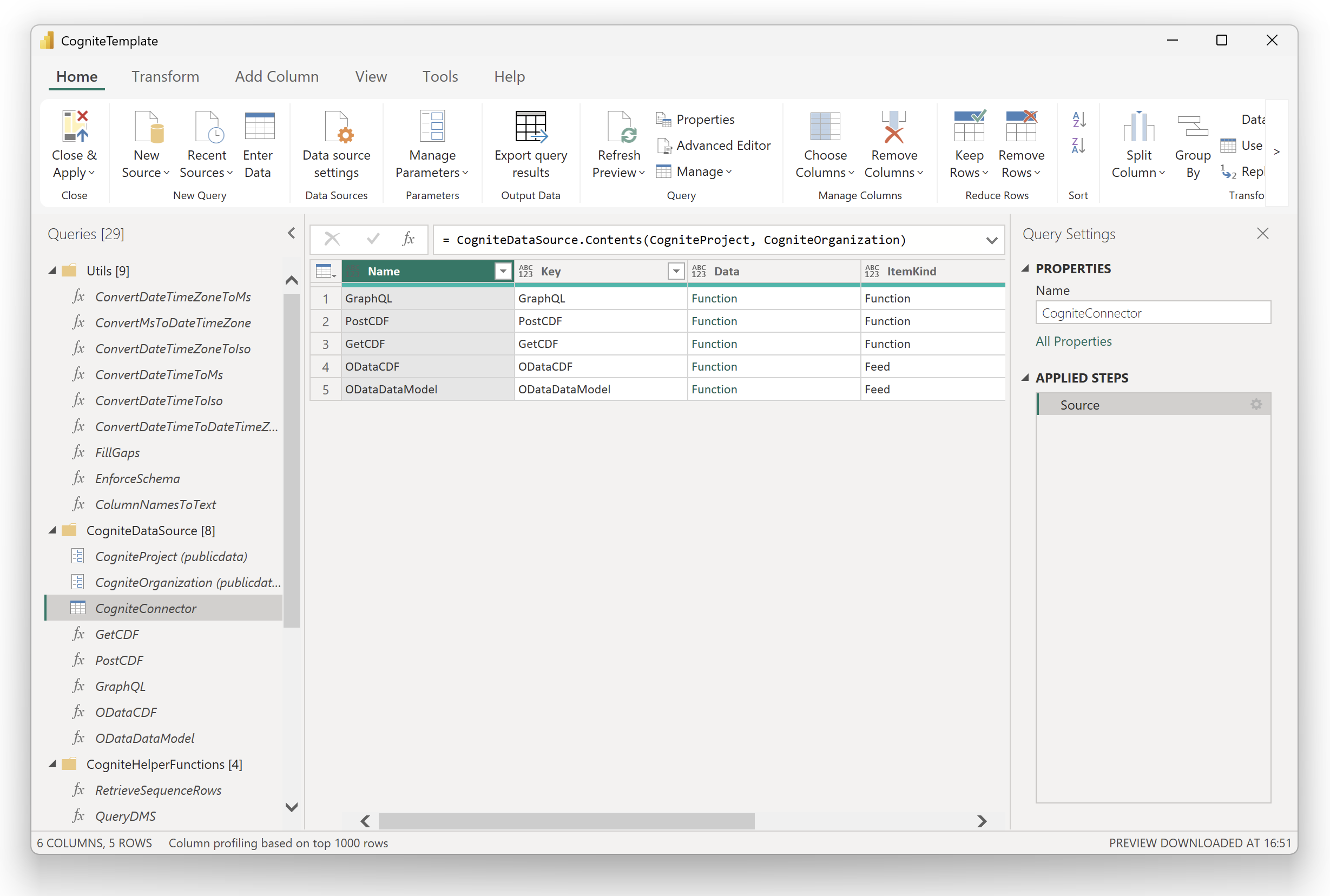 | Folder | Description |
| -------------------------- | ------------------------------------------------------------------------------------------------------------------------------------------------------------------------------------------------------------------------------------------------------------------------------------------------------------------------------------------------------------------------------------------------------------------------------------------------------------------------------------------------ |
| **Utils** | Utility functions: timestamp conversion (`ConvertDateTimeZoneToMs`, `ConvertMsToDateTimeZone`, `ConvertDateTimeZoneToIso`, `ConvertDateTimeToMs`, `ConvertDateTimeToIso`, `ConvertDateTimeToDateTimeZone`), gap filling (`FillGaps`), schema enforcement (`EnforceSchema`), and column name conversion (`ColumnNamesToText`). For detailed information, see [utility functions](#utility-functions) and [incremental refresh](/cdf/dashboards/references/rest/powerbi_rest_incremental_refresh). |
| **CogniteDataSource** | Pre-configured connection to the Cognite REST API Power BI connector with `CogniteProject` and `CogniteOrganization` parameters ready to update. |
| **CogniteHelperFunctions** | [Helper functions](#advanced-examples): `RetrieveSequenceRows`, `QueryDMS`, `RetrieveDataPoints`, and `RetrieveDataPointsMultipleTs`. |
| **Other Queries** | Pre-configured `RangeStart` and `RangeEnd` parameters for [incremental refresh](/cdf/dashboards/references/rest/powerbi_rest_incremental_refresh), along with derived variables (`RangeStartMs`, `RangeEndMs`, `RangeStartDtz`, `RangeEndDtz`, `RangeStartIso`, `RangeEndIso`) ready to use with any connector function. |
### Getting started with the template
Download the template file and open it in Power BI Desktop.
Select **Transform Data** to open the Power Query editor. Update the `CogniteProject` and `CogniteOrganization` parameters with your CDF project name and organization.
When prompted, sign in with your organizational account to authenticate with CDF.
Create your queries using the pre-configured functions, or use them as a reference alongside the documentation on this page.
Use the template as a companion file and refer to the [connector functions](/cdf/dashboards/references/rest/powerbi_rest_functions), this page, and the [incremental refresh](/cdf/dashboards/references/rest/powerbi_rest_incremental_refresh) documentation for detailed explanations, parameters, and usage examples.
The template file and Power Query functions are provided as reference implementations and are not covered by Cognite Support. You can modify them to fit your specific needs. If you encounter issues or have suggestions, report them on [Cognite Hub](https://hub.cognite.com) or open a support ticket for evaluation.
## Utility functions
### Convert timestamps from/to epoch
CDF resource types expect and return timestamps using *milliseconds since the Unix epoch*. Power Query doesn't have methods to automatically parse this format to a `datetimezone` type to represent timezone-aware timestamps. CDF [data models](/cdf/dm) represent timestamps using the [*ISO 8601*](https://en.wikipedia.org/wiki/ISO_8601) format for primitive fields.
Use the functions below to convert between a `datetimezone` variable and *milliseconds since the Unix epoch* and from a `datetimezone` variable to text in *ISO 8601* format.
```js title="Convert datetimezone to milliseconds since epoch" theme={"languages":{"custom":["/_languages/kuiper.json","../_languages/kuiper.json"]}}
(dtz as nullable datetimezone) as nullable number =>
if dtz = null then null else
let
// Convert the input DateTimeZone to UTC
UtcDateTime = DateTimeZone.RemoveZone(DateTimeZone.SwitchZone(dtz, 0)),
// Define the Unix epoch start
UnixEpochStart = #datetime(1970, 1, 1, 0, 0, 0),
// Calculate the duration between the input date and Unix epoch start
Delta = UtcDateTime - UnixEpochStart,
// Convert duration to total milliseconds
TotalMilliseconds = Number.RoundDown(Duration.TotalSeconds(Delta) * 1000)
in
TotalMilliseconds
```
```js title="Convert milliseconds since epoch to datetimezone" theme={"languages":{"custom":["/_languages/kuiper.json","../_languages/kuiper.json"]}}
(ms as nullable number) as nullable datetimezone =>
if ms = null then null else
let
// Convert ms to seconds
SecondsSinceEpoch = ms / 1000,
// Create a duration
DurationSinceEpoch = #duration(0, 0, 0, SecondsSinceEpoch),
// Add duration to Unix epoch start to get UTC datetime
UnixEpochStart = #datetime(1970, 1, 1, 0, 0, 0),
UtcDateTime = UnixEpochStart + DurationSinceEpoch,
// Convert UTC datetime to local time zone
LocalDateTimeZone = DateTimeZone.From(UtcDateTime)
in
LocalDateTimeZone
```
```js title="Convert DateTimeZone to ISO 8601 text representation" theme={"languages":{"custom":["/_languages/kuiper.json","../_languages/kuiper.json"]}}
(dtz as nullable datetimezone) as nullable text =>
if dtz = null then null else
let
// Use DateTimeZone.ToText with ISO 8601 format
Result = DateTimeZone.ToText(dtz, [Format="yyyy-MM-ddTHH:mm:sszzz", Culture="en-US"])
in
Result
```
### Fill gaps in time series data
This function creates a uniform time index and fills missing values using forward fill or linear interpolation. It's used by [`RetrieveDataPoints`](#fetch-time-series-datapoints-with-the-postcdf-function) when gap filling is enabled.
```js title="Fill gaps in time series data" theme={"languages":{"custom":["/_languages/kuiper.json","../_languages/kuiper.json"]}}
(
dataTable as table,
startTime as datetimezone,
endTime as datetimezone,
granularity as text,
fillMode as text,
valueColumns as list
) as table =>
let
// Helper function to convert granularity string to duration
ParseGranularityToDuration = (g as text) as duration =>
let
TrimmedGranularity = Text.Trim(g),
Characters = Text.ToList(TrimmedGranularity),
UnitStartIndex = List.PositionOf(
List.Transform(Characters, each not Text.Contains("0123456789", _)),
true
),
NumberPart = Text.Start(TrimmedGranularity, UnitStartIndex),
UnitPart = Text.Lower(Text.Middle(TrimmedGranularity, UnitStartIndex)),
NumericValue = Number.FromText(NumberPart),
Result =
if UnitPart = "s" then #duration(0, 0, 0, NumericValue)
else if UnitPart = "m" then #duration(0, 0, NumericValue, 0)
else if UnitPart = "h" then #duration(0, NumericValue, 0, 0)
else if UnitPart = "d" then #duration(NumericValue, 0, 0, 0)
else if UnitPart = "w" then #duration(NumericValue * 7, 0, 0, 0)
else error "Unsupported granularity unit: " & UnitPart
in
Result,
// Convert granularity to milliseconds
StepDuration = ParseGranularityToDuration(granularity),
StepMs = Number.Round(Duration.TotalSeconds(StepDuration) * 1000),
// Add epoch_ms to data for lookup
DataWithEpoch = Table.AddColumn(dataTable, "epoch_ms", each ConvertDateTimeZoneToMs([timestamp])),
DataEpochs = Table.Column(DataWithEpoch, "epoch_ms"),
// Get the first data point's epoch as anchor
MinDataEpoch = List.Min(DataEpochs),
// Calculate number of steps from user's requested duration
UserDurationMs = Duration.TotalSeconds(endTime - startTime) * 1000,
NumSteps = Number.RoundDown(UserDurationMs / StepMs),
// Generate uniform epochs anchored to first data point
UniformEpochList = List.Transform(
{0..NumSteps - 1},
each MinDataEpoch + (_ * StepMs)
),
// Build lookup: epoch (as text) -> data record
DataRecords = Table.ToRecords(DataWithEpoch),
EpochToRecord = List.Accumulate(
DataRecords,
[],
(state, row) =>
Record.AddField(state, Text.From(row[epoch_ms]), row)
),
// Get timezone from first data row to use for gap timestamps
FirstDataTimestamp = dataTable{0}[timestamp],
DataTzHours = DateTimeZone.ZoneHours(FirstDataTimestamp),
DataTzMinutes = DateTimeZone.ZoneMinutes(FirstDataTimestamp),
// Helper function to convert epoch to datetimezone in data's timezone
EpochToDataTz = (epochMs as number) as datetimezone =>
let
SecondsSinceEpoch = epochMs / 1000,
DurationSinceEpoch = #duration(0, 0, 0, SecondsSinceEpoch),
UnixEpochStart = #datetimezone(1970, 1, 1, 0, 0, 0, 0, 0),
UtcDateTimeZone = UnixEpochStart + DurationSinceEpoch,
DataDateTimeZone = DateTimeZone.SwitchZone(UtcDateTimeZone, DataTzHours, DataTzMinutes)
in
DataDateTimeZone,
// Identify metadata columns
AllColumns = Table.ColumnNames(dataTable),
MetadataColumns = List.RemoveItems(AllColumns, List.Combine({{"timestamp"}, valueColumns})),
FirstRowMetadata = if Table.RowCount(dataTable) > 0 then
Record.SelectFields(dataTable{0}, MetadataColumns)
else
[],
// Build uniform rows with looked-up values
UniformRows = List.Transform(
UniformEpochList,
(epochMs) =>
let
epochKey = Text.From(epochMs),
matchedRow = Record.FieldOrDefault(EpochToRecord, epochKey, null),
timestamp = if matchedRow <> null then
matchedRow[timestamp]
else
EpochToDataTz(epochMs),
baseRecord = [timestamp = timestamp],
withValues = List.Accumulate(
valueColumns,
baseRecord,
(rec, col) =>
Record.AddField(rec, col,
if matchedRow <> null then
Record.FieldOrDefault(matchedRow, col, null)
else
null
)
)
in
withValues
),
ExpandedTable = Table.FromRecords(UniformRows),
// Convert to list of records for processing
RowsList = Table.ToRecords(ExpandedTable),
RowCount = List.Count(RowsList),
// Apply fill mode
FilledRows =
if fillMode = "ffill" then
// Forward fill implementation
List.Accumulate(
{0..RowCount-1},
[rows = {}, lastValues = []],
(state, idx) =>
let
currentRow = RowsList{idx},
newLastValues = List.Accumulate(
valueColumns,
state[lastValues],
(lv, col) =>
let
currentVal = Record.FieldOrDefault(currentRow, col, null)
in
if currentVal <> null then
Record.AddField(Record.RemoveFields(lv, {col}, MissingField.Ignore), col, currentVal)
else
lv
),
filledRow = List.Accumulate(
valueColumns,
currentRow,
(row, col) =>
let
currentVal = Record.Field(row, col),
lastVal = Record.FieldOrDefault(newLastValues, col, null)
in
if currentVal = null and lastVal <> null then
Record.TransformFields(row, {{col, each lastVal}})
else
row
)
in
[rows = state[rows] & {filledRow}, lastValues = newLastValues]
)[rows]
else if fillMode = "linear" then
// Linear interpolation with forward fill for tail values
let
ValuesPerColumn = List.Transform(valueColumns, each
List.Transform(RowsList, (row) => Record.FieldOrDefault(row, _, null))
),
InterpolatedColumns = List.Transform(
List.Zip({valueColumns, ValuesPerColumn}),
(pair) =>
let
colName = pair{0},
values = pair{1},
nonNullIndices = List.Select({0..RowCount-1}, each values{_} <> null),
interpolatedValues =
if List.Count(nonNullIndices) < 1 then
values
else
List.Transform({0..RowCount-1}, (idx) =>
let
currentVal = values{idx}
in
if currentVal <> null then
currentVal
else
let
prevIndices = List.Select(nonNullIndices, each _ < idx),
nextIndices = List.Select(nonNullIndices, each _ > idx),
prevIdx = if List.Count(prevIndices) > 0 then List.Last(prevIndices) else null,
nextIdx = if List.Count(nextIndices) > 0 then List.First(nextIndices) else null
in
if prevIdx <> null and nextIdx <> null then
let
prevVal = values{prevIdx},
nextVal = values{nextIdx},
ratio = (idx - prevIdx) / (nextIdx - prevIdx)
in
prevVal + (nextVal - prevVal) * ratio
else if prevIdx <> null then
values{prevIdx}
else
null
)
in
{colName, interpolatedValues}
),
rebuiltRows = List.Transform({0..RowCount-1}, (idx) =>
let
baseRow = RowsList{idx},
updatedRow = List.Accumulate(
InterpolatedColumns,
baseRow,
(row, colPair) =>
let
colName = colPair{0},
colValues = colPair{1},
newVal = colValues{idx}
in
Record.TransformFields(row, {{colName, each newVal}})
)
in
updatedRow
)
in
rebuiltRows
else
error "Invalid fillMode: " & fillMode & ". Use: ffill or linear",
// Convert back to table
FilledTable = Table.FromRecords(FilledRows),
// Add back metadata columns
FinalTable =
if Record.FieldCount(FirstRowMetadata) > 0 then
List.Accumulate(
Record.FieldNames(FirstRowMetadata),
FilledTable,
(tbl, fieldName) => Table.AddColumn(
tbl, fieldName, each Record.Field(FirstRowMetadata, fieldName)
)
)
else FilledTable,
// Reorder columns to match original order
ReorderedTable = Table.ReorderColumns(
FinalTable,
List.Combine({MetadataColumns, {"timestamp"}, valueColumns})
),
// Apply proper column types from original table
OriginalTypes = Table.Schema(dataTable),
TypeMappings = List.Transform(
Table.ToRecords(OriginalTypes),
each {[Name],
if [Kind] = "datetimezone" then type datetimezone
else if [Kind] = "datetime" then type datetime
else if [Kind] = "number" then type number
else if [Kind] = "text" then type text
else if [Kind] = "int64" then Int64.Type
else type any
}
),
TypedTable = Table.TransformColumnTypes(ReorderedTable, TypeMappings)
in
TypedTable
```
## Add function
To add a new function in Power Query, select **Get Data** > **Blank Query** and write your function or copy one of the functions below.
### Time deltas
It's common to define **start** and **end** timestamps based on time deltas. The values will be updated when a dataset is refreshed. In the example below, `EndTime` is the current time, and `StartTime` is 7 days before `EndTime`. You can adapt this example to use different time deltas.
```js title="Time deltas" theme={"languages":{"custom":["/_languages/kuiper.json","../_languages/kuiper.json"]}}
CurrentTime = DateTimeZone.LocalNow(),
EndTime = CurrentTime,
StartTime = CurrentTime - #duration(7, 0, 0, 0)
```
### Common GET request
When you fetch data from CDF using the [`GetCDF`](/cdf/dashboards/references/rest/powerbi_rest_functions#getcdf) function from the CDF REST API connector for Power BI, you must use query parameters to pass on filters to select which data to fetch.
The example below shows how you can add the `externalIdPrefix` and `limit` query parameters from the `/timeseries` endpoint to the URL to filter data on the server side.
```js title="List all time series instances with an externalId starting with a specific string" theme={"languages":{"custom":["/_languages/kuiper.json","../_languages/kuiper.json"]}}
let
Source = GetCDF("/timeseries?externalIdPrefix=EVE&limit=1000")
in
Source
```
### Common POST request
When you fetch data from CDF with the [`PostCDF`](cdf/dashboards/references/rest/powerbi_rest_functions#postcdf) function, you must write a request body to select which data to fetch. The function accepts a text representation of the JSON body, but you can also write the body using a Power Query record data type and then convert it to a JSON text data type before passing the value to the `PostCDF` function.
```js title="List all data modeling instances for a view using the DMS API" theme={"languages":{"custom":["/_languages/kuiper.json","../_languages/kuiper.json"]}}
let
SpaceExternalId = "Geography",
ViewExternalId = "City",
ViewVersion = "1",
Body = [
sources = {
[
source = [
type = "view",
space = SpaceExternalId,
externalId = ViewExternalId,
version = ViewVersion
]
]
},
limit = 1000
],
BodyText = Text.FromBinary(Json.FromValue(Body)),
Source = PostCDF("/models/instances/list", BodyText)
in
Source
```
Alternatively, you can manually write the POST body as text, but you need to escape double quotes (`"`) with another set of double-quote characters:
```js theme={"languages":{"custom":["/_languages/kuiper.json","../_languages/kuiper.json"]}}
let
BodyText = "{""sources"": [{""source"": {""type"": ""view"", ""space"": ""Geography"", ""externalId"": ""City"", ""version"": ""1""}}], ""limit"": 1000}",
Source = PostCDF("/models/instances/list", BodyText)
in
Source
```
If you need to reuse a POST request, you can transform it into a Power Query function. For example:
```js theme={"languages":{"custom":["/_languages/kuiper.json","../_languages/kuiper.json"]}}
(SpaceExternalId as text, ViewExternalId as text, ViewVersion as text) as table =>
let
Body = [
sources = {
[
source = [
type = "view",
space = SpaceExternalId,
externalId = ViewExternalId,
version = ViewVersion
]
]
},
limit = 1000
],
BodyText = Text.FromBinary(Json.FromValue(Body)),
Source = PostCDF("/models/instances/list", BodyText)
in
Source
```
You can define the function name by right-clicking on the entry in the query list in the Power Query editor and selecting Rename.
If the function above is named `ListInstancesDMS`, you can use it in a new query by entering the field values in Power Query or by writing a new query:
```js theme={"languages":{"custom":["/_languages/kuiper.json","../_languages/kuiper.json"]}}
let
Source = ListInstancesDMS("Geography", "City", "1")
in
Source
```
### GraphQL requests
When you fetch data from CDF using the [`GraphQL`](/cdf/dashboards/references/rest/powerbi_rest_functions#graphql) function, you must write a GraphQL request to select which data to fetch from a specific data model. The function expects you to specify the external ID of the space, the external ID of the view, the version of the view, the GraphQL query to run, and optionally a set of variables to be used in the query.
The query below uses the GraphQL syntax and passes the variables as JSON texts. Using variables in the query makes it easier to parameterize and use with external values.
```js title="List all work orders with an end date greater than a specific date" theme={"languages":{"custom":["/_languages/kuiper.json","../_languages/kuiper.json"]}}
let
Source = GraphQL(
"cdf_idm",
"CogniteProcessIndustries",
"v1",
"query MyQuery($cursor: String, $endTime: Timestamp) {#(lf) listCogniteMaintenanceOrder(#(lf) first: 1000#(lf) after: $cursor#(lf) filter: {endTime: {gte: $endTime}}#(lf) ) {#(lf) items {#(lf) name#(lf) type#(lf) startTime#(lf) endTime#(lf) priority#(lf) }#(lf) pageInfo {#(lf) endCursor#(lf) hasNextPage#(lf) }#(lf) }#(lf)}",
"{""endTime"": ""2024-10-01T00:00:00+02:00""}"
)
in
Source
```
The `#(lf)` represents a line-break character. In the example above, the query was pasted into the text area field in Power BI and the variables were passed as JSON text. Notice how Power BI added the line breaks to the original query and expressed it as a single-line text variable.
Alternatively, you can write the query directly as a multi-line text variable. You can define the variables as Power Query records and convert them to JSON text before passing them to the `GraphQL` function. For example, see how the [`ConvertDateTimeZoneToIso`](#convertdatetimezonetoiso) function converts a `datetimezone` variable to a text representation of the ISO 8601 format and then passes it as a variable to the query.
```js theme={"languages":{"custom":["/_languages/kuiper.json","../_languages/kuiper.json"]}}
let
// This could be a parameter or referenced from another query
EndTime = #datetimezone(2024, 10, 1, 0, 0, 0, 2, 0),
VariablesRecord = [
endTime = ConvertDateTimeZoneToIso(EndTime)
],
VariablesText = Text.FromBinary(Json.FromValue(VariablesRecord)),
Query = "query MyQuery($cursor: String, $endTime: Timestamp) {
listCogniteMaintenanceOrder(
first: 1000
after: $cursor
filter: {endTime: {gte: $endTime}}
) {
items {
name
type
startTime
endTime
priority
}
pageInfo {
endCursor
hasNextPage
}
}
}",
Data = GraphQL(
"cdf_idm",
"CogniteProcessIndustries",
"v1",
Query,
VariablesText
)
in
Data
```
## Advanced examples
Depending on the shape of the Cognite API response, you may need additional Power Query transformations to fetch and transform the data. Copy and adapt the examples below to fit your business needs.
### Fetch sequence rows with the `PostCDF` function
The Power Query function below fetches and processes sequence rows data for a sequence external ID from CDF. It sends a POST request, extracts column information, expands nested response data, and reorganizes it into tabular format. The function handles data type conversion, removes unnecessary fields, and groups data by row. The final output is a well-structured table with correctly typed columns.
```js title="Fetch sequence rows with PostCDF" theme={"languages":{"custom":["/_languages/kuiper.json","../_languages/kuiper.json"]}}
(externalId as text) as table =>
let
RequestBody = "{""externalId"": """ & externalId & """, ""limit"": 10000}",
Response = PostCDF("/sequences/data/list", RequestBody),
// Extract columns information from the first page
FirstPage = Response{0},
Columns = FirstPage[columns],
ColumnNames = List.Transform(Columns, each [externalId]),
ColumnTypes = List.Transform(Columns, each
if [valueType] = "STRING" then type text else
if [valueType] = "DOUBLE" then type number else
if [valueType] = "LONG" then Int64.Type
else type any
),
// Extract the 'values' from each row
Rows = Table.ExpandListColumn(Response, "rows"),
ValuesTable = Table.ExpandRecordColumn(Rows, "rows", {"rowNumber", "values"}, {"rows.rowNumber", "rows.values"}),
RemoveColumns = Table.RemoveColumns(ValuesTable,{"id", "externalId", "columns", "nextCursor"}),
ExpandValues = Table.ExpandListColumn(RemoveColumns, "rows.values"),
// Group by rowNumber and create a record for each row
GroupedRows = Table.Group(ExpandValues, {"rows.rowNumber"}, {
{"RowData", (t) => Record.FromList(t[rows.values], ColumnNames)}
}),
// Expand the RowData column
ExpandRows = Table.ExpandRecordColumn(GroupedRows, "RowData", ColumnNames),
// Set column data types
FinalTable = Table.TransformColumnTypes(ExpandRows, List.Zip({ColumnNames, ColumnTypes}))
in
FinalTable
```
To use the function:
```js theme={"languages":{"custom":["/_languages/kuiper.json","../_languages/kuiper.json"]}}
let
Source = RetrieveSequenceRows("sequence-externalId")
in
Source
```
### Fetch instances from the DMS query endpoint with the `PostCDF` function
The Power Query function below retrieves and processes data modeling instances for a DMS query. It paginates through the response, extracts the instances, and expands the nested data.
```js title="Fetch instances from the DMS query endpoint with PostCDF" theme={"languages":{"custom":["/_languages/kuiper.json","../_languages/kuiper.json"]}}
(query as text) as table =>
let
FetchPage = (query as text, optional cursors as nullable record) as table =>
let
Query = Json.Document(query),
UpdatedQuery =
if cursors <> null then
let
// Get all field names of both records
QueryWithFields = Record.FieldNames(Query[with]),
QuerySelectFields = Record.FieldNames(Query[select]),
CursorsFields = Record.FieldNames(cursors),
// Find the intersection of field names
CommonFields = List.Intersect({QueryWithFields, QuerySelectFields, CursorsFields}),
// Create new records containing only the common fields
UpdatedQueryWithAndSelect = Record.TransformFields(
Query,
{
{"with", each Record.SelectFields(_, CommonFields)},
{"select", each Record.SelectFields(_, CommonFields)}
}
)
in
UpdatedQueryWithAndSelect
else
Query,
// Add cursors if they are provided
UpdatedQueryWithCursors =
if cursors <> null then
Record.AddField(UpdatedQuery, "cursors", cursors)
else
UpdatedQuery,
FinalBody = Text.FromBinary(Json.FromValue(UpdatedQueryWithCursors)),
Response = PostCDF("/models/instances/query", FinalBody)
in
Response,
// Helper function to create next cursor record from result table
CreateNextCursorRecordFromTable = (inputTable as table) as record =>
let
RecordsList = List.Transform(
Table.ToRecords(inputTable), each Record.FromList({[nextCursor]}, {[resultExpression]})
),
CombinedRecord = Record.Combine(RecordsList)
in
CombinedRecord,
// Helper function to check if all cursors are null
AllCursorsNull = (cursorsRecord as record) as logical =>
let
CursorValues = Record.ToList(cursorsRecord),
NullCount = List.Count(List.Select(CursorValues, each _ = null))
in
NullCount = List.Count(CursorValues),
// Helper function to aggregate items from all pages and convert to tables
AggregateResults = (results as list) as table =>
let
// Combine all tables
CombinedTable = Table.Combine(results),
// Group by resultExpression and convert items to tables
GroupedTable = Table.Group(
CombinedTable,
{"resultExpression"},
{
{
"items",
each
Table.FromRecords(
List.Combine(List.Transform([items], each if Value.Is(_, type list) then _ else {
_
}))
),
type table
}
}
)
in
GroupedTable,
// Main pagination logic
FetchAllPages = () as list =>
let
// Initialize accumulator
InitialAcc = [
results = {},
currentCursors = null,
hasMore = true
],
// Pagination function
PaginationFunction = (acc as record) =>
let
CurrentPage = FetchPage(query, acc[currentCursors]),
NextCursors = CreateNextCursorRecordFromTable(CurrentPage),
HasMoreResults = not AllCursorsNull(NextCursors) and Table.RowCount(CurrentPage) > 0,
UpdatedResults = List.Combine({acc[results], {CurrentPage}})
in
[
results = UpdatedResults,
currentCursors = NextCursors,
hasMore = HasMoreResults
],
// Keep fetching until no more results
AllResults = List.Generate(
() => InitialAcc, each _[hasMore], each PaginationFunction(_), each _[results]
),
// Get the final list of results
FinalResults = List.Last(AllResults)
in
FinalResults,
// Execute pagination and combine results
AllPages = FetchAllPages(),
FinalTable = AggregateResults(AllPages)
in
FinalTable
```
To use the function:
```js theme={"languages":{"custom":["/_languages/kuiper.json","../_languages/kuiper.json"]}}
let
Query = [
with = [
cities = [
nodes = [
filter = [
hasData = {
[
space = "Geography",
externalId = "City",
version = "1",
#"type" = "view"
]
}
],
chainTo = "destination",
direction = "outwards"
]
],
countries = [
nodes = [
filter = [
hasData = {
[
space = "Geography",
externalId = "Country",
version = "1",
#"type" = "view"
]
}
],
chainTo = "destination",
direction = "outwards"
]
]
],
select = [
cities = [
sources = {
[
source = [
space = "Geography",
externalId = "City",
version = "1",
#"type" = "view"
],
properties = {
"name"
}
]
}
],
countries = [
sources = {
[
source = [
space = "Geography",
externalId = "Country",
version = "1",
#"type" = "view"
],
properties = {
"name"
}
]
}
]
]
],
QueryText = Text.FromBinary(Json.FromValue(Query)),
Source = QueryDMS(QueryText)
in
Source
```
Add filters like the `hasData` filter in the example above to avoid fetching all instances from CDF.
### Fetch time series datapoints with the `PostCDF` function
The Power Query function below retrieves and processes aggregated time series datapoints for a time series within a time range. It converts local timezone inputs to UTC for the CDF API requests, supports multiple aggregates and custom granularity, and handles data pagination. The function then converts the returned UTC timestamps back to the local timezone, expands the nested API response, and outputs a well-formatted table with properly typed columns. It also includes local timestamps and decimal aggregate values.
The function also supports optional client-side gap filling. Use the `fillGaps` parameter to create a uniform time index and fill missing values.
| Fill mode | Description |
| ---------- | --------------------------------------------------------------------------------------------------------- |
| `"ffill"` | Forward fill: carries the last known value forward until a new value is encountered |
| `"linear"` | Linear interpolation: calculates intermediate values based on time-weighted position between known values |
| `null` | No gap filling (default behavior) |
In the example, the [`ConvertDateTimeZoneToMs`](#convertdatetimezonetoms) and [`ConvertMsToDateTimeZone`](#convertmstodatetimezone) functions are used to convert timestamps. To enable gap filling, add the [`FillGaps`](#fillgaps) utility function.
```js title="Fetch time series datapoints with PostCDF" theme={"languages":{"custom":["/_languages/kuiper.json","../_languages/kuiper.json"]}}
(
item as record,
start as datetimezone,
optional end as nullable datetimezone,
optional aggregates as nullable text,
optional granularity as nullable text,
optional targetUnit as nullable text,
optional targetUnitSystem as nullable text,
optional timeZone as nullable text,
optional fillGaps as nullable text
) =>
let
// Function to detect query type based on item record structure
DetectQueryType = (item as record) =>
let
Fields = Record.FieldNames(item),
HasId = List.Contains(Fields, "id"),
HasExternalId = List.Contains(Fields, "externalId"),
HasSpace = List.Contains(Fields, "space"),
FieldCount = List.Count(Fields),
QueryType =
if HasId and not HasExternalId and not HasSpace and FieldCount = 1 then "id"
else if HasExternalId and not HasId and not HasSpace and FieldCount = 1 then "externalId"
else if HasExternalId and HasSpace and not HasId and FieldCount = 2 then "instanceId"
else Error.Record("Invalid item content", "The item record does not match any supported query type", item)
in QueryType,
// Detect query type
queryType = DetectQueryType(item),
// Determine limit based on presence of aggregates
limit = if aggregates <> null then 10000 else 100000,
// Convert aggregates from comma-separated string to list format accepted by the API
AggregatesList = Text.Split(aggregates, ","),
AggregatesTrimmedList = List.Transform(AggregatesList, each Text.Trim(_)),
StartMs = Number.Round(ConvertDateTimeZoneToMs(start)),
EndMs = Number.Round(ConvertDateTimeZoneToMs(end)),
// Function to fetch a single page of data
FetchPage = (cursor as nullable text) =>
let
// Build body item
bodyItem =
if queryType = "id" then
[id = Record.Field(item, "id")]
& (if targetUnit <> null then [targetUnit = targetUnit] else [])
& (if targetUnitSystem <> null then [targetUnitSystem = targetUnitSystem] else [])
& (if cursor <> null then [cursor = cursor] else [])
else if queryType = "externalId" then
[externalId = Record.Field(item, "externalId")]
& (if targetUnit <> null then [targetUnit = targetUnit] else [])
& (if targetUnitSystem <> null then [targetUnitSystem = targetUnitSystem] else [])
& (if cursor <> null then [cursor = cursor] else [])
else if queryType = "instanceId" then
[ instanceId = [ space = Record.Field(item, "space"), externalId = Record.Field(item, "externalId") ] ]
& (if targetUnit <> null then [targetUnit = targetUnit] else [])
& (if targetUnitSystem <> null then [targetUnitSystem = targetUnitSystem] else [])
& (if cursor <> null then [cursor = cursor] else [])
else error "Invalid query type",
// Build request body
body = [items = {bodyItem}, limit = limit, ignoreUnknownIds = true, start = Text.From(StartMs)]
& (if end <> null then [end = Text.From(EndMs)] else [])
& (if aggregates <> null then [aggregates = AggregatesTrimmedList] else [])
& (if granularity <> null then [granularity = granularity] else [])
& (if timeZone <> null then [timeZone = timeZone] else []),
Response = PostCDF("/timeseries/data/list", Text.FromBinary(Json.FromValue(body))),
// Try to fetch the cursor from the first item in the response
FirstItem = if Type.Is(Value.Type(Response), type table) and Table.RowCount(Response) > 0
then Table.First(Response) else null,
NextCursor = if FirstItem <> null then Record.FieldOrDefault(FirstItem, "nextCursor", null) else null,
// Handles empty response and extracts data points when present
FinalItemsList =
if Table.HasColumns(Response, "datapoints") then
let
// Clean up the response table
ColumnsToRemove = {"nextCursor", "isStep", "unit"},
ColumnsPresent = List.Intersect({Table.ColumnNames(Response), ColumnsToRemove}),
CleanedTable = Table.RemoveColumns(Response, ColumnsPresent),
// Expand the "datapoints" column
ExpandedDatapointsList = Table.ExpandListColumn(CleanedTable, "datapoints"),
// Handles the case where the list of "datapoints" is empty
FinalDataPointsList =
if List.NonNullCount(ExpandedDatapointsList[datapoints]) > 0 then
let
// Extract a sample record to determine available fields dynamically
SampleRecord = ExpandedDatapointsList[datapoints]{0},
AvailableFields = Record.FieldNames(SampleRecord),
// Expand the "datapoints" records using the available fields
ExpandedDatapointsRecords = Table.ExpandRecordColumn(
ExpandedDatapointsList, "datapoints", AvailableFields, AvailableFields
)
in Table.ToRecords(ExpandedDatapointsRecords)
else {}
in FinalDataPointsList
else Table.ToRecords(Response)
in {FinalItemsList, NextCursor},
// Recursive function to accumulate all pages of data
AccumulateData = (cursor as nullable text, accumulatedItems as list) =>
let
CurrentPage = FetchPage(cursor),
NewItems = CurrentPage{0},
NextCursor = CurrentPage{1},
UpdatedAccumulatedItems = accumulatedItems & NewItems,
Result = if NextCursor <> null
then @AccumulateData(NextCursor, UpdatedAccumulatedItems)
else UpdatedAccumulatedItems
in Result,
// Fetch all data
AllItems = AccumulateData(null, {}),
// Convert the accumulated items to a table
ConvertToTable = if List.IsEmpty(AllItems)
then Table.FromList({}, Splitter.SplitByNothing(), null, null, ExtraValues.Error)
else Table.FromList(AllItems, Splitter.SplitByNothing(), null, null, ExtraValues.Error),
// Expand the table column and convert timestamps
ExpandedTable =
if not Table.IsEmpty(ConvertToTable) and Table.HasColumns(ConvertToTable, "Column1") then
let
TmpTable = Table.ExpandRecordColumn(ConvertToTable, "Column1", Record.FieldNames(ConvertToTable{0}[Column1])),
// timestamp should be always present when there are datapoints
FixType = Table.TransformColumnTypes(TmpTable, {{"timestamp", Int64.Type}}),
ParseTimestamp = Table.TransformColumns(FixType, {"timestamp", each ConvertMsToDateTimeZone(_)}),
ParsedWithType = Table.TransformColumnTypes(ParseTimestamp, {{"timestamp", type datetimezone}}),
// check if the timeseries is of type string
FirstEntry = ParsedWithType{0},
IsString = FirstEntry[isString],
CleanedTable = Table.RemoveColumns(ParsedWithType, {"isString"}),
// Convert aggregate/value columns to decimal number
ValuesAsDecimal =
if aggregates <> null then
Table.TransformColumnTypes(CleanedTable, List.Transform(AggregatesTrimmedList, each {_, type number}))
else if IsString then CleanedTable
else Table.TransformColumnTypes(CleanedTable, List.Transform({"value"}, each {_, type number})),
// Check if "id" column is present and convert to integer
IdAsInteger = if Table.HasColumns(ValuesAsDecimal, "id")
then Table.TransformColumnTypes(ValuesAsDecimal, {{"id", Int64.Type}})
else ValuesAsDecimal
in IdAsInteger
else ConvertToTable,
// Apply gap filling if specified
FinalTable =
if fillGaps <> null and granularity <> null and end <> null and not Table.IsEmpty(ExpandedTable) then
let
ValueColumns = if aggregates <> null then AggregatesTrimmedList else {"value"},
FilledTable = FillGaps(ExpandedTable, start, end, granularity, fillGaps, ValueColumns)
in FilledTable
else ExpandedTable
in
FinalTable
```
```js title="Fetch multiple time series datapoints with PostCDF" theme={"languages":{"custom":["/_languages/kuiper.json","../_languages/kuiper.json"]}}
(
externalIds as list,
start as datetimezone,
end as datetimezone,
aggregates as text,
granularity as text,
optional targetUnitSystem as nullable text,
optional timeZone as nullable text,
optional fillGaps as nullable text
) =>
let
TablesList = List.Transform(
externalIds,
each RetrieveDataPoints(
[ externalId = _ ],
start,
end,
aggregates,
granularity,
null,
targetUnitSystem,
timeZone,
fillGaps
)
),
CombinedTable = Table.Combine(TablesList)
in
CombinedTable
```
The functions handle complex scenarios, including pagination, data type conversion, and nested data expansion. To use the function:
```js theme={"languages":{"custom":["/_languages/kuiper.json","../_languages/kuiper.json"]}}
let
Source = RetrieveDataPoints(
[ externalId = "EVE-TI-FORNEBU-01-3" ],
#datetimezone(2024, 10, 1, 0, 0, 0, 2, 0),
#datetimezone(2024, 10, 13, 10, 0, 0, 2, 0),
"average,max,min",
"1d",
null,
"SI",
"Europe/Oslo",
null
)
in
Source
```
To use gap filling, pass `"ffill"` or `"linear"` as the last parameter:
```js theme={"languages":{"custom":["/_languages/kuiper.json","../_languages/kuiper.json"]}}
let
Source = RetrieveDataPoints(
[ externalId = "EVE-TI-FORNEBU-01-3" ],
#datetimezone(2024, 10, 1, 0, 0, 0, 2, 0),
#datetimezone(2024, 10, 13, 10, 0, 0, 2, 0),
"average,max,min",
"1h",
null,
"SI",
"Europe/Oslo",
"ffill"
)
in
Source
```
To use `RetrieveDataPointsMultipleTs` to iterate over a list of time series external IDs:
```js theme={"languages":{"custom":["/_languages/kuiper.json","../_languages/kuiper.json"]}}
let
Source = RetrieveDataPointsMultipleTs(
{"EVE-TI-FORNEBU-01-2", "EVE-TI-FORNEBU-01-3"},
#datetimezone(2024, 10, 1, 0, 0, 0, 2, 0),
#datetimezone(2024, 10, 13, 10, 0, 0, 2, 0),
"average,max,min",
"1d",
"SI",
"Europe/Oslo",
"ffill"
)
in
Source
```
**Learn more**: Microsoft [Power Query documentation](https://docs.microsoft.com/en-us/power-query)
| Folder | Description |
| -------------------------- | ------------------------------------------------------------------------------------------------------------------------------------------------------------------------------------------------------------------------------------------------------------------------------------------------------------------------------------------------------------------------------------------------------------------------------------------------------------------------------------------------ |
| **Utils** | Utility functions: timestamp conversion (`ConvertDateTimeZoneToMs`, `ConvertMsToDateTimeZone`, `ConvertDateTimeZoneToIso`, `ConvertDateTimeToMs`, `ConvertDateTimeToIso`, `ConvertDateTimeToDateTimeZone`), gap filling (`FillGaps`), schema enforcement (`EnforceSchema`), and column name conversion (`ColumnNamesToText`). For detailed information, see [utility functions](#utility-functions) and [incremental refresh](/cdf/dashboards/references/rest/powerbi_rest_incremental_refresh). |
| **CogniteDataSource** | Pre-configured connection to the Cognite REST API Power BI connector with `CogniteProject` and `CogniteOrganization` parameters ready to update. |
| **CogniteHelperFunctions** | [Helper functions](#advanced-examples): `RetrieveSequenceRows`, `QueryDMS`, `RetrieveDataPoints`, and `RetrieveDataPointsMultipleTs`. |
| **Other Queries** | Pre-configured `RangeStart` and `RangeEnd` parameters for [incremental refresh](/cdf/dashboards/references/rest/powerbi_rest_incremental_refresh), along with derived variables (`RangeStartMs`, `RangeEndMs`, `RangeStartDtz`, `RangeEndDtz`, `RangeStartIso`, `RangeEndIso`) ready to use with any connector function. |
### Getting started with the template
Download the template file and open it in Power BI Desktop.
Select **Transform Data** to open the Power Query editor. Update the `CogniteProject` and `CogniteOrganization` parameters with your CDF project name and organization.
When prompted, sign in with your organizational account to authenticate with CDF.
Create your queries using the pre-configured functions, or use them as a reference alongside the documentation on this page.
Use the template as a companion file and refer to the [connector functions](/cdf/dashboards/references/rest/powerbi_rest_functions), this page, and the [incremental refresh](/cdf/dashboards/references/rest/powerbi_rest_incremental_refresh) documentation for detailed explanations, parameters, and usage examples.
The template file and Power Query functions are provided as reference implementations and are not covered by Cognite Support. You can modify them to fit your specific needs. If you encounter issues or have suggestions, report them on [Cognite Hub](https://hub.cognite.com) or open a support ticket for evaluation.
## Utility functions
### Convert timestamps from/to epoch
CDF resource types expect and return timestamps using *milliseconds since the Unix epoch*. Power Query doesn't have methods to automatically parse this format to a `datetimezone` type to represent timezone-aware timestamps. CDF [data models](/cdf/dm) represent timestamps using the [*ISO 8601*](https://en.wikipedia.org/wiki/ISO_8601) format for primitive fields.
Use the functions below to convert between a `datetimezone` variable and *milliseconds since the Unix epoch* and from a `datetimezone` variable to text in *ISO 8601* format.
```js title="Convert datetimezone to milliseconds since epoch" theme={"languages":{"custom":["/_languages/kuiper.json","../_languages/kuiper.json"]}}
(dtz as nullable datetimezone) as nullable number =>
if dtz = null then null else
let
// Convert the input DateTimeZone to UTC
UtcDateTime = DateTimeZone.RemoveZone(DateTimeZone.SwitchZone(dtz, 0)),
// Define the Unix epoch start
UnixEpochStart = #datetime(1970, 1, 1, 0, 0, 0),
// Calculate the duration between the input date and Unix epoch start
Delta = UtcDateTime - UnixEpochStart,
// Convert duration to total milliseconds
TotalMilliseconds = Number.RoundDown(Duration.TotalSeconds(Delta) * 1000)
in
TotalMilliseconds
```
```js title="Convert milliseconds since epoch to datetimezone" theme={"languages":{"custom":["/_languages/kuiper.json","../_languages/kuiper.json"]}}
(ms as nullable number) as nullable datetimezone =>
if ms = null then null else
let
// Convert ms to seconds
SecondsSinceEpoch = ms / 1000,
// Create a duration
DurationSinceEpoch = #duration(0, 0, 0, SecondsSinceEpoch),
// Add duration to Unix epoch start to get UTC datetime
UnixEpochStart = #datetime(1970, 1, 1, 0, 0, 0),
UtcDateTime = UnixEpochStart + DurationSinceEpoch,
// Convert UTC datetime to local time zone
LocalDateTimeZone = DateTimeZone.From(UtcDateTime)
in
LocalDateTimeZone
```
```js title="Convert DateTimeZone to ISO 8601 text representation" theme={"languages":{"custom":["/_languages/kuiper.json","../_languages/kuiper.json"]}}
(dtz as nullable datetimezone) as nullable text =>
if dtz = null then null else
let
// Use DateTimeZone.ToText with ISO 8601 format
Result = DateTimeZone.ToText(dtz, [Format="yyyy-MM-ddTHH:mm:sszzz", Culture="en-US"])
in
Result
```
### Fill gaps in time series data
This function creates a uniform time index and fills missing values using forward fill or linear interpolation. It's used by [`RetrieveDataPoints`](#fetch-time-series-datapoints-with-the-postcdf-function) when gap filling is enabled.
```js title="Fill gaps in time series data" theme={"languages":{"custom":["/_languages/kuiper.json","../_languages/kuiper.json"]}}
(
dataTable as table,
startTime as datetimezone,
endTime as datetimezone,
granularity as text,
fillMode as text,
valueColumns as list
) as table =>
let
// Helper function to convert granularity string to duration
ParseGranularityToDuration = (g as text) as duration =>
let
TrimmedGranularity = Text.Trim(g),
Characters = Text.ToList(TrimmedGranularity),
UnitStartIndex = List.PositionOf(
List.Transform(Characters, each not Text.Contains("0123456789", _)),
true
),
NumberPart = Text.Start(TrimmedGranularity, UnitStartIndex),
UnitPart = Text.Lower(Text.Middle(TrimmedGranularity, UnitStartIndex)),
NumericValue = Number.FromText(NumberPart),
Result =
if UnitPart = "s" then #duration(0, 0, 0, NumericValue)
else if UnitPart = "m" then #duration(0, 0, NumericValue, 0)
else if UnitPart = "h" then #duration(0, NumericValue, 0, 0)
else if UnitPart = "d" then #duration(NumericValue, 0, 0, 0)
else if UnitPart = "w" then #duration(NumericValue * 7, 0, 0, 0)
else error "Unsupported granularity unit: " & UnitPart
in
Result,
// Convert granularity to milliseconds
StepDuration = ParseGranularityToDuration(granularity),
StepMs = Number.Round(Duration.TotalSeconds(StepDuration) * 1000),
// Add epoch_ms to data for lookup
DataWithEpoch = Table.AddColumn(dataTable, "epoch_ms", each ConvertDateTimeZoneToMs([timestamp])),
DataEpochs = Table.Column(DataWithEpoch, "epoch_ms"),
// Get the first data point's epoch as anchor
MinDataEpoch = List.Min(DataEpochs),
// Calculate number of steps from user's requested duration
UserDurationMs = Duration.TotalSeconds(endTime - startTime) * 1000,
NumSteps = Number.RoundDown(UserDurationMs / StepMs),
// Generate uniform epochs anchored to first data point
UniformEpochList = List.Transform(
{0..NumSteps - 1},
each MinDataEpoch + (_ * StepMs)
),
// Build lookup: epoch (as text) -> data record
DataRecords = Table.ToRecords(DataWithEpoch),
EpochToRecord = List.Accumulate(
DataRecords,
[],
(state, row) =>
Record.AddField(state, Text.From(row[epoch_ms]), row)
),
// Get timezone from first data row to use for gap timestamps
FirstDataTimestamp = dataTable{0}[timestamp],
DataTzHours = DateTimeZone.ZoneHours(FirstDataTimestamp),
DataTzMinutes = DateTimeZone.ZoneMinutes(FirstDataTimestamp),
// Helper function to convert epoch to datetimezone in data's timezone
EpochToDataTz = (epochMs as number) as datetimezone =>
let
SecondsSinceEpoch = epochMs / 1000,
DurationSinceEpoch = #duration(0, 0, 0, SecondsSinceEpoch),
UnixEpochStart = #datetimezone(1970, 1, 1, 0, 0, 0, 0, 0),
UtcDateTimeZone = UnixEpochStart + DurationSinceEpoch,
DataDateTimeZone = DateTimeZone.SwitchZone(UtcDateTimeZone, DataTzHours, DataTzMinutes)
in
DataDateTimeZone,
// Identify metadata columns
AllColumns = Table.ColumnNames(dataTable),
MetadataColumns = List.RemoveItems(AllColumns, List.Combine({{"timestamp"}, valueColumns})),
FirstRowMetadata = if Table.RowCount(dataTable) > 0 then
Record.SelectFields(dataTable{0}, MetadataColumns)
else
[],
// Build uniform rows with looked-up values
UniformRows = List.Transform(
UniformEpochList,
(epochMs) =>
let
epochKey = Text.From(epochMs),
matchedRow = Record.FieldOrDefault(EpochToRecord, epochKey, null),
timestamp = if matchedRow <> null then
matchedRow[timestamp]
else
EpochToDataTz(epochMs),
baseRecord = [timestamp = timestamp],
withValues = List.Accumulate(
valueColumns,
baseRecord,
(rec, col) =>
Record.AddField(rec, col,
if matchedRow <> null then
Record.FieldOrDefault(matchedRow, col, null)
else
null
)
)
in
withValues
),
ExpandedTable = Table.FromRecords(UniformRows),
// Convert to list of records for processing
RowsList = Table.ToRecords(ExpandedTable),
RowCount = List.Count(RowsList),
// Apply fill mode
FilledRows =
if fillMode = "ffill" then
// Forward fill implementation
List.Accumulate(
{0..RowCount-1},
[rows = {}, lastValues = []],
(state, idx) =>
let
currentRow = RowsList{idx},
newLastValues = List.Accumulate(
valueColumns,
state[lastValues],
(lv, col) =>
let
currentVal = Record.FieldOrDefault(currentRow, col, null)
in
if currentVal <> null then
Record.AddField(Record.RemoveFields(lv, {col}, MissingField.Ignore), col, currentVal)
else
lv
),
filledRow = List.Accumulate(
valueColumns,
currentRow,
(row, col) =>
let
currentVal = Record.Field(row, col),
lastVal = Record.FieldOrDefault(newLastValues, col, null)
in
if currentVal = null and lastVal <> null then
Record.TransformFields(row, {{col, each lastVal}})
else
row
)
in
[rows = state[rows] & {filledRow}, lastValues = newLastValues]
)[rows]
else if fillMode = "linear" then
// Linear interpolation with forward fill for tail values
let
ValuesPerColumn = List.Transform(valueColumns, each
List.Transform(RowsList, (row) => Record.FieldOrDefault(row, _, null))
),
InterpolatedColumns = List.Transform(
List.Zip({valueColumns, ValuesPerColumn}),
(pair) =>
let
colName = pair{0},
values = pair{1},
nonNullIndices = List.Select({0..RowCount-1}, each values{_} <> null),
interpolatedValues =
if List.Count(nonNullIndices) < 1 then
values
else
List.Transform({0..RowCount-1}, (idx) =>
let
currentVal = values{idx}
in
if currentVal <> null then
currentVal
else
let
prevIndices = List.Select(nonNullIndices, each _ < idx),
nextIndices = List.Select(nonNullIndices, each _ > idx),
prevIdx = if List.Count(prevIndices) > 0 then List.Last(prevIndices) else null,
nextIdx = if List.Count(nextIndices) > 0 then List.First(nextIndices) else null
in
if prevIdx <> null and nextIdx <> null then
let
prevVal = values{prevIdx},
nextVal = values{nextIdx},
ratio = (idx - prevIdx) / (nextIdx - prevIdx)
in
prevVal + (nextVal - prevVal) * ratio
else if prevIdx <> null then
values{prevIdx}
else
null
)
in
{colName, interpolatedValues}
),
rebuiltRows = List.Transform({0..RowCount-1}, (idx) =>
let
baseRow = RowsList{idx},
updatedRow = List.Accumulate(
InterpolatedColumns,
baseRow,
(row, colPair) =>
let
colName = colPair{0},
colValues = colPair{1},
newVal = colValues{idx}
in
Record.TransformFields(row, {{colName, each newVal}})
)
in
updatedRow
)
in
rebuiltRows
else
error "Invalid fillMode: " & fillMode & ". Use: ffill or linear",
// Convert back to table
FilledTable = Table.FromRecords(FilledRows),
// Add back metadata columns
FinalTable =
if Record.FieldCount(FirstRowMetadata) > 0 then
List.Accumulate(
Record.FieldNames(FirstRowMetadata),
FilledTable,
(tbl, fieldName) => Table.AddColumn(
tbl, fieldName, each Record.Field(FirstRowMetadata, fieldName)
)
)
else FilledTable,
// Reorder columns to match original order
ReorderedTable = Table.ReorderColumns(
FinalTable,
List.Combine({MetadataColumns, {"timestamp"}, valueColumns})
),
// Apply proper column types from original table
OriginalTypes = Table.Schema(dataTable),
TypeMappings = List.Transform(
Table.ToRecords(OriginalTypes),
each {[Name],
if [Kind] = "datetimezone" then type datetimezone
else if [Kind] = "datetime" then type datetime
else if [Kind] = "number" then type number
else if [Kind] = "text" then type text
else if [Kind] = "int64" then Int64.Type
else type any
}
),
TypedTable = Table.TransformColumnTypes(ReorderedTable, TypeMappings)
in
TypedTable
```
## Add function
To add a new function in Power Query, select **Get Data** > **Blank Query** and write your function or copy one of the functions below.
### Time deltas
It's common to define **start** and **end** timestamps based on time deltas. The values will be updated when a dataset is refreshed. In the example below, `EndTime` is the current time, and `StartTime` is 7 days before `EndTime`. You can adapt this example to use different time deltas.
```js title="Time deltas" theme={"languages":{"custom":["/_languages/kuiper.json","../_languages/kuiper.json"]}}
CurrentTime = DateTimeZone.LocalNow(),
EndTime = CurrentTime,
StartTime = CurrentTime - #duration(7, 0, 0, 0)
```
### Common GET request
When you fetch data from CDF using the [`GetCDF`](/cdf/dashboards/references/rest/powerbi_rest_functions#getcdf) function from the CDF REST API connector for Power BI, you must use query parameters to pass on filters to select which data to fetch.
The example below shows how you can add the `externalIdPrefix` and `limit` query parameters from the `/timeseries` endpoint to the URL to filter data on the server side.
```js title="List all time series instances with an externalId starting with a specific string" theme={"languages":{"custom":["/_languages/kuiper.json","../_languages/kuiper.json"]}}
let
Source = GetCDF("/timeseries?externalIdPrefix=EVE&limit=1000")
in
Source
```
### Common POST request
When you fetch data from CDF with the [`PostCDF`](cdf/dashboards/references/rest/powerbi_rest_functions#postcdf) function, you must write a request body to select which data to fetch. The function accepts a text representation of the JSON body, but you can also write the body using a Power Query record data type and then convert it to a JSON text data type before passing the value to the `PostCDF` function.
```js title="List all data modeling instances for a view using the DMS API" theme={"languages":{"custom":["/_languages/kuiper.json","../_languages/kuiper.json"]}}
let
SpaceExternalId = "Geography",
ViewExternalId = "City",
ViewVersion = "1",
Body = [
sources = {
[
source = [
type = "view",
space = SpaceExternalId,
externalId = ViewExternalId,
version = ViewVersion
]
]
},
limit = 1000
],
BodyText = Text.FromBinary(Json.FromValue(Body)),
Source = PostCDF("/models/instances/list", BodyText)
in
Source
```
Alternatively, you can manually write the POST body as text, but you need to escape double quotes (`"`) with another set of double-quote characters:
```js theme={"languages":{"custom":["/_languages/kuiper.json","../_languages/kuiper.json"]}}
let
BodyText = "{""sources"": [{""source"": {""type"": ""view"", ""space"": ""Geography"", ""externalId"": ""City"", ""version"": ""1""}}], ""limit"": 1000}",
Source = PostCDF("/models/instances/list", BodyText)
in
Source
```
If you need to reuse a POST request, you can transform it into a Power Query function. For example:
```js theme={"languages":{"custom":["/_languages/kuiper.json","../_languages/kuiper.json"]}}
(SpaceExternalId as text, ViewExternalId as text, ViewVersion as text) as table =>
let
Body = [
sources = {
[
source = [
type = "view",
space = SpaceExternalId,
externalId = ViewExternalId,
version = ViewVersion
]
]
},
limit = 1000
],
BodyText = Text.FromBinary(Json.FromValue(Body)),
Source = PostCDF("/models/instances/list", BodyText)
in
Source
```
You can define the function name by right-clicking on the entry in the query list in the Power Query editor and selecting Rename.
If the function above is named `ListInstancesDMS`, you can use it in a new query by entering the field values in Power Query or by writing a new query:
```js theme={"languages":{"custom":["/_languages/kuiper.json","../_languages/kuiper.json"]}}
let
Source = ListInstancesDMS("Geography", "City", "1")
in
Source
```
### GraphQL requests
When you fetch data from CDF using the [`GraphQL`](/cdf/dashboards/references/rest/powerbi_rest_functions#graphql) function, you must write a GraphQL request to select which data to fetch from a specific data model. The function expects you to specify the external ID of the space, the external ID of the view, the version of the view, the GraphQL query to run, and optionally a set of variables to be used in the query.
The query below uses the GraphQL syntax and passes the variables as JSON texts. Using variables in the query makes it easier to parameterize and use with external values.
```js title="List all work orders with an end date greater than a specific date" theme={"languages":{"custom":["/_languages/kuiper.json","../_languages/kuiper.json"]}}
let
Source = GraphQL(
"cdf_idm",
"CogniteProcessIndustries",
"v1",
"query MyQuery($cursor: String, $endTime: Timestamp) {#(lf) listCogniteMaintenanceOrder(#(lf) first: 1000#(lf) after: $cursor#(lf) filter: {endTime: {gte: $endTime}}#(lf) ) {#(lf) items {#(lf) name#(lf) type#(lf) startTime#(lf) endTime#(lf) priority#(lf) }#(lf) pageInfo {#(lf) endCursor#(lf) hasNextPage#(lf) }#(lf) }#(lf)}",
"{""endTime"": ""2024-10-01T00:00:00+02:00""}"
)
in
Source
```
The `#(lf)` represents a line-break character. In the example above, the query was pasted into the text area field in Power BI and the variables were passed as JSON text. Notice how Power BI added the line breaks to the original query and expressed it as a single-line text variable.
Alternatively, you can write the query directly as a multi-line text variable. You can define the variables as Power Query records and convert them to JSON text before passing them to the `GraphQL` function. For example, see how the [`ConvertDateTimeZoneToIso`](#convertdatetimezonetoiso) function converts a `datetimezone` variable to a text representation of the ISO 8601 format and then passes it as a variable to the query.
```js theme={"languages":{"custom":["/_languages/kuiper.json","../_languages/kuiper.json"]}}
let
// This could be a parameter or referenced from another query
EndTime = #datetimezone(2024, 10, 1, 0, 0, 0, 2, 0),
VariablesRecord = [
endTime = ConvertDateTimeZoneToIso(EndTime)
],
VariablesText = Text.FromBinary(Json.FromValue(VariablesRecord)),
Query = "query MyQuery($cursor: String, $endTime: Timestamp) {
listCogniteMaintenanceOrder(
first: 1000
after: $cursor
filter: {endTime: {gte: $endTime}}
) {
items {
name
type
startTime
endTime
priority
}
pageInfo {
endCursor
hasNextPage
}
}
}",
Data = GraphQL(
"cdf_idm",
"CogniteProcessIndustries",
"v1",
Query,
VariablesText
)
in
Data
```
## Advanced examples
Depending on the shape of the Cognite API response, you may need additional Power Query transformations to fetch and transform the data. Copy and adapt the examples below to fit your business needs.
### Fetch sequence rows with the `PostCDF` function
The Power Query function below fetches and processes sequence rows data for a sequence external ID from CDF. It sends a POST request, extracts column information, expands nested response data, and reorganizes it into tabular format. The function handles data type conversion, removes unnecessary fields, and groups data by row. The final output is a well-structured table with correctly typed columns.
```js title="Fetch sequence rows with PostCDF" theme={"languages":{"custom":["/_languages/kuiper.json","../_languages/kuiper.json"]}}
(externalId as text) as table =>
let
RequestBody = "{""externalId"": """ & externalId & """, ""limit"": 10000}",
Response = PostCDF("/sequences/data/list", RequestBody),
// Extract columns information from the first page
FirstPage = Response{0},
Columns = FirstPage[columns],
ColumnNames = List.Transform(Columns, each [externalId]),
ColumnTypes = List.Transform(Columns, each
if [valueType] = "STRING" then type text else
if [valueType] = "DOUBLE" then type number else
if [valueType] = "LONG" then Int64.Type
else type any
),
// Extract the 'values' from each row
Rows = Table.ExpandListColumn(Response, "rows"),
ValuesTable = Table.ExpandRecordColumn(Rows, "rows", {"rowNumber", "values"}, {"rows.rowNumber", "rows.values"}),
RemoveColumns = Table.RemoveColumns(ValuesTable,{"id", "externalId", "columns", "nextCursor"}),
ExpandValues = Table.ExpandListColumn(RemoveColumns, "rows.values"),
// Group by rowNumber and create a record for each row
GroupedRows = Table.Group(ExpandValues, {"rows.rowNumber"}, {
{"RowData", (t) => Record.FromList(t[rows.values], ColumnNames)}
}),
// Expand the RowData column
ExpandRows = Table.ExpandRecordColumn(GroupedRows, "RowData", ColumnNames),
// Set column data types
FinalTable = Table.TransformColumnTypes(ExpandRows, List.Zip({ColumnNames, ColumnTypes}))
in
FinalTable
```
To use the function:
```js theme={"languages":{"custom":["/_languages/kuiper.json","../_languages/kuiper.json"]}}
let
Source = RetrieveSequenceRows("sequence-externalId")
in
Source
```
### Fetch instances from the DMS query endpoint with the `PostCDF` function
The Power Query function below retrieves and processes data modeling instances for a DMS query. It paginates through the response, extracts the instances, and expands the nested data.
```js title="Fetch instances from the DMS query endpoint with PostCDF" theme={"languages":{"custom":["/_languages/kuiper.json","../_languages/kuiper.json"]}}
(query as text) as table =>
let
FetchPage = (query as text, optional cursors as nullable record) as table =>
let
Query = Json.Document(query),
UpdatedQuery =
if cursors <> null then
let
// Get all field names of both records
QueryWithFields = Record.FieldNames(Query[with]),
QuerySelectFields = Record.FieldNames(Query[select]),
CursorsFields = Record.FieldNames(cursors),
// Find the intersection of field names
CommonFields = List.Intersect({QueryWithFields, QuerySelectFields, CursorsFields}),
// Create new records containing only the common fields
UpdatedQueryWithAndSelect = Record.TransformFields(
Query,
{
{"with", each Record.SelectFields(_, CommonFields)},
{"select", each Record.SelectFields(_, CommonFields)}
}
)
in
UpdatedQueryWithAndSelect
else
Query,
// Add cursors if they are provided
UpdatedQueryWithCursors =
if cursors <> null then
Record.AddField(UpdatedQuery, "cursors", cursors)
else
UpdatedQuery,
FinalBody = Text.FromBinary(Json.FromValue(UpdatedQueryWithCursors)),
Response = PostCDF("/models/instances/query", FinalBody)
in
Response,
// Helper function to create next cursor record from result table
CreateNextCursorRecordFromTable = (inputTable as table) as record =>
let
RecordsList = List.Transform(
Table.ToRecords(inputTable), each Record.FromList({[nextCursor]}, {[resultExpression]})
),
CombinedRecord = Record.Combine(RecordsList)
in
CombinedRecord,
// Helper function to check if all cursors are null
AllCursorsNull = (cursorsRecord as record) as logical =>
let
CursorValues = Record.ToList(cursorsRecord),
NullCount = List.Count(List.Select(CursorValues, each _ = null))
in
NullCount = List.Count(CursorValues),
// Helper function to aggregate items from all pages and convert to tables
AggregateResults = (results as list) as table =>
let
// Combine all tables
CombinedTable = Table.Combine(results),
// Group by resultExpression and convert items to tables
GroupedTable = Table.Group(
CombinedTable,
{"resultExpression"},
{
{
"items",
each
Table.FromRecords(
List.Combine(List.Transform([items], each if Value.Is(_, type list) then _ else {
_
}))
),
type table
}
}
)
in
GroupedTable,
// Main pagination logic
FetchAllPages = () as list =>
let
// Initialize accumulator
InitialAcc = [
results = {},
currentCursors = null,
hasMore = true
],
// Pagination function
PaginationFunction = (acc as record) =>
let
CurrentPage = FetchPage(query, acc[currentCursors]),
NextCursors = CreateNextCursorRecordFromTable(CurrentPage),
HasMoreResults = not AllCursorsNull(NextCursors) and Table.RowCount(CurrentPage) > 0,
UpdatedResults = List.Combine({acc[results], {CurrentPage}})
in
[
results = UpdatedResults,
currentCursors = NextCursors,
hasMore = HasMoreResults
],
// Keep fetching until no more results
AllResults = List.Generate(
() => InitialAcc, each _[hasMore], each PaginationFunction(_), each _[results]
),
// Get the final list of results
FinalResults = List.Last(AllResults)
in
FinalResults,
// Execute pagination and combine results
AllPages = FetchAllPages(),
FinalTable = AggregateResults(AllPages)
in
FinalTable
```
To use the function:
```js theme={"languages":{"custom":["/_languages/kuiper.json","../_languages/kuiper.json"]}}
let
Query = [
with = [
cities = [
nodes = [
filter = [
hasData = {
[
space = "Geography",
externalId = "City",
version = "1",
#"type" = "view"
]
}
],
chainTo = "destination",
direction = "outwards"
]
],
countries = [
nodes = [
filter = [
hasData = {
[
space = "Geography",
externalId = "Country",
version = "1",
#"type" = "view"
]
}
],
chainTo = "destination",
direction = "outwards"
]
]
],
select = [
cities = [
sources = {
[
source = [
space = "Geography",
externalId = "City",
version = "1",
#"type" = "view"
],
properties = {
"name"
}
]
}
],
countries = [
sources = {
[
source = [
space = "Geography",
externalId = "Country",
version = "1",
#"type" = "view"
],
properties = {
"name"
}
]
}
]
]
],
QueryText = Text.FromBinary(Json.FromValue(Query)),
Source = QueryDMS(QueryText)
in
Source
```
Add filters like the `hasData` filter in the example above to avoid fetching all instances from CDF.
### Fetch time series datapoints with the `PostCDF` function
The Power Query function below retrieves and processes aggregated time series datapoints for a time series within a time range. It converts local timezone inputs to UTC for the CDF API requests, supports multiple aggregates and custom granularity, and handles data pagination. The function then converts the returned UTC timestamps back to the local timezone, expands the nested API response, and outputs a well-formatted table with properly typed columns. It also includes local timestamps and decimal aggregate values.
The function also supports optional client-side gap filling. Use the `fillGaps` parameter to create a uniform time index and fill missing values.
| Fill mode | Description |
| ---------- | --------------------------------------------------------------------------------------------------------- |
| `"ffill"` | Forward fill: carries the last known value forward until a new value is encountered |
| `"linear"` | Linear interpolation: calculates intermediate values based on time-weighted position between known values |
| `null` | No gap filling (default behavior) |
In the example, the [`ConvertDateTimeZoneToMs`](#convertdatetimezonetoms) and [`ConvertMsToDateTimeZone`](#convertmstodatetimezone) functions are used to convert timestamps. To enable gap filling, add the [`FillGaps`](#fillgaps) utility function.
```js title="Fetch time series datapoints with PostCDF" theme={"languages":{"custom":["/_languages/kuiper.json","../_languages/kuiper.json"]}}
(
item as record,
start as datetimezone,
optional end as nullable datetimezone,
optional aggregates as nullable text,
optional granularity as nullable text,
optional targetUnit as nullable text,
optional targetUnitSystem as nullable text,
optional timeZone as nullable text,
optional fillGaps as nullable text
) =>
let
// Function to detect query type based on item record structure
DetectQueryType = (item as record) =>
let
Fields = Record.FieldNames(item),
HasId = List.Contains(Fields, "id"),
HasExternalId = List.Contains(Fields, "externalId"),
HasSpace = List.Contains(Fields, "space"),
FieldCount = List.Count(Fields),
QueryType =
if HasId and not HasExternalId and not HasSpace and FieldCount = 1 then "id"
else if HasExternalId and not HasId and not HasSpace and FieldCount = 1 then "externalId"
else if HasExternalId and HasSpace and not HasId and FieldCount = 2 then "instanceId"
else Error.Record("Invalid item content", "The item record does not match any supported query type", item)
in QueryType,
// Detect query type
queryType = DetectQueryType(item),
// Determine limit based on presence of aggregates
limit = if aggregates <> null then 10000 else 100000,
// Convert aggregates from comma-separated string to list format accepted by the API
AggregatesList = Text.Split(aggregates, ","),
AggregatesTrimmedList = List.Transform(AggregatesList, each Text.Trim(_)),
StartMs = Number.Round(ConvertDateTimeZoneToMs(start)),
EndMs = Number.Round(ConvertDateTimeZoneToMs(end)),
// Function to fetch a single page of data
FetchPage = (cursor as nullable text) =>
let
// Build body item
bodyItem =
if queryType = "id" then
[id = Record.Field(item, "id")]
& (if targetUnit <> null then [targetUnit = targetUnit] else [])
& (if targetUnitSystem <> null then [targetUnitSystem = targetUnitSystem] else [])
& (if cursor <> null then [cursor = cursor] else [])
else if queryType = "externalId" then
[externalId = Record.Field(item, "externalId")]
& (if targetUnit <> null then [targetUnit = targetUnit] else [])
& (if targetUnitSystem <> null then [targetUnitSystem = targetUnitSystem] else [])
& (if cursor <> null then [cursor = cursor] else [])
else if queryType = "instanceId" then
[ instanceId = [ space = Record.Field(item, "space"), externalId = Record.Field(item, "externalId") ] ]
& (if targetUnit <> null then [targetUnit = targetUnit] else [])
& (if targetUnitSystem <> null then [targetUnitSystem = targetUnitSystem] else [])
& (if cursor <> null then [cursor = cursor] else [])
else error "Invalid query type",
// Build request body
body = [items = {bodyItem}, limit = limit, ignoreUnknownIds = true, start = Text.From(StartMs)]
& (if end <> null then [end = Text.From(EndMs)] else [])
& (if aggregates <> null then [aggregates = AggregatesTrimmedList] else [])
& (if granularity <> null then [granularity = granularity] else [])
& (if timeZone <> null then [timeZone = timeZone] else []),
Response = PostCDF("/timeseries/data/list", Text.FromBinary(Json.FromValue(body))),
// Try to fetch the cursor from the first item in the response
FirstItem = if Type.Is(Value.Type(Response), type table) and Table.RowCount(Response) > 0
then Table.First(Response) else null,
NextCursor = if FirstItem <> null then Record.FieldOrDefault(FirstItem, "nextCursor", null) else null,
// Handles empty response and extracts data points when present
FinalItemsList =
if Table.HasColumns(Response, "datapoints") then
let
// Clean up the response table
ColumnsToRemove = {"nextCursor", "isStep", "unit"},
ColumnsPresent = List.Intersect({Table.ColumnNames(Response), ColumnsToRemove}),
CleanedTable = Table.RemoveColumns(Response, ColumnsPresent),
// Expand the "datapoints" column
ExpandedDatapointsList = Table.ExpandListColumn(CleanedTable, "datapoints"),
// Handles the case where the list of "datapoints" is empty
FinalDataPointsList =
if List.NonNullCount(ExpandedDatapointsList[datapoints]) > 0 then
let
// Extract a sample record to determine available fields dynamically
SampleRecord = ExpandedDatapointsList[datapoints]{0},
AvailableFields = Record.FieldNames(SampleRecord),
// Expand the "datapoints" records using the available fields
ExpandedDatapointsRecords = Table.ExpandRecordColumn(
ExpandedDatapointsList, "datapoints", AvailableFields, AvailableFields
)
in Table.ToRecords(ExpandedDatapointsRecords)
else {}
in FinalDataPointsList
else Table.ToRecords(Response)
in {FinalItemsList, NextCursor},
// Recursive function to accumulate all pages of data
AccumulateData = (cursor as nullable text, accumulatedItems as list) =>
let
CurrentPage = FetchPage(cursor),
NewItems = CurrentPage{0},
NextCursor = CurrentPage{1},
UpdatedAccumulatedItems = accumulatedItems & NewItems,
Result = if NextCursor <> null
then @AccumulateData(NextCursor, UpdatedAccumulatedItems)
else UpdatedAccumulatedItems
in Result,
// Fetch all data
AllItems = AccumulateData(null, {}),
// Convert the accumulated items to a table
ConvertToTable = if List.IsEmpty(AllItems)
then Table.FromList({}, Splitter.SplitByNothing(), null, null, ExtraValues.Error)
else Table.FromList(AllItems, Splitter.SplitByNothing(), null, null, ExtraValues.Error),
// Expand the table column and convert timestamps
ExpandedTable =
if not Table.IsEmpty(ConvertToTable) and Table.HasColumns(ConvertToTable, "Column1") then
let
TmpTable = Table.ExpandRecordColumn(ConvertToTable, "Column1", Record.FieldNames(ConvertToTable{0}[Column1])),
// timestamp should be always present when there are datapoints
FixType = Table.TransformColumnTypes(TmpTable, {{"timestamp", Int64.Type}}),
ParseTimestamp = Table.TransformColumns(FixType, {"timestamp", each ConvertMsToDateTimeZone(_)}),
ParsedWithType = Table.TransformColumnTypes(ParseTimestamp, {{"timestamp", type datetimezone}}),
// check if the timeseries is of type string
FirstEntry = ParsedWithType{0},
IsString = FirstEntry[isString],
CleanedTable = Table.RemoveColumns(ParsedWithType, {"isString"}),
// Convert aggregate/value columns to decimal number
ValuesAsDecimal =
if aggregates <> null then
Table.TransformColumnTypes(CleanedTable, List.Transform(AggregatesTrimmedList, each {_, type number}))
else if IsString then CleanedTable
else Table.TransformColumnTypes(CleanedTable, List.Transform({"value"}, each {_, type number})),
// Check if "id" column is present and convert to integer
IdAsInteger = if Table.HasColumns(ValuesAsDecimal, "id")
then Table.TransformColumnTypes(ValuesAsDecimal, {{"id", Int64.Type}})
else ValuesAsDecimal
in IdAsInteger
else ConvertToTable,
// Apply gap filling if specified
FinalTable =
if fillGaps <> null and granularity <> null and end <> null and not Table.IsEmpty(ExpandedTable) then
let
ValueColumns = if aggregates <> null then AggregatesTrimmedList else {"value"},
FilledTable = FillGaps(ExpandedTable, start, end, granularity, fillGaps, ValueColumns)
in FilledTable
else ExpandedTable
in
FinalTable
```
```js title="Fetch multiple time series datapoints with PostCDF" theme={"languages":{"custom":["/_languages/kuiper.json","../_languages/kuiper.json"]}}
(
externalIds as list,
start as datetimezone,
end as datetimezone,
aggregates as text,
granularity as text,
optional targetUnitSystem as nullable text,
optional timeZone as nullable text,
optional fillGaps as nullable text
) =>
let
TablesList = List.Transform(
externalIds,
each RetrieveDataPoints(
[ externalId = _ ],
start,
end,
aggregates,
granularity,
null,
targetUnitSystem,
timeZone,
fillGaps
)
),
CombinedTable = Table.Combine(TablesList)
in
CombinedTable
```
The functions handle complex scenarios, including pagination, data type conversion, and nested data expansion. To use the function:
```js theme={"languages":{"custom":["/_languages/kuiper.json","../_languages/kuiper.json"]}}
let
Source = RetrieveDataPoints(
[ externalId = "EVE-TI-FORNEBU-01-3" ],
#datetimezone(2024, 10, 1, 0, 0, 0, 2, 0),
#datetimezone(2024, 10, 13, 10, 0, 0, 2, 0),
"average,max,min",
"1d",
null,
"SI",
"Europe/Oslo",
null
)
in
Source
```
To use gap filling, pass `"ffill"` or `"linear"` as the last parameter:
```js theme={"languages":{"custom":["/_languages/kuiper.json","../_languages/kuiper.json"]}}
let
Source = RetrieveDataPoints(
[ externalId = "EVE-TI-FORNEBU-01-3" ],
#datetimezone(2024, 10, 1, 0, 0, 0, 2, 0),
#datetimezone(2024, 10, 13, 10, 0, 0, 2, 0),
"average,max,min",
"1h",
null,
"SI",
"Europe/Oslo",
"ffill"
)
in
Source
```
To use `RetrieveDataPointsMultipleTs` to iterate over a list of time series external IDs:
```js theme={"languages":{"custom":["/_languages/kuiper.json","../_languages/kuiper.json"]}}
let
Source = RetrieveDataPointsMultipleTs(
{"EVE-TI-FORNEBU-01-2", "EVE-TI-FORNEBU-01-3"},
#datetimezone(2024, 10, 1, 0, 0, 0, 2, 0),
#datetimezone(2024, 10, 13, 10, 0, 0, 2, 0),
"average,max,min",
"1d",
"SI",
"Europe/Oslo",
"ffill"
)
in
Source
```
**Learn more**: Microsoft [Power Query documentation](https://docs.microsoft.com/en-us/power-query)