> ## Documentation Index
> Fetch the complete documentation index at: https://docs.cognite.com/llms.txt
> Use this file to discover all available pages before exploring further.

# Assign capabilities

> Control access to data and features in Cognite Data Fusion (CDF) by assigning capabilities to groups.

To control access to data and features in Cognite Data Fusion (CDF), you define what **capabilities** users or applications have to work with different **resource types** in CDF, for example, if they can *read* a *time series* (`timeseries:read`) or *create* a *3D model* (`3D:create`).

Capabilities also decide which **features** you have access to. For example, you need the `3d:create` capability to upload 3D models to CDF.

A capability is defined by a **resource type**, a **scope**, and **actions**. The resource type and scope define **the data** the capability applies to, while the action defines **the operations** you are allowed to perform.

<Frame>
  <img src="https://apps-cdn.cogniteapp.com/@cognite/docs-portal-images/1.0.0/images/cdf/access/groups_in_cdf.svg" alt="Groups in CDF" width="50%" />
</Frame>

Instead of assigning capabilities to individual users and applications, you use **groups** in CDF to define which capabilities the group members (users or applications) should have. You **link** and synchronize the CDF groups to user groups in your identity provider (IdP), for instance, Microsoft Entra ID or Amazon Cognito.

For example, if you want users or applications to *read*, but not *write*, time series data in CDF, you first create a group in your IdP to add the relevant users and applications. Next, you create a CDF group with the necessary capabilities (`timeseries:read`) and link the CDF group and the IdP group.

You can tag sensitive resources with additional **security categories** for even more fine-grained access control and protection.

This flexibility lets you manage and update your data governance policies quickly and securely. You can continue to manage users and applications in your organization's IdP service outside of CDF.

This article explains how to [add capabilities to groups](#create-a-group-and-add-capabilities), [create and assign security categories](#create-and-assign-security-categories). You will also find overviews of the necessary [capabilities to access and use different features in CDF](#feature-capabilities).

<Info>
  For users to successfully sign in and use Fusion UI, the following minimum set of capabilities is required : `projects:list`, `groups:list` and `groups:read`
</Info>

<a id="create-a-group-and-add-capabilities" />

## Create a group and add capabilities

<Steps>
  <Step title="Navigate to the Groups page">
    Navigate to <span class="ui-element">Admin</span> > <span class="ui-element">Groups</span> > <span class="ui-element">Create group</span>.
  </Step>

  <Step title="Enter a name">
    Enter a unique name for the group.
  </Step>

  <Step title="Add capabilities">
    * In the **Capability type** field, select a resource type, such as assets and time series, CDF groups, data sets, or specific functionality.
    * In the **Action** field, allow for actions on the data, such as `read`, `write` or `list`.
    * In the **Scope** field, scope the access to **all data** or **a subset** within the selected capability type. The subset differs according to the capability type but always includes all data as an option.
  </Step>

  <Step title="Save the group">
    Select **Save**.
  </Step>

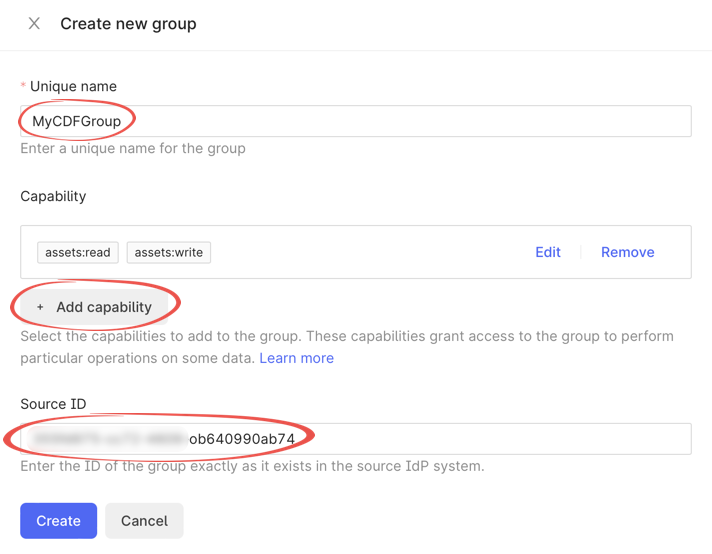
  <Step title="Link the group to your identity provider">
    In the **Source ID** field, enter the **Object Id** (Entra ID) or **Group name** (Cognito) exactly as it exists in your identity provider (IdP). It will link the CDF group to a group in Microsoft Entra ID or Amazon Cognito.

    <Frame>
      <img src="https://apps-cdn.cogniteapp.com/@cognite/docs-portal-images/1.0.0/images/cdf/access/create_CDF_group_sourceId_oidc.png" alt="Create new group with link to Microsoft Entra ID group object ID" width="60%" />
    </Frame>
  </Step>
</Steps>

<a id="create-and-assign-security-categories" />

## Create and assign security categories

You can add an extra access level for **time series** and **files** by tagging resources with **security categories** via the Cognite API. This is useful if you want to protect market-sensitive data. To access resources tagged with a security category, you must have both the standard capabilities for the resource type and capabilities for the security category.

To access, create, update, and delete security categories, you need these capabilities via a group membership:

* `securitycategories:create`
* `securitycategories:update`
* `securitycategories:delete`

To assign security categories to groups:

<Steps>
  <Step title="Open the group">
    Open the group where you want to add security categories.
  </Step>

  <Step title="Select Security categories">
    In the **Capability type** field, select **Security categories**.
  </Step>

  <Step title="Set the security category">
    In the **Action** field, select `securitycategories:memberof`.
  </Step>

  <Step title="Set the scope">
    In the **Scope** field, select **Security categories**, associate a security category or select **All**.
  </Step>
</Steps>

To perform actions, such as `read` or `write` on **time series** and **files** tagged with capabilities and security categories:

* You must be a member of a group with actions that give access to a times series or files, for instance, `timeseries:read`.
* You must be a member of a group with the `securitycategories:memberof` capability for the same time series or files.

<a id="share-data-and-mention-coworkers" />

## Share data and mention coworkers

User profiles let users share data and mention (@name) coworkers. By default, CDF will collect user information, such as name, email, and job title.

All users with **any** group membership in a CDF project get the `userProfilesAcl:READ` capability and can search for other users.

<a id="feature-capabilities" />

## Feature capabilities

The tables below describe the necessary capabilities to access different CDF features.

<Note>
  In addition to the capabilities listed in the sections below, users and applications need these **minimum** capabilities to access any feature in CDF.

  | Capability type | Action          | Scope             | Description                                                                                                                                 |
  | --------------- | --------------- | ----------------- | ------------------------------------------------------------------------------------------------------------------------------------------- |
  | Groups          | `groups:list`   | Current user, All | Verifies user group access.                                                                                                                 |
  | Projects        | `projects:list` | All               | Verifies that a user or application has access to a CDF project. To access the resources in the project, see the capabilities listed below. |
</Note>

### Atlas AI

Build and deploy AI agents to automate tasks and workflows.

Use the **Atlas AI Agents** capability type to control who can view, create, edit, and run agents.

<Info>
  **Agent lifecycle and permissions**

  * **Draft agents** can be edited, deleted, and published by users with `agents:write` access to that agent.
  * **Published agents** can only be unpublished. They cannot be edited or deleted until they are unpublished first. The **Agent library** view lists only published agents.
  * **Create and duplicate** always require `agents:write` with **All** scope. The `agents:write` action is scoped to specific agent external IDs and does not grant these actions.
</Info>

#### All-scope access

Grant the following capabilities when users need broad access across all agents in projects.

| User outcome                | Capability type | Actions                                     | Scope | What you can do                                                                                                           |
| --------------------------- | --------------- | ------------------------------------------- | ----- | ------------------------------------------------------------------------------------------------------------------------- |
| Administer all agents       | Agents          | `agents:read`, `agents:write`, `agents:run` | All   | Create and duplicate agents. Edit, delete, and publish any draft agent. Unpublish any published agent. Run any agent.     |
| Build and manage all agents | Agents          | `agents:read`, `agents:write`               | All   | Create and duplicate agents. Edit, delete, and publish any draft agent. Unpublish any published agent. Cannot run agents. |
| Use all agents              | Agents          | `agents:read`, `agents:run`                 | All   | View and run any agent. Cannot create, edit, delete, or publish.                                                          |
| View all agents             | Agents          | `agents:read`                               | All   | Browse agents. Cannot run, create, edit, delete, or publish.                                                              |

#### Scoped access (specific agents)

Use scoped capabilities to limit users to a named list of agents by external ID. Users gain page-level access to the Agents page, but all actions are restricted to the agents whose external IDs are listed in the scope.

Scoped `agents:write` does not grant create or duplicate — those always require `agents:write` with **All** scope.

| User outcome                    | Capability type | Actions                                     | Scope                       | What you can do                                                                                                                        |
| ------------------------------- | --------------- | ------------------------------------------- | --------------------------- | -------------------------------------------------------------------------------------------------------------------------------------- |
| Manage and run specific agents  | Agents          | `agents:read`, `agents:write`, `agents:run` | Specific agent external IDs | Edit, delete, and publish in-scope draft agents. Unpublish in-scope published agents. Run in-scope agents. Cannot create or duplicate. |
| Manage specific agents (no run) | Agents          | `agents:read`, `agents:write`               | Specific agent external IDs | Edit, delete, and publish in-scope draft agents. Unpublish in-scope published agents. Cannot run, create, or duplicate.                |
| Run specific agents only        | Agents          | `agents:read`, `agents:run`                 | Specific agent external IDs | View in-scope agents (page-level access). Run only in-scope agents. Cannot write.                                                      |
| View specific agents only       | Agents          | `agents:read`                               | Specific agent external IDs | Page-level access to browse in-scope agents. No run or write actions on any agent.                                                     |

To configure scoped access for specific agents:

<Steps>
  <Step title="Open or create a group">
    Go to **Admin** > **Access Management** > **Groups** and open an existing group or create a new one.
  </Step>

  <Step title="Add the Agents capability">
    Select **Atlas AI Agents** as the capability type and choose the required actions: `agents:read`, `agents:write`, or `agents:run`.
  </Step>

  <Step title="Set scope to specific agent external IDs">
    Select **Specific agent external IDs** as the scope and enter the external IDs the group can access. Users in this group can complete actions on matching agents but cannot create or duplicate agents.
  </Step>

  <Step title="Save and verify">
    Save the group and verify with a test user that only in-scope agents are accessible.
  </Step>
</Steps>

<Note>
  You might need more capabilities that depend on the tools that are used by agents:

  * `datamodels:read` for tool calls that read data model definitions
  * `datamodelinstances:read` for tool calls that read data model instance data
  * `sessions:create` when a tool flow requests a user session at runtime
</Note>

<Warning>
  **Troubleshooting agent access**

  * If a user can access Atlas but cannot run a specific agent, verify that their `agents:run` access scopes to include that agent's external ID or to all agents.
  * If a user has `agents:write` access that scopes to include the agent but they cannot edit or delete an agent, the agent is probably in **published** state. Unpublish the agent first before making changes.
  * If a user can edit draft agents but cannot create a new agent, add `agents:write` with scope **All**.
</Warning>

<a id="canvas" />

### Canvas

Add assets, engineering diagrams, sensor data, images, and 3D models to a canvas.

To set up a canvas and its features, you'll need <span class="ui-element">extended access</span>. To work on a canvas, you'll need <span class="ui-element">end-user access</span>.

<span class="ui-element">Extended access</span>

Users with extended access can set up the <span class="ui-element">Canvas</span> tool, create [threshold rules](/cdf/explore/canvas#set-threshold-rules-beta), and set up [canvas labels](/cdf/configure/canvas_settings):

| Capability type      | Action                                                | Scope                                                                                                                         | Description                                                                                                                                                                           |
| -------------------- | ----------------------------------------------------- | ----------------------------------------------------------------------------------------------------------------------------- | ------------------------------------------------------------------------------------------------------------------------------------------------------------------------------------- |
| Data models          | `datamodels:read`, `datamodels:write`                 | `cdf_industrial_canvas`, `cdf_apps_shared`, `IndustrialCanvasInstanceSpace`                                                   | - Scope `IndustrialCanvasInstanceSpace` to set up the <span class="ui-element">Canvas</span> tool. <br /><br /> - `datamodels:write` is required to set up the canvas labels feature. |
| Data model instances | `datamodelinstances:read`, `datamodelinstances:write` | `cdf_industrial_canvas`, `cdf_apps_shared`, `IndustrialCanvasInstanceSpace`, `SolutionTagsInstanceSpace`, `RuleInstanceSpace` | - Scope `SolutionTagsInstanceSpace` to create, edit, and delete canvas labels. <br /><br /> - Scope `RuleInstanceSpace` to set up threshold rules.                                    |

<span class="ui-element">End-user access</span>

Add these capabilities for users that will work on a <span class="ui-element">canvas</span>:

| Capability type      | Action                                                          | Scope                                                                                                                                                 | Description                                                                                                                                                                                                              |
| -------------------- | --------------------------------------------------------------- | ----------------------------------------------------------------------------------------------------------------------------------------------------- | ------------------------------------------------------------------------------------------------------------------------------------------------------------------------------------------------------------------------ |
| Data models          | `datamodels:read`                                               | `cdf_industrial_canvas`, `cdf_apps_shared`, `IndustrialCanvasInstanceSpace`, `CommentInstanceSpace`                                                   | - Scope `IndustrialCanvasInstanceSpace`to use the Canvas tool. <br /><br /> - Scope `CommentInstanceSpace` to use the Comment feature on a canvas.                                                                       |
| Data model instances | `datamodelinstances:read`                                       | `cdf_industrial_canvas`, `cdf_apps_shared`, `IndustrialCanvasInstanceSpace`, `CommentInstanceSpace`, `SolutionTagsInstanceSpace`, `RuleInstanceSpace` | - View, create, update, delete canvas data. <br /><br /> - Scope `CommentInstanceSpace` to use the Comment feature on a canvas. <br /><br /> - Scope `SolutionTagsInstanceSpace` to add and remove labels from a canvas. |
| Resource types       | `read` actions for the resource types you want to add to canvas | Data sets, All                                                                                                                                        | View assets, events, files, time series, and 3D models                                                                                                                                                                   |
| Files                | `write`                                                         | Data sets or All                                                                                                                                      | Add [local files](/cdf/explore/canvas#supported-file-formats) on a canvas. This is an optional capability.                                                                                                               |

<Info>
  **Private canvases**

  Private canvases aren't governed by CDF access management.
</Info>

<a id="charts" />

### Charts

| Capability type | Action             | Scope             | Description                        |
| --------------- | ------------------ | ----------------- | ---------------------------------- |
| Assets          | `assets:read`      | Data sets, All    | Search for assets.                 |
| Time series     | `timeseries:read`  | Data sets, All    | Search for time series.            |
| Time series     | `timeseries:write` | Data sets,        | Schedule calculations.             |
| Files           | `files:read`       | Data sets, All    | Search for files.                  |
| Groups          | `groups:list`      | Current user, All | Use calculations.                  |
| Projects        | `projects:list`    | All               | Use calculations                   |
| Sessions        | `Sessions:list`    | All               | Monitor and schedule calculations. |
| Sessions        | `Sessions:create`  | All               | Monitor and schedule calculations. |
| Sessions        | `Sessions:delete`  | All               | Monitor and schedule calculations. |

### Configure InField

Set up the InField application.

| Capability type | Action             | Scope                                    | Description                                                       |
| --------------- | ------------------ | ---------------------------------------- | ----------------------------------------------------------------- |
| Assets          | `assets:read`      | Data sets, All                           | View asset data from the CDF project that InField runs on top of. |
| Groups          | `groups:read`      | Current user, All                        | For InField administrators to grant access to users.              |
| 3D              | `3d:read`          | Data sets, All                           | Upload 3D models to be displayed in InField.                      |
| Files           | `files:write`      | Data sets                                | Allow users to upload images.                                     |
| Time series     | `timeseries:write` | Data sets, Time series, Root assets, All | Allow users to upload measurement readings.                       |

Add the InField admin users to an access group named `applications-configuration`. [Learn more](/cdf/infield/guides/config#create-an-admin-group)

<a id="configure-inrobot" />

### Project settings

Configure default settings for how data is displayed in <span class="ui-element">search</span> and configure location filters to help users find and select data related to a specific physical location.

| Capability type  | Action                                          | Scope                 | Description                                                          |
| ---------------- | ----------------------------------------------- | --------------------- | -------------------------------------------------------------------- |
| Location-filters | `locationfilters:read`, `locationfilters:write` | Location-filters, All | View, create, edit, and delete location filters.                     |
| App-config       | `appconfig:read`, `appconfig:write`             | app-scope: Search     | Create, edit, and delete search display settings for search results. |

### Data explorer and Image and video data

Find, validate, and learn about the data you need to build solutions in the **Data explorer** and **Image and video management**.

| Capability type | Action              | Scope          | Description                                 |
| --------------- | ------------------- | -------------- | ------------------------------------------- |
| Resource types  | `files:read`        | Data sets, All | All resource types used in the CDF project. |
| Annotations     | `annotations:write` | All            | Create new/edit existing annotations.       |

### Data modeling

Create data models and ingest data into them.

| Capability type      | Action                                | Scope      | Description                                                       |
| -------------------- | ------------------------------------- | ---------- | ----------------------------------------------------------------- |
| Data models          | `datamodels:read`                     | All, Space | View data models.                                                 |
| Data models          | `datamodels:write`                    | All, Space | Create, update, delete data models.                               |
| Data model instances | `datamodelinstances:read`             | All, Space | View data in data models.                                         |
| Data model instances | `datamodelinstances:write`            | All, Space | Create, update, delete instances.                                 |
| Data model instances | `datamodelinstances:write_properties` | All, Space | Write properties without allowing creation/deletion of instances. |

For more details, see [Access control lists](/cdf/dm/dm_concepts/dm_access_control#access-control-lists-acls).

### Records

Manage streams and ingest or read records in the defined streams.

| Capability type | Action                | Scope      | Description               |
| --------------- | --------------------- | ---------- | ------------------------- |
| Data models     | `datamodels:write`    | All, Space | Create containers         |
| Data models     | `datamodels:read`     | All, Space | View containers           |
| Streams         | `streams:read`        | All        | View streams              |
| Streams         | `streams:create`      | All        | Create streams            |
| Streams         | `streams:delete`      | All        | Delete streams            |
| Records         | `streamrecords:read`  | All, Space | Read records from streams |
| Records         | `streamrecords:write` | All, Space | Write records to streams  |

<Note>
  To read or write records, you must have the `datamodels:read` capability scoped to **All** or to at least the **Space** where the container is located, in addition to the stream records capabilities. For more details, see [Records and Streams](/cdf/dm/records/concepts/records_and_streams).
</Note>

### Data sets and Data catalog

Use the **Data sets** capability type to grant users and applications access to add or edit metadata for data sets.

To add or edit data within a data set, use the relevant resource type capability. For instance, to write time series to a data set, use the **Time series** capability type. Read more [here](/cdf/data_governance/guides/datasets/create_data_sets).

| Capability type | Action           | Scope          | Description               |
| --------------- | ---------------- | -------------- | ------------------------- |
| Data sets       | `datasets:read`  | Data sets, All | View data sets.           |
| Data sets       | `datasets:write` | Data sets, All | Create or edit data sets. |

### Data workflows

Use data workflows to coordinate interdependent processes.

| Capability type   | Action                        | Scope             | Description                                                                                                                                        |
| ----------------- | ----------------------------- | ----------------- | -------------------------------------------------------------------------------------------------------------------------------------------------- |
| Data workflows    | `workfloworchestration:read`  | Data sets, All    | View data workflows, versions, executions, tasks, and triggers.                                                                                    |
| Data workflows    | `workfloworchestration:write` | Data sets, All    | Create, update, delete, and run data workflows, versions, executions, tasks, and triggers.                                                         |
| Subscribe signals | `subscribesignals:read`       | Current user, All | View email notification settings for workflows.                                                                                                    |
| Subscribe signals | `subscribesignals:write`      | Current user, All | Configure email notifications for workflow failures, timeouts, and trigger failures. Users with scope `All` can set up notifications for any user. |

### Diagram parsing for asset-centric data models

Find, extract, and match tags on engineering diagrams and link them to an asset hierarchy or other resource types.

| Capability type | Action                        | Scope          | Description                                                                        |
| --------------- | ----------------------------- | -------------- | ---------------------------------------------------------------------------------- |
| Files           | `files:read`, `files:write`   | Data sets, All | List and extract tags from engineering diagrams.                                   |
| Assets          | `assets:read`                 | All            | List assets.                                                                       |
| Events          | `events:read`, `events:write` | Data sets, All | View and create annotations manually or automatically in the engineering diagrams. |
| Data sets       | `datasets:read`               | Data sets, All | List data sets.                                                                    |
| Annotations     | `annotations:write`           | All            | View and create annotations manually or automatically in the engineering diagrams. |
| Labels          | `labels:read`, `labels:write` | All            | View the approval status of parsed engineering diagrams.                           |

### Diagram parsing for data modeling

Analyze and detect symbols and tags on engineering diagrams and link them to an asset hierarchy or other resource type in CDF.

| Capability type      | Action                                                | Scope                 | Description                                                                       |
| -------------------- | ----------------------------------------------------- | --------------------- | --------------------------------------------------------------------------------- |
| Diagram parsing      | `diagramParsing:read`                                 | No scope              | See the results of completed parsing jobs and read the outputs from parsed files. |
| Data model instances | `dataModelInstances:read`                             | Space IDs, All        | See the results of completed parsing jobs and read the outputs from parsed files. |
| Diagram parsing      | `diagramParsing:read`, `diagramParsing:write`         | No scope              | Start a diagram parsing job.                                                      |
| Data model instances | `dataModelInstances:read`, `dataModelInstances:write` | Space IDs, All        | Start a diagram parsing job.                                                      |
| Sessions             | `sessions:create`                                     | All                   | Start a diagram parsing job.                                                      |
| Location filters     | `locationFilters:read`                                | Location filters, All | List files belonging to a location.                                               |

### Document parser

Extract data from documents, such as datasheets, equipment specifications, or process flow diagrams.

| Capability type | Action             | Scope          | Description                                                                                 |
| --------------- | ------------------ | -------------- | ------------------------------------------------------------------------------------------- |
| Data models     | `datamodels:read`  | Space IDs, All | Start a document parsing job or see the results of completed parsing jobs.                  |
| Data models     | `datamodels:write` | Space IDs, All | Approve the results of completed parsing jobs. The data are saved in a data model instance. |
| Files           | `files:read`       | Data sets, All | Start a document parsing job or see the results of completed parsing jobs.                  |

<a id="flows" />

### Flows custom apps

Control who can discover and run **Flows** custom apps and who can create or change them, for example, new versions, lifecycle state, and descriptions.

Use the **App hosting** capability type to grant broad access to all Flows custom apps or scoped access to specific apps.

#### All-scope access

Grant the following capabilities when users need access across all Flows custom apps in the project.

| Capability type | Actions                                                 | Scope | Description                                                                     |
| --------------- | ------------------------------------------------------- | ----- | ------------------------------------------------------------------------------- |
| App hosting     | `apphosting:read`, `apphosting:write`, `apphosting:run` | All   | Administer all custom apps: list, create, update, and run any Flows custom app. |
| App hosting     | `apphosting:read`, `apphosting:write`                   | All   | Build and manage custom apps: list, create, and update any Flows custom app.    |
| App hosting     | `apphosting:read`, `apphosting:run`                     | All   | Use all listed custom apps: list and run any Flows custom app.                  |
| App hosting     | `apphosting:run`                                        | All   | Run all shared custom apps: run custom apps through links shared with you.      |

#### Scoped access

Use scoped capabilities to limit users to a named list of apps by external ID.

<Note>
  Scoped `apphosting:write` lets users create and update only apps whose `externalId` is listed in the scope. Add `apphosting:run` to the same capability when those users also need to run the apps.
</Note>

| Capability type | Actions                                                 | Scope                     | Description                                                                |
| --------------- | ------------------------------------------------------- | ------------------------- | -------------------------------------------------------------------------- |
| App hosting     | `apphosting:read`, `apphosting:write`, `apphosting:run` | Specific app external IDs | Manage and run specific apps: list, create, update, and run in-scope apps. |
| App hosting     | `apphosting:read`, `apphosting:write`                   | Specific app external IDs | Manage specific apps: list, create, and update in-scope apps.              |
| App hosting     | `apphosting:read`, `apphosting:run`                     | Specific app external IDs | Use specific listed apps: list and run in-scope apps.                      |
| App hosting     | `apphosting:run`                                        | Specific app external IDs | Run specific apps only: run in-scope apps through links shared with you.   |

To configure scoped access, follow the steps in [Create a group and add capabilities](#create-a-group-and-add-capabilities). When setting the scope, select **App external IDs** and enter the `externalId` values from each app's `app.json` file. Save the group and verify with a test user that they can access only in-scope apps.

#### Common group configurations

| User group            | Capabilities                                            | Scope                            |
| --------------------- | ------------------------------------------------------- | -------------------------------- |
| End users             | `apphosting:read`, `apphosting:run`                     | All or specific app external IDs |
| Run-only end users    | `apphosting:run`                                        | All or specific app external IDs |
| Developers            | `apphosting:read`, `apphosting:write`                   | All or specific app external IDs |
| Scoped builders       | `apphosting:read`, `apphosting:write`, `apphosting:run` | Specific app external IDs        |
| CI/CD service account | `apphosting:read`, `apphosting:write`                   | All or specific app external IDs |
| Administrators        | `apphosting:read`, `apphosting:write`, `apphosting:run` | All                              |

### Extraction pipelines

Set up and monitor extraction pipelines and report the pipeline run history.

<table>
  <tr>
    <th>User</th>
    <th>Action</th>
    <th>Capability</th>
    <th>Description</th>
  </tr>

  <tr>
    <th rowspan="5">End-user</th>
    <td>Create and edit extraction pipelines</td>
    <td><code>extractionpipelines:write</code></td>
    <td>Gives access to create and edit individual pipelines and edit notification settings. Ensure that the pipeline has <code>read</code> access to the data set being used by the extraction pipeline.</td>
  </tr>

  <tr>
    <td>View extraction pipelines</td>
    <td><code>extractionpipelines:read</code></td>
    <td>Gives access to list and view pipeline metadata.</td>
  </tr>

  <tr>
    <td>Create and edit extraction configurations</td>
    <td><code>extractionconfigs:write</code></td>
    <td>Gives access to create and edit an extractor configuration in an extraction pipeline.</td>
  </tr>

  <tr>
    <td>View extraction configurations</td>
    <td><code>extractionconfigs:read</code></td>
    <td>Gives access to view an extractor configuration in an extraction pipeline.</td>
  </tr>

  <tr>
    <td>View extraction logs</td>
    <td><code>extractionruns:read</code></td>
    <td>Gives access to view run history reported by the extraction pipeline runs.</td>
  </tr>

  <tr>
    <th rowspan="2">Extractor</th>
    <td>Read extraction configurations</td>
    <td><code>extractionconfigs:read</code></td>
    <td>Gives access to read an extractor configuration from an extraction pipeline.</td>
  </tr>

  <tr>
    <td>Post extraction logs</td>
    <td><code>extractionruns:write</code></td>
    <td>Gives access to post run history reported by the extraction pipeline runs.</td>
  </tr>

  <tr>
    <th rowspan="2">Third-party actors</th>
    <td>Create and edit extraction pipelines</td>
    <td><code>extractionpipelines:write</code></td>
    <td>Gives access to create and edit individual pipelines and edit notification settings. Ensure that the pipeline has <code>read</code> access to the data set being used by the extraction pipeline.</td>
  </tr>

  <tr>
    <td>Create and edit extraction configurations</td>
    <td><code>extractionconfigs:write</code></td>
    <td>Gives access to create and edit the extractor configuration from an extraction pipeline.</td>
  </tr>
</table>

### Functions

Deploy Python code to CDF and call the code on-demand or schedule the code to run at regular intervals.

| Capability type | Action            | Scope | Description                                                                                                         |
| --------------- | ----------------- | ----- | ------------------------------------------------------------------------------------------------------------------- |
| Functions       | `functions:write` | All   | Create, call, schedule, and delete functions.                                                                       |
| Functions       | `functions:read`  | All   | Retrieve and list functions, function calls, and function schedules, retrieve function responses and function logs. |
| Functions       | `functions:run`   | All   | Call functions.                                                                                                     |
| Files           | `files:read`      | All   | View functions.                                                                                                     |
| Files           | `files:write`     | All   | Create functions.                                                                                                   |
| Sessions        | `sessions:create` | All   | Call and schedule functions.                                                                                        |

### Hosted extractors

#### Job email notifications

Subscribe to email alerts when hosted extractor job status changes.

| Capability type   | Action                                            | Scope             | Description                                                                                                                               |
| ----------------- | ------------------------------------------------- | ----------------- | ----------------------------------------------------------------------------------------------------------------------------------------- |
| Hosted extractors | `hostedextractors:read`, `hostedextractors:write` | All               | Create and manage hosted extractor jobs.                                                                                                  |
| Subscribe signals | `subscribesignals:read`                           | Current user, All | View email notifications for hosted extractor jobs.                                                                                       |
| Subscribe signals | `subscribesignals:write`                          | Current user, All | Configure email notifications for hosted extractor job status updates. Users with scope **All** can configure notifications for any user. |

#### Cognite Event Hub extractor

| Capability type   | Action                                            | Scope                                    | Description                        |
| ----------------- | ------------------------------------------------- | ---------------------------------------- | ---------------------------------- |
| Hosted extractors | `hostedextractors:read`, `hostedextractors:write` | All                                      | Create an Event Hub extractor.     |
| Time series       | `timeseries:read`, `timeseries:write`             | Data sets, Time series, Root assets, All | Write data points and time series. |
| Events            | `event:read`, `events:write`                      | Data sets, All                           | Write events.                      |
| RAW               | `raw:read`, `raw:write`                           | Tables, All                              | Write RAW rows.                    |
| Data models       | `datamodelinstances:write`                        | Space IDs, All                           | Write to data models.              |

#### Cognite Kafka extractor

| Capability type   | Action                                            | Scope                                    | Description                        |
| ----------------- | ------------------------------------------------- | ---------------------------------------- | ---------------------------------- |
| Hosted extractors | `hostedextractors:read`, `hostedextractors:write` | All                                      | Create a Kafka extractor.          |
| Time series       | `timeseries:read`, `timeseries:write`             | Data sets, Time series, Root assets, All | Write data points and time series. |
| Events            | `event:read`, `events:write`, `assets:read`       | Data sets, All                           | Write events.                      |
| RAW               | `raw:read`, `raw:write`                           | Tables, All                              | Write RAW rows.                    |
| Data models       | `datamodelinstances:write`                        | Space IDs, All                           | Write to data models.              |

#### Cognite MQTT extractor

| Capability type   | Action                                            | Scope                                    | Description                        |
| ----------------- | ------------------------------------------------- | ---------------------------------------- | ---------------------------------- |
| Hosted extractors | `hostedextractors:read`, `hostedextractors:write` | All                                      | Create an MQTT extractor.          |
| Time series       | `timeseries:read`, `timeseries:write`             | Data sets, Time series, Root assets, All | Write data points and time series. |
| Events            | `event:read`, `events:write`, `assets:read`       | Data sets, All                           | Write events.                      |
| RAW               | `raw:read`, `raw:write`                           | Tables, All                              | Write RAW rows.                    |
| Data models       | `datamodelinstances:write`                        | Space IDs, All                           | Write to data models.              |

#### Cognite REST extractor

| Capability type   | Action                                            | Scope                                    | Description                        |
| ----------------- | ------------------------------------------------- | ---------------------------------------- | ---------------------------------- |
| Hosted extractors | `hostedextractors:read`, `hostedextractors:write` | All                                      | Create a REST extractor.           |
| Time series       | `timeseries:read`, `timeseries:write`             | Data sets, Time series, Root assets, All | Write data points and time series. |
| Events            | `event:read`, `events:write`, `assets:read`       | Data sets, All                           | Write events.                      |
| RAW               | `raw:read`, `raw:write`                           | Tables, All                              | Write RAW rows.                    |
| Data models       | `datamodelinstances:write`                        | Space IDs, All                           | Write to data models.              |

### Match entities

Create and tune models to automatically contextualize resources.

| Capability type | Action                    | Scope          | Description                                    |
| --------------- | ------------------------- | -------------- | ---------------------------------------------- |
| Entity matching | `entitymatchingAcl:read`  | All            | List and view entity matching models.          |
| Entity matching | `entitymatchingAcl:write` | All            | Create, update, delete entity matching models. |
| Assets          | `assets:read`             | Data sets, All | Match entities to assets.                      |

### On-premises extractors
<Info>
  The service principal used by the on-premises extractors must also be assigned the capabilities listed in the [Feature capabilities table](#feature-capabilities).
</Info>

#### DB extractor

Extract data from any database supporting Open Database Connectivity (ODBC) drivers.

| Capability type            | Action                                | Scope                                | Description                                                      |
| -------------------------- | ------------------------------------- | ------------------------------------ | ---------------------------------------------------------------- |
| RAW                        | `RAW:read`, `RAW:write`, `RAW:list`   | Tables, All                          | Ingest to CDF RAW and for state store configured to use CDF RAW. |
| Time series                | `timeseries:read`, `timeseries:write` | Data sets, All                       | Use when query destination is set to `time_series`.              |
| Events                     | `events:read`, `events:write`         | Data sets, All                       | Use when query destination is set to `events`.                   |
| Files                      | `files:read`, `files:write`           | Data sets, All                       | Use when query destination is set to `files`.                    |
| Sequences                  | `sequences:read`, `sequences:write`   | Data sets, All                       | Use when query destination is set to `sequences`.                |
| Extraction pipeline runs   | `extractionruns:write`                | Data sets, Extraction pipelines, All | Allow the extractor to report state and heartbeat back to CDF.   |
| Remote configuration files | `extractionconfigs:read`              | Data sets, Extraction pipelines, All | Use versioned extractor configuration files stored in the cloud. |

#### Documentum extractor

Extract documents from OpenText Documentum or OpenText D2 systems.

| Capability type            | Action                              | Scope                                | Description                                                      |
| -------------------------- | ----------------------------------- | ------------------------------------ | ---------------------------------------------------------------- |
| Files                      | `files:read`, `files:write`         | Data sets, All                       | Ingest files.                                                    |
| RAW                        | `raw:read`, `raw:write`, `raw:list` | Tables, All                          | Ingest metadata to CDF RAW.                                      |
| Extraction pipeline runs   | `extractionruns:write`              | Data sets, Extraction pipelines, All | Allow the extractor to report state and heartbeat back to CDF.   |
| Remote configuration files | `extractionconfigs:read`            | Data sets, Extraction pipelines, All | Use versioned extractor configuration files stored in the cloud. |

#### EDM extractor

Connect to the [Landmark Engineers Data Model](https://www.landmark.solutions/Engineers-Data-Model) server and extract data through the [Open Data protocol](https://www.odata.org) (OData) from DecisionSpace Integration Server (DSIS) to [CDF RAW](/cdf/integration/guides/extraction/raw_explorer).

| Capability type | Action                              | Scope       | Description                                       |
| --------------- | ----------------------------------- | ----------- | ------------------------------------------------- |
| RAW             | `raw:read`, `raw:write`, `raw:list` | Tables, All | Ingest data from Landmark EDM model into CDF RAW. |

#### File extractor

Connect to local file systems, SharePoint Online Document libraries, and network sharing protocols, like FTP, FTPS, and SFTP, and extract files into CDF.

| Capability type            | Action                                                | Scope                                | Description                                                      |
| -------------------------- | ----------------------------------------------------- | ------------------------------------ | ---------------------------------------------------------------- |
| Files                      | `files:read`, `files:write`                           | Data sets, All                       | Ingest files.                                                    |
| RAW                        | `raw:read`, `raw:write`, `raw:list`                   | Tables, All                          | For state store configured to use CDF RAW.                       |
| Data models                | `datamodelinstances:read`, `datamodelinstances:write` | Space IDs, All                       | Use when `data_model` is set as destination                      |
| Extraction pipeline runs   | `extractionruns:write`                                | Data sets, Extraction pipelines, All | Allow the extractor to report state and heartbeat back to CDF.   |
| Remote configuration files | `extractionconfigs:read`                              | Data sets, Extraction pipelines, All | Use versioned extractor configuration files stored in the cloud. |

#### OPC classic extractor

| Capability type      | Action                                                                       | Scope          | Description                                        |
| -------------------- | ---------------------------------------------------------------------------- | -------------- | -------------------------------------------------- |
| Time series          | `timeseries:read`, `timeseries:write`                                        | Data sets, All | Ingest time series                                 |
| Extraction pipelines | `extractionpipelines:read`, `extractionruns:write`, `extractionconfigs:read` | Data sets, All | For extraction pipelines and remote configuration. |
| Assets               | `assets:read`, `assets:write` if `metadata-sinks.clean.assets` is set        | Data sets, All | Ingest assets                                      |
| RAW                  | `raw:read`, `raw:write`, `raw:list` if `state-store` is set to use CDF RAW   | Tables, All    |                                                    |
| Data sets            | `datasets:read`, if using `dataset-external-id`                              | Data sets, All |                                                    |

#### OPC UA extractor

Extract time series, events, and asset data via the OPC UA protocol.

| Capability type            | Action                                                                            | Scope                                | Description                                                                       |
| -------------------------- | --------------------------------------------------------------------------------- | ------------------------------------ | --------------------------------------------------------------------------------- |
| Time series                | `timeseries:read`, `timeseries:write`                                             | Data sets, All                       | Ingest time series.                                                               |
| Assets                     | `assets:read`, `assets:write`                                                     | Data sets, All                       | Use if the configuration parameters `raw-metadata` or `skip-metadata` aren't set. |
| Events                     | `events:read`, `events:write`                                                     | Data sets, All                       | Ingest events if enabled.                                                         |
| RAW                        | `RAW:read`, `RAW:write`, `RAW:list`                                               | Tables, All                          | Ingest metadata to CDF RAW or the state-store is set to use CDF RAW.              |
| Relationships              | `relationships:read`, `relationships:write`                                       | Data sets, All                       | Ingest relationships if enabled in the configuration.                             |
| Data sets                  | `data-sets:read`                                                                  | Data sets, All                       | Ingest the data set external ID if enabled in the configuration.                  |
| Extraction pipeline runs   | `extractionruns:write`                                                            | Data sets, Extraction pipelines, All | Allow the extractor to report state and heartbeat back to CDF.                    |
| Extraction pipeline runs   | `extractionruns:write`                                                            | Data sets, Extraction pipelines, All | Allow the extractor to report state and heartbeat back to CDF.                    |
| Remote configuration files | `extractionconfigs:read`                                                          | Data sets, Extraction pipelines, All | Use versioned extractor configuration files stored in the cloud.                  |
| Data model instances       | `datamodelinstances:read`, `datamodelinstances:write`                             | Space IDs, All                       | Use when writing to Core Data Models.                                             |
| Data models                | `datamodel:read`, `datamodel:write`                                               | Space IDs, All                       | Use when creating data models from OPC-UA extractor (alpha feature)               |
| Streams                    | `streamrecords:read` , `streamrecords:write`, `streams:read`, and `streams:write` | Space IDs, All                       | Use when ingesting to CDF streams (alpha feature)                                 |

#### OSDU extractor

Connect to the Open Group OSDU™ Data Platform and ingest data into CDF.

| Capability type          | Action                                                  | Scope                                | Description                                                                |
| ------------------------ | ------------------------------------------------------- | ------------------------------------ | -------------------------------------------------------------------------- |
| RAW                      | `raw:read`, `raw:write`, `raw:list`                     | Tables, All                          | Ingest configurable OSDU records, such as wells, wellbores, and well logs. |
| Files                    | `files:read`, `files:write`                             | Data sets, All                       | Ingest linked data files.                                                  |
| Extraction pipelines     | `extractionpipelines:read`, `extractionpipelines:write` | Data sets, Extraction pipelines, All | Create and edit extraction pipelines.                                      |
| Extraction pipeline runs | `extractionruns:read`, `extractionruns:write`           | Data sets, Extraction pipelines, All | Allow the extractor to report state and heartbeat back to CDF.             |

#### PI AF extractor

Extract data from the OSIsoft PI Asset Framework (PI AF).

| Capability type            | Action                              | Scope                                | Description                                                      |
| -------------------------- | ----------------------------------- | ------------------------------------ | ---------------------------------------------------------------- |
| RAW                        | `raw:read`, `raw:write`, `raw:list` | Tables, All                          | Ingest to CDF RAW and for state store configured to use CDF RAW. |
| Extraction pipeline runs   | `extractionruns:write`              | Data sets, Extraction pipelines, All | Allow the extractor to report state and heartbeat back to CDF.   |
| Remote configuration files | `extractionconfigs:read`            | Data sets, Extraction pipelines, All | Use versioned extractor configuration files stored in the cloud. |

#### PI extractor

Extract time series data from the OSISoft PI Data Archive.

| Capability type            | Action                                                | Scope                                | Description                                                      |
| -------------------------- | ----------------------------------------------------- | ------------------------------------ | ---------------------------------------------------------------- |
| Timeseries                 | `timeseries:read`, `timeseries:write`                 | Data set, All                        | Ingest time series                                               |
| RAW                        | `raw:read`, `raw:write`, `raw:list`                   | Tables, All                          | Ingest to CDF RAW and for state store configured to use CDF RAW. |
| Events                     | `events:read`, `events:write`                         | Data sets, All                       | Log extractor incidents as events in CDF.                        |
| Extraction pipeline runs   | `extractionruns:write`                                | Data sets, Extraction pipelines, All | Allow the extractor to report state and heartbeat back to CDF.   |
| Remote configuration files | `extractionconfigs:read`                              | Data sets, Extraction pipelines, All | Use versioned extractor configuration files stored in the cloud. |
| Data models                | `datamodelinstances:read`, `datamodelinstances:write` | Space IDs, All                       | Use when writing to Core Data Models.                            |

#### PI Replace utility

Re-ingest time series to CDF by optionally deleting a data point time range and ingesting the data points in PI for that time range.

| Capability type            | Action                                                | Scope                                | Description                                                      |
| -------------------------- | ----------------------------------------------------- | ------------------------------------ | ---------------------------------------------------------------- |
| Time series                | `timeseries:read`, `timeseries:write`                 | Data sets, All                       | Re-ingest time series into CDF.                                  |
| RAW                        | `RAW:read`, `RAW:write`, `RAW:list`                   | Tables, All                          | Ingest to CDF RAW and for state store configured to use CDF RAW. |
| Events                     | `events:read`, `events:write`                         | Data sets, All                       | Log extractor incidents as events in CDF.                        |
| Extraction pipeline runs   | `extractionruns:write`                                | Data sets, Extraction pipelines, All | Allow the extractor to report state and heartbeat back to CDF.   |
| Remote configuration files | `extractionconfigs:read`                              | Data sets, Extraction pipelines, All | Use versioned extractor configuration files stored in the cloud. |
| Data models                | `datamodelinstances:read`, `datamodelinstances:write` | Space IDs, All                       | Use when writing to Core Data Models.                            |

#### SAP extractor

Extract data from SAP ERP servers into Cognite Data Fusion.

| Capability type            | Action                                | Scope                                | Description                                                      |
| -------------------------- | ------------------------------------- | ------------------------------------ | ---------------------------------------------------------------- |
| RAW                        | `RAW:read`, `RAW:write`, `RAW:list`   | Tables, All                          | Ingest to CDF RAW and for state store configured to use CDF RAW. |
| Time series                | `timeseries:read`, `timeseries:write` | Data sets, All                       | Use when destination is set to `time_series`.                    |
| Events                     | `events:read`, `events:write`         | Data sets, All                       | Use when destination is set to `events`.                         |
| Files                      | `files:read`, `files:write`           | Data sets, All                       | Use when extracting `attachments` from SAP to CDF files.         |
| Extraction pipeline runs   | `extractionruns:write`                | Data sets, Extraction pipelines, All | Allow the extractor to report state and heartbeat back to CDF.   |
| Remote configuration files | `extractionconfigs:read`              | Data sets, Extraction pipelines, All | Use versioned extractor configuration files stored in the cloud. |

#### Studio for Petrel extractor

Connect to SLB Studio for Petrel through the Ocean SDK and stream Petrel object data to the CDF files service as protobuf objects.

| Capability type | Action                                    | Scope          | Description                                        |
| --------------- | ----------------------------------------- | -------------- | -------------------------------------------------- |
| Files           | `files:read`, `files:write`, `files:list` | Data sets, All | Ingest SLB Studio for Petrel object data into CDF. |

#### WITSML extractor

Connect via the Simple Object Access Protocol (SOAP) and the Energistics Transfer Protocol (ETP) and extract data using the Wellsite Information Transfer Standard Markup Language (WITSML) into CDF.

| Capability type          | Action                                                   | Scope                                | Description                                                                                                                                      |
| ------------------------ | -------------------------------------------------------- | ------------------------------------ | ------------------------------------------------------------------------------------------------------------------------------------------------ |
| Time series              | `timeseries:read`, `timeseries:write`, `timeseries:list` | Data sets, All                       | Ingest WITSML [growing objects](/cdf/integration/guides/extraction/witsml/witsml_guide), such as WITSML logs, into the CDF time series services. |
| Sequences                | `sequences:read`, `sequences:write`, `sequences:list`    | Data sets, All                       | Ingest WITSML [growing objects](/cdf/integration/guides/extraction/witsml/witsml_guide), such as WITSML logs, into the CDF sequences services.   |
| RAW                      | `raw:read`, `raw:write`, and `raw:list`                  | Tables, All                          | Ingest WITSML [non-growing objects](/cdf/integration/guides/extraction/witsml/witsml_guide), such as `wellbore`, into CDF RAW.                   |
| Files                    | `files:read` and `files:write`                           | Data sets, All                       | Ingest WITSML SOAP queries and responses to CDF files.                                                                                           |
| Extraction pipelines     | `extractionpipelines:write`, `extractionpipelines:read`  | Data sets, Extraction pipelines, All | Allow the extractor to report state and heartbeat back to CDF.                                                                                   |
| Extraction pipeline runs | `extractionruns:write`                                   | Data sets, Extraction pipelines, All | Allow the extractor to report state and heartbeat back to CDF.                                                                                   |

### PostgreSQL gateway

Ingest data into CDF using the Cognite PostgreSQL gateway.

| Capability type | Action          | Scope          | Description                                                                                                                                                       |
| --------------- | --------------- | -------------- | ----------------------------------------------------------------------------------------------------------------------------------------------------------------- |
| Resource types  | `read`, `write` | Data sets, All | Add `read` and `write` capabilities for the CDF resources you want to ingest data into. For instance, to ingest **assets**, add `assets:read` and `assets:write`. |

<Info>
  If you revoke the capabilities in the CDF group, you also revoke access for the PostgreSQL gateway.
</Info>

### Simulator connectors

Integrate existing simulators with CDF to remotely run simulations.

| Capability type      | Action                                                  | Scope          | Description                                                    |
| -------------------- | ------------------------------------------------------- | -------------- | -------------------------------------------------------------- |
| Simulators           | `simulators:manage`                                     | Data sets, All | Connect to the simulators API.                                 |
| Time series          | `timeseries:read`, `timeseries:write`                   | Data sets, All | Use CDF time series as source/destination for simulation data. |
| Extraction pipelines | `extractionpipelines:read`, `extractionpipelines:write` | Data sets, All | Store the connector configuration remotely.                    |
| Files                | `files:read`                                            | Data sets, All | Download simulation model files.                               |
| Data sets            | `datasets:read`                                         | Data sets, All | View data sets.                                                |

### Simulators users

Set access to the user interface for integrating existing simulators with CDF to remotely run simulations.

| Capability type | Action                                                                        | Scope          | Description                                                    |
| --------------- | ----------------------------------------------------------------------------- | -------------- | -------------------------------------------------------------- |
| Simulators      | `simulators:read`, `simulators:write`, `simulators:delete` , `simulators:run` | Data sets, All | Connect to the simulators API.                                 |
| Time series     | `timeseries:read`,                                                            | Data sets, All | Use CDF time series as source/destination for simulation data. |
| Files           | `files:read`, `files:write`                                                   | Data sets, All | Upload and download simulation model files.                    |
| Data sets       | `datasets:read`                                                               | Data sets, All | View data sets.                                                |

### Staged data

Work with tables and databases in CDF RAW.

| Capability type | Action                 | Scope       | Description                                             |
| --------------- | ---------------------- | ----------- | ------------------------------------------------------- |
| RAW             | `RAW:read`, `RAW:list` | Tables, All | View tables and databases in CDF RAW.                   |
| RAW             | `RAW:write`            | Tables, All | Create, update, delete tables and databases in CDF RAW. |

### Streamlit apps

Build custom web applications in CDF.

| Capability type | Action                      | Scope          | Description                  |
| --------------- | --------------------------- | -------------- | ---------------------------- |
| Files           | `files:read`, `files:write` | Data sets, All | Edit Streamlit applications. |
| Files           | `files:read`                | Data sets, All | Use Streamlit applications.  |

### Transform data

Transform data from RAW tables into the CDF data model.

| Capability type | Action                                                                                                              | Scope          | Description                                                                                                                            |
| --------------- | ------------------------------------------------------------------------------------------------------------------- | -------------- | -------------------------------------------------------------------------------------------------------------------------------------- |
| Resource types  | `read` and `write` actions according to the CDF resources you want to read from and write to using transformations. | Data sets, All | For instance, to transform data in CDF RAW and write data to assets, add `RAW:read` and `assets:write`.                                |
| Transformations | `transformations:read`                                                                                              | All            | View transformations.                                                                                                                  |
| Transformations | `transformations:write`                                                                                             | All            | Create, update, delete CDF transformations.                                                                                            |
| Session         | `sessions:create`                                                                                                   | All            | Run scheduled transformations. You must also set the `token_url`. Read more [here](/cdf/integration/guides/transformation/admin_oidc). |

<Warning>
  **Legacy access to transformations via group name**

  To ensure backward compatibility, groups named `transformations` or `jetfire` are treated as having both `transformations:read:All` and `transformations:write:All`. We're deprecating this access control method and will remove it in a future release.
</Warning>

### Upload 3D models

Upload and work with 3D models, 3D revisions and 3D files.

| Capability type      | Action                              | Scope          | Description                                                               |
| -------------------- | ----------------------------------- | -------------- | ------------------------------------------------------------------------- |
| 3D                   | `3d:read`, `file:read`              | Data sets, All | View 3D models.                                                           |
| 3D                   | `3d:create`, `file:read`            | Data sets, All | Upload 3D models to CDF.                                                  |
| 3D                   | `3d:update`                         | Data sets, All | Update existing 3D models in CDF.                                         |
| 3D                   | `3d:delete`                         | Data sets, All | Delete 3D models.                                                         |
| Files                | `files:write`                       | Data sets, All | Upload source 3D files to CDF, and write the 360° images to files API.    |
| Data sets (Optional) | `dataset:read`, `dataset:owner`     | Data sets, All | Read and write the dataset scoped source file, 3D model, and its outputs. |
| Data model instances | `datamodelinstances:read`           | Space IDs, All | View 360° image data stored in data models.                               |
| Data model instances | `datamodelinstances:write`          | Space IDs, All | Create, update, delete data model instances for 360° images.              |
| Data models          | `datamodel:read`, `datamodel:write` | Space IDs, All | Upload 360° image metadata to data model views.                           |
| Sessions             | `sessions:create`                   | All            | Start 360° image upload/processing.                                       |
