> ## Documentation Index
> Fetch the complete documentation index at: https://docs.cognite.com/llms.txt
> Use this file to discover all available pages before exploring further.
# Synthetic time series
> Create synthetic time series queries in Cognite Data Fusion (CDF).
**Works with both data modeling and asset-centric projects.**
You can reference time series using `instanceId` (DM), `externalId`, or `id` (asset-centric).
Combine several time series, constants, and operators to create new synthetic time series. Instead of storing computed data, you define expressions that are evaluated at query time, so you always get up-to-date results.
For example, use the expression `3.6 * TS{externalId='wind-speed'}` to convert units from m/s to km/h.
You can also **combine** time series: `TS{id=123} + TS{externalId='my_external_id'} / TS{space='my_space', externalId='dm_ts'}`, use **functions**: `sin(pow(TS{id=123}, 2))`, and **aggregate**: `TS{id=123, aggregate='average', granularity='1h'}+TS{id=456}`.
## Referencing time series
Use the `TS{}` expression to reference any time series, regardless of project type:
| Project type | Syntax | Example |
| -------------------------- | ----------------------------------- | ------------------------------------------ |
| **Data modeling** | `TS{space='...', externalId='...'}` | `TS{space='my_space', externalId='my_ts'}` |
| **Asset-centric** | `TS{externalId='...'}` | `TS{externalId='wind-speed'}` |
| **Asset-centric (legacy)** | `TS{id=...}` | `TS{id=123}` |
Single or double quotes must surround string values like `externalId` and `space`.
You can mix reference types within a single expression:
```
TS{space='my_space', externalId='dm_ts'} + TS{externalId='legacy_ts'} / TS{id=456}
```
## Functions
Synthetic time series support these functions:
* Inputs with internal ID, external ID, or data modeling instance ID (space and externalId) — see [Referencing time series](#referencing-time-series) above.
* Mathematical operators +,-,\*,/.
* Grouping with brackets ().
* Trigonometrics. sin(x), cos(x) and pi().
* ln(x), pow(base, exponent), sqrt(x), exp(x), abs(x).
* Variable length functions. max(x1, x2, ...), min(...), avg(...).
* round(x, decimals) (`-10
Functions like `avg(x1, x2, ...)`, `min(...)`, and `max(...)` compute values across multiple inputs **at each point in time**. They don't aggregate a single time series across a time range. To aggregate over time, use the `aggregate` parameter instead, for example, `ts{id=123, aggregate='average', granularity='1h'}`.
### Convert string time series to doubles
The `map()` function can handle time series of type *string* and convert strings to doubles. If, for example, a time series for a valve can have the values `"OPEN"` or `"CLOSED"`, you can convert it to a number with:
```json wrap theme={"languages":{"custom":["/_languages/kuiper.json","../_languages/kuiper.json"]}}
map(TS{externalId='stringstate'}, ['OPEN', 'CLOSED'], [1, 0], -1)
```
`"OPEN"` is mapped to 1, `"CLOSED"` to 0, and everything else to -1.
Aggregates on string time series are currently not supported. All string time series are considered to be stepped time series.
### Error handling: on\_error()
There are three possible errors:
* **TYPE\_ERROR**: You're using an invalid type as input. For example, a string time series with the division operator.
* **BAD\_DOMAIN**: You're using invalid input ranges. For example, division by zero, or sqrt of a negative number.
* **OVERFLOW**: The result is more than 10^100 in absolute value.
Instead of returning a value for these cases, CDF returns an error field with an error message. To avoid these, you can wrap the (sub)expression in the `on_error()` function, for example `on_error(1/TS{externalId='canBeZero'}, 0)`. This can happen because of interpolation, even if none of the raw data points are zero.
## Aggregation
You define aggregates similar to time series inputs, but aggregates have extra parameters: `aggregate`, `granularity`, and (optionally) `alignment`. Aggregate must be one of **interpolation**, **stepinterpolation**, or **average**.
You must enclose the value of aggregate and granularity in quotes.
```json wrap theme={"languages":{"custom":["/_languages/kuiper.json","../_languages/kuiper.json"]}}
ts{id=12356, aggregate="average", granularity="2h", alignment=3600000}
```
See also: [Aggregating time series data](/dev/concepts/aggregation).
### Granularity
The granularity decides the length of the intervals CDF takes the aggregate over. They're specified as a number plus a granularity unit, like `120s`, `15m`, `48h`, or `365d`.
Intervals are half-open, including the start time and excluding the end time. `[start, start+granularity)`
Granularity must be on the form NG where N is a number, and G is *s*, *m*, *h*, or *d* (second, minute, hour, day). The maximum number you can specify is 120, 120, 100,000, and 100,000 for seconds, minutes, hours, and days, respectively.
### Output granularity
Data points are returned at any point in time where:
* Any input time series has an input.
* All time series are defined (between the first and last data point, inclusive)
For example, if time series A has data at time 15, 30, 45, 60, and time series B has data at times 30, 40, 50, A+B will have data at 30, 40, 45, and 50.
### Interpolation
If there is no input data, CDF interpolates. As a general rule, CDF uses **linear** interpolation: finds the previous and next data point and draws a straight line between these. The other case is **step** interpolation: CDF uses the value of the previous data point.
CDF interpolates *any* interval. If there are data points in 1971 and 2050, CDF defines the time series for all timestamps between.
Most aggregates are constant for the whole duration of *granularity*. The only exception is the *interpolation* aggregate on non-step time series.
### Alignment
The alignment decides the start of the intervals and is specified in milliseconds.
The `alignment` parameter lets you align weekly aggregates to start on specific days of the week, for example, Saturday or Monday. By default, aggregation with synthetic time series is aligned to *Thursday 00:00:00 UTC, 1 January 1970*, for instance, `alignment=0`.
You can also use alignment to create aggregates that are aligned to different time zones. For example, the chart below shows the daily average chlorine indicator for city water aligned to two different time zones: GMT+0 and GMT+3.
* To align to UTC/GMT+0 (aligned to: Sep 09 2020 00:00:00 UTC)
`ts{externalId='houston.ro.REMOTE_AI[34]', alignment=1599609600000, aggregate='average', granularity='24h'}`
* To align to UTC/GMT+3 (aligned to: Sep 09 2020 03:00:00 UTC)
`ts{externalId='houston.ro.REMOTE_AI[34]', alignment=1599620400000, aggregate='average', granularity='24h'}`
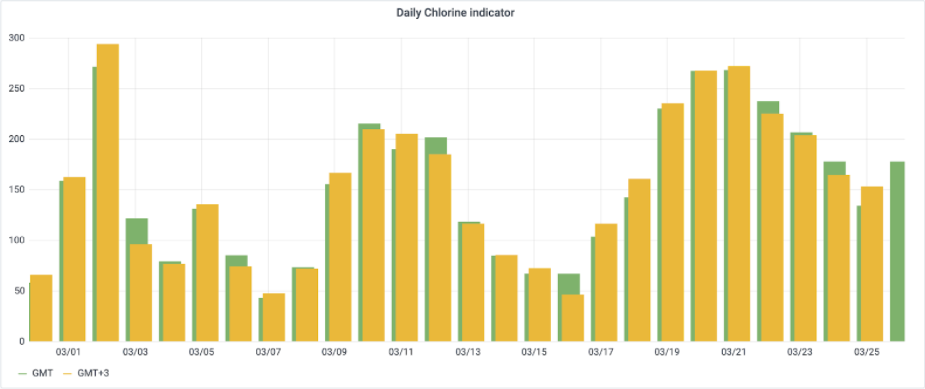 The alignment must be a multiple of the granularity unit. In the example above, the alignment needs to be a multiple of a whole hour, since the granularity is 24h.
All intervals are on the form `(N*granularity + alignment, (N+1)*granularity + alignment)`, where `N` is an integer.
#### Alignment differences from regular aggregates
Synthetic time series and regular data point retrieval align aggregate intervals differently:
| Aspect | Regular data point retrieval | Synthetic time series |
| ------------- | ---------------------------------------------------------------------- | --------------------------------------------------------------- |
| **Alignment** | Aligned to the query start time, rounded down to the granularity unit. | Aligned to **epoch** (midnight January 1, 1970 UTC) by default. |
| **Override** | Not configurable. | Use the `alignment` parameter. |
The same data and granularity can produce different time boundaries depending on which endpoint you use.
For example, if you query with `start=08:15:46` and `granularity="6s"`:
* **Regular retrieval** rounds the query start time down to the nearest second, so the first interval starts at `08:15:46`.
* **Synthetic time series** computes intervals at multiples of 6 seconds since epoch (e.g., `...08:15:42, 08:15:48, 08:15:54...`). Intervals before the query start time are filtered out, so the first returned interval starts at `08:15:48`.
If you see unexpected timestamps or shifted values, check whether the default epoch alignment is the cause. You can override it with the `alignment` parameter.
### Time zone
The `timeZone` parameter controls how calendar-based granularities (`day`, `month`) are interpreted. Specify it at the **query level** (not per-expression) using any IANA time zone identifier, such as `Europe/Oslo` or `America/New_York`.
```json wrap theme={"languages":{"custom":["/_languages/kuiper.json","../_languages/kuiper.json"]}}
POST /api/v1/projects/{project}/timeseries/synthetic/query
Content-Type: application/json
{
"items": [
{
"expression": "ts{externalId='pump-temp', aggregate='average', granularity='1day'}"
}
],
"start": 1700000000000,
"end": "now",
"timeZone": "Europe/Oslo"
}
```
When a time zone is set, day and month granularities align to local midnight. Daylight saving time transitions are handled automatically. If no time zone is specified, CDF defaults to `UTC`.
For a complete reference on calendar granularities, DST handling, and worked examples, see [Calendar and time zone](/dev/concepts/aggregation/calendar).
## Unit conversion
If a time series has a defined `unitExternalId`, you can convert its values to a different unit within the same quantity.
```json wrap theme={"languages":{"custom":["/_languages/kuiper.json","../_languages/kuiper.json"]}}
ts{externalId='temperature_f_houston', aggregate='average', granularity='24h', targetUnit='temperature:deg_c'}
ts{id='123', targetUnitSystem='Imperial'}
```
For each time series/aggregate, you may specify either `targetUnit` or `targetUnitSystem`, but not both. The chosen target unit must be compatible with the original unit. When querying data points using synthetic time series, the values will no longer retain their unit information.
For instance, despite it not being physically accurate, it is possible to add values from a **temperature** time series to those from a **distance** time series.
## Limits
In a single request, you can ask for:
* 10 expressions (10 synthetic time series).
* 10,000 data points, summed over all expressions.
* 100 input time series referrals, summed over all expressions.
* 2000 tokens in each expression. Similar to 2000 characters, except that words and numbers are counted as a single character.
If you use time series aggregates as inputs, and you get slow responses or a 503 error code, try again or reduce the limit. This is expected behavior when you have recently updated the data points and CDF needs to recalculate aggregates.
The alignment must be a multiple of the granularity unit. In the example above, the alignment needs to be a multiple of a whole hour, since the granularity is 24h.
All intervals are on the form `(N*granularity + alignment, (N+1)*granularity + alignment)`, where `N` is an integer.
#### Alignment differences from regular aggregates
Synthetic time series and regular data point retrieval align aggregate intervals differently:
| Aspect | Regular data point retrieval | Synthetic time series |
| ------------- | ---------------------------------------------------------------------- | --------------------------------------------------------------- |
| **Alignment** | Aligned to the query start time, rounded down to the granularity unit. | Aligned to **epoch** (midnight January 1, 1970 UTC) by default. |
| **Override** | Not configurable. | Use the `alignment` parameter. |
The same data and granularity can produce different time boundaries depending on which endpoint you use.
For example, if you query with `start=08:15:46` and `granularity="6s"`:
* **Regular retrieval** rounds the query start time down to the nearest second, so the first interval starts at `08:15:46`.
* **Synthetic time series** computes intervals at multiples of 6 seconds since epoch (e.g., `...08:15:42, 08:15:48, 08:15:54...`). Intervals before the query start time are filtered out, so the first returned interval starts at `08:15:48`.
If you see unexpected timestamps or shifted values, check whether the default epoch alignment is the cause. You can override it with the `alignment` parameter.
### Time zone
The `timeZone` parameter controls how calendar-based granularities (`day`, `month`) are interpreted. Specify it at the **query level** (not per-expression) using any IANA time zone identifier, such as `Europe/Oslo` or `America/New_York`.
```json wrap theme={"languages":{"custom":["/_languages/kuiper.json","../_languages/kuiper.json"]}}
POST /api/v1/projects/{project}/timeseries/synthetic/query
Content-Type: application/json
{
"items": [
{
"expression": "ts{externalId='pump-temp', aggregate='average', granularity='1day'}"
}
],
"start": 1700000000000,
"end": "now",
"timeZone": "Europe/Oslo"
}
```
When a time zone is set, day and month granularities align to local midnight. Daylight saving time transitions are handled automatically. If no time zone is specified, CDF defaults to `UTC`.
For a complete reference on calendar granularities, DST handling, and worked examples, see [Calendar and time zone](/dev/concepts/aggregation/calendar).
## Unit conversion
If a time series has a defined `unitExternalId`, you can convert its values to a different unit within the same quantity.
```json wrap theme={"languages":{"custom":["/_languages/kuiper.json","../_languages/kuiper.json"]}}
ts{externalId='temperature_f_houston', aggregate='average', granularity='24h', targetUnit='temperature:deg_c'}
ts{id='123', targetUnitSystem='Imperial'}
```
For each time series/aggregate, you may specify either `targetUnit` or `targetUnitSystem`, but not both. The chosen target unit must be compatible with the original unit. When querying data points using synthetic time series, the values will no longer retain their unit information.
For instance, despite it not being physically accurate, it is possible to add values from a **temperature** time series to those from a **distance** time series.
## Limits
In a single request, you can ask for:
* 10 expressions (10 synthetic time series).
* 10,000 data points, summed over all expressions.
* 100 input time series referrals, summed over all expressions.
* 2000 tokens in each expression. Similar to 2000 characters, except that words and numbers are counted as a single character.
If you use time series aggregates as inputs, and you get slow responses or a 503 error code, try again or reduce the limit. This is expected behavior when you have recently updated the data points and CDF needs to recalculate aggregates.